
Estimate bridge
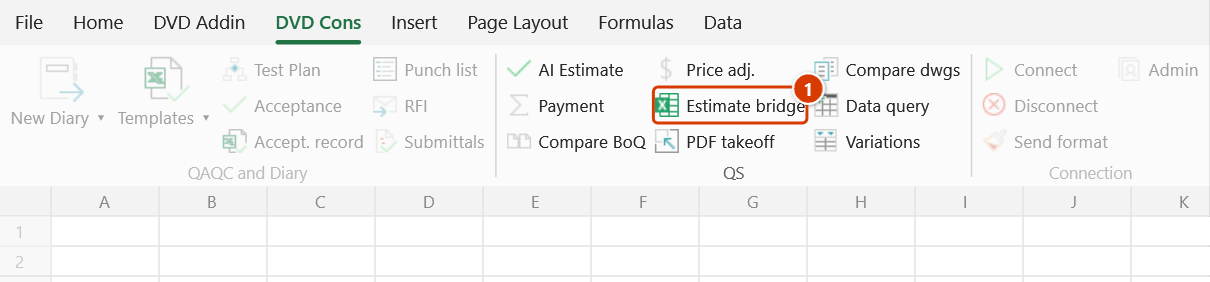
Ribbon location: DVD Cons tab → QS group
Command ID: btnEstimateBridge
License required
This command needs an active DVDAddin account (Standard or PRO). During the Trial period it is fully available.
What it does
Reads the Excel export from another estimating package and normalises it into the layout DVDAddin's QS commands expect.
The hard part is not reading the file — it is that every package names its columns differently: Mã hiệu here, Số hiệu there; Nội dung công việc in one, Diễn giải in another; older exports drop the Vietnamese diacritics entirely. This command locates the header row, scores each column against a keyword list and proposes a mapping, which you then check and correct.
How to use it
- Click Estimate bridge.
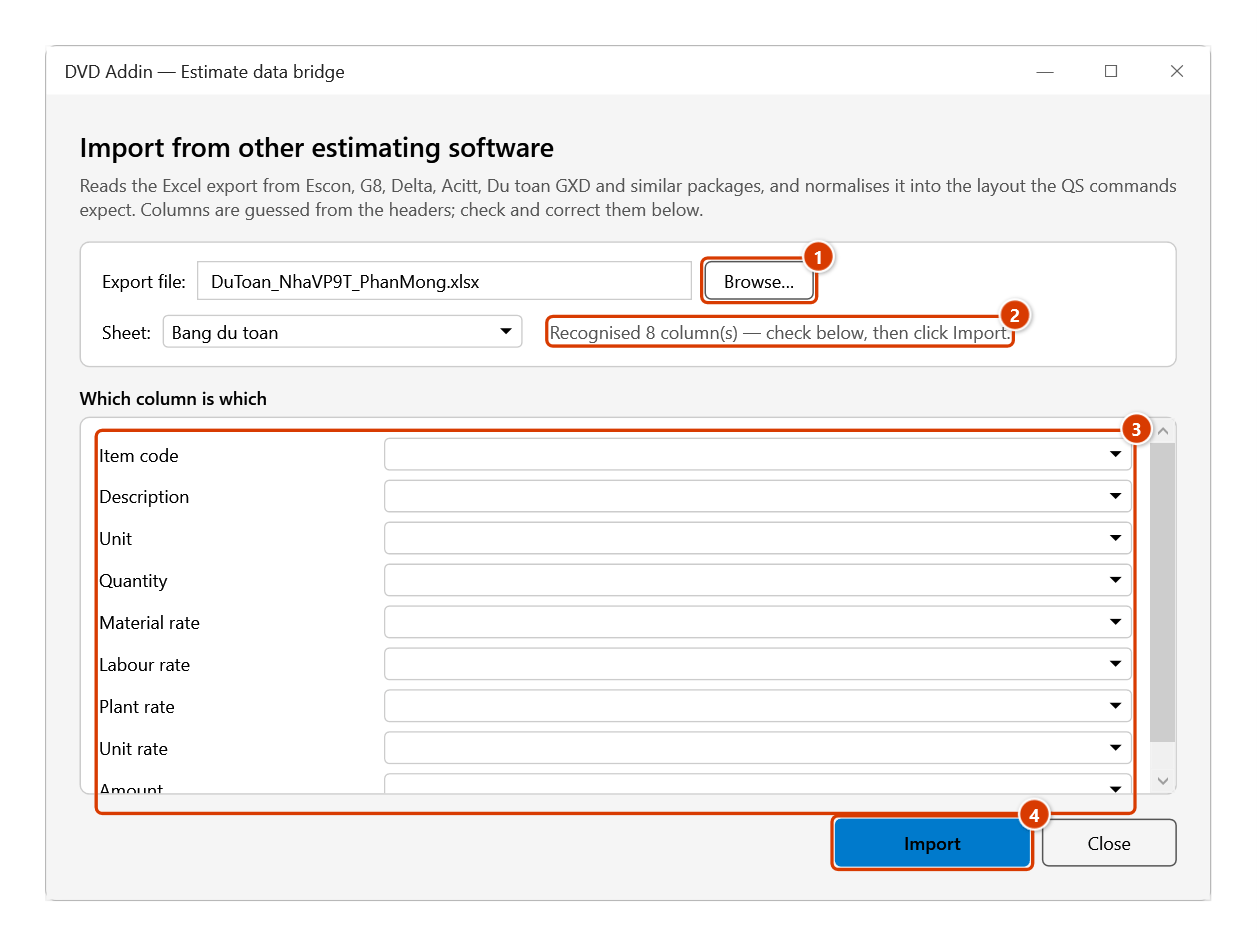
- Browse… to the
.xlsx/.xlsexport. The file is not opened and not modified. - Pick the sheet. Detection runs immediately and reports "Recognised N columns".
- The Which column is which table lists the nine standard fields. Correct any wrong guess; set fields absent from the export to (none).
- Click Import. The data is written to a new sheet in the open workbook.
Video tutorial
Narrated in Vietnamese, with Vietnamese subtitles. AI Báo giá, So sánh BoQ và Cầu nối dự toán · 6 min 26 s · 13 cases · Download the video · Practice workbook for the video
Commands in this video: AI Construction Estimate · Compare BoQ · Estimate bridge
Chapters (19)
- Giới thiệu
- Mở lệnh
- 1 · Đủ tên, đơn vị, khối lượng
- 2 · Không có khối lượng
- 3 · Công bố giá Sở XD
- 4 · Sửa tay, hạng mục lạ
- 5 · Khi không hỏi được AI
- So sánh BoQ
- 6 · Hai sheet cùng một tệp
- 7 · Hai tệp trùng tên
- 8 · Nhiều sheet, Sổ phát sinh
- 9 · Bẫy: mã lệch, số dạng chữ
- Cầu nối dự toán
- 10 · Bản xuất chuẩn
- 11 · Mất dấu, tiêu đề 2 dòng
- 12 · Đoán nhầm cột
- 13 · Font cũ TCVN3
- Mẹo
- Kết thúc
Illustrated walkthrough
Practice
Download this command's sample workbook — the data matches the pictures below (sheet Bang du toan), so you can follow each step right away.
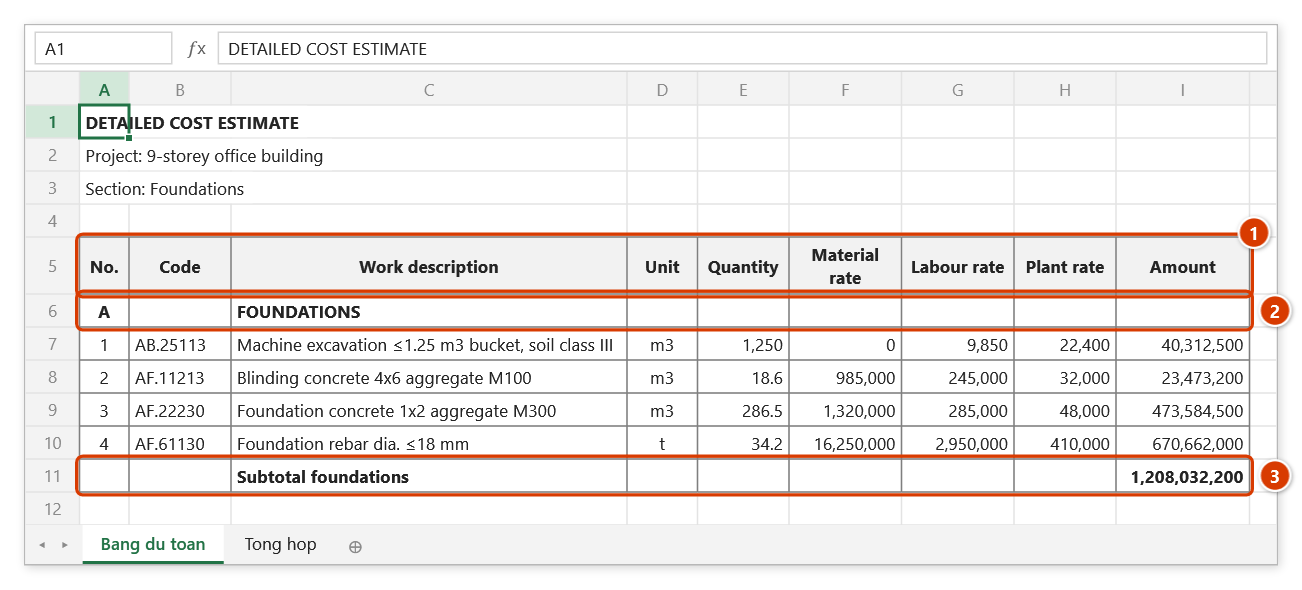
Step 1. In the estimating software, export the estimate to Excel. The export usually has a few project-name lines, a column-heading row (1), chapter rows (2) and subtotal rows (3) — no clean-up is needed, and the file does not have to be open.
Step 2. On the ribbon, open the DVD Cons tab → QS group → click Estimate bridge.
Step 3. Click Browse… (1) to pick the export (the file is neither opened nor changed), then choose the Sheet: the add-in finds the heading row and reports how many columns it recognised (2). Check the Which column is which list (3) — fields missing from the export stay (none) — and click Import (4).
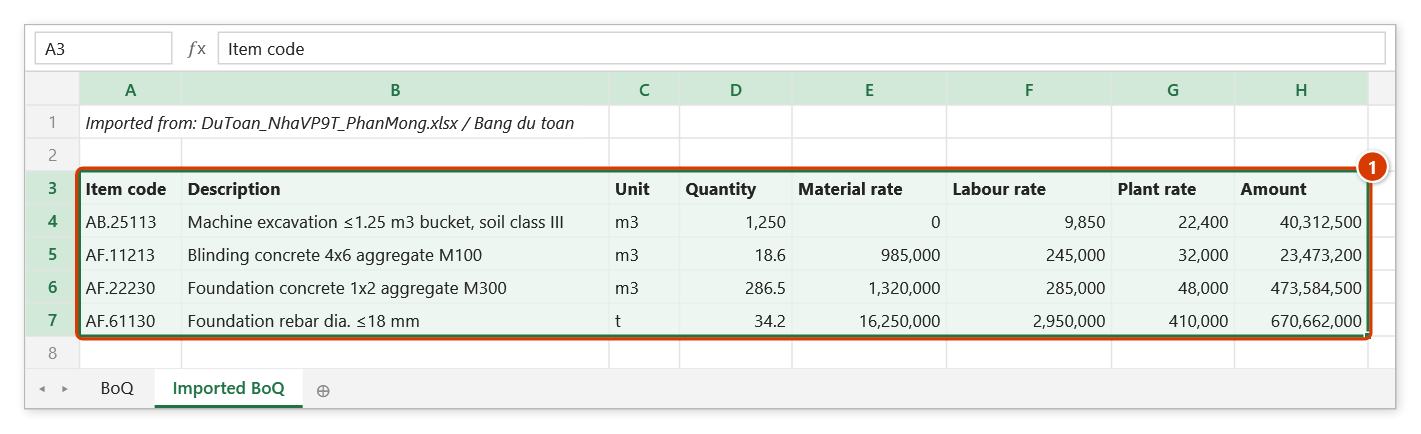
Step 4. The data lands on a new Imported BoQ sheet in the standard layout (1), keeping only rows that have a quantity; the message reports 4 rows imported and 2 rows without a quantity skipped (chapter and subtotal rows).
What it recognises
| Standard field | Header examples matched |
|---|---|
| Item code | Mã hiệu, Mã hiệu đơn giá, Mã ĐM, Số hiệu, Ma hieu, Code |
| Description | Tên công tác, Nội dung công việc, Diễn giải, Ten cong tac |
| Unit | Đơn vị tính, ĐVT, DVT, Unit |
| Quantity | Khối lượng, Khối lượng mời thầu, KL, Số lượng, Qty |
| Material / labour / plant rate | Đơn giá vật liệu, Nhân công, Máy thi công, Vat lieu, Nhan cong, May |
| Unit rate | Đơn giá, Don gia, Unit price |
| Amount | Thành tiền, Thanh tien, Amount |
Headers that wrap mid-cell (Đơn giá⏎vật liệu) are still matched. The material rate column is matched before the generic unit rate, so the two are not confused.
Example
An export with three project-title rows on top, headers on row 5, chapter rows like A — PHẦN MÓNG in between, and a Cộng subtotal at the end.
The add-in finds the right header row, maps 8 columns, and imports only rows that carry a quantity — chapter and subtotal rows are left out, with the message "Skipped 3 rows without a quantity".
Scope — Excel exports, not the native files
This reads the Excel export, not each package's own binary format (.esc, .g8, .dt…).
The reason is practical: those are closed specifications that would have to be reverse-engineered from sample files, and their structure changes between versions. Every estimating package, meanwhile, has an Export-to-Excel button its users already press, and that export is far more stable across versions.
Notes
- At minimum, Description and Quantity must be mapped; without them the Import button stays disabled.
- Only rows whose quantity is a non-zero number are imported. Estimating exports interleave many chapter headings and subtotal rows; importing them would corrupt every sum downstream. The number of skipped rows is always reported.
- Numbers stored as text (
1.150.000) are read correctly as numbers. - Data goes to a new sheet; no existing sheet is touched.
- Password-protected exports cannot be read.
See also
- Data query functions — read closed files straight from a formula, without importing.
- BoQ compare · Price adjustment
- Combine files — merge several exports into one.