
Compare BoQ
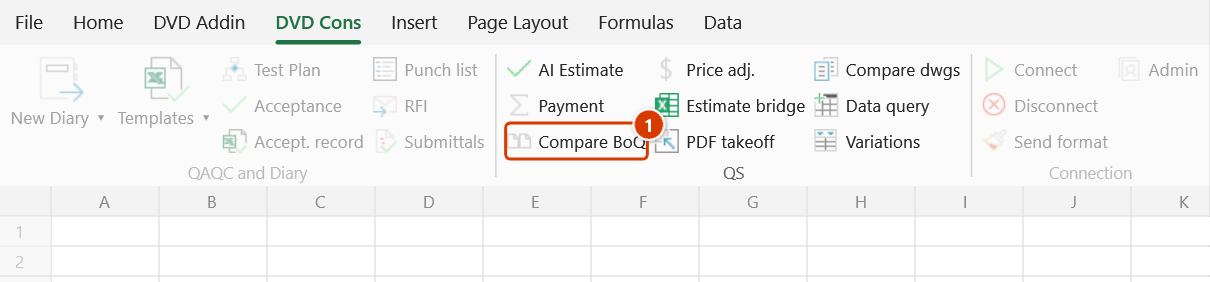
Location on ribbon: Tab DVD Cons → Group QS
Command ID: btnBoqCompare
License required
This command needs an active DVDAddin account (Standard or PRO). During the Trial period it is fully available.
What it does
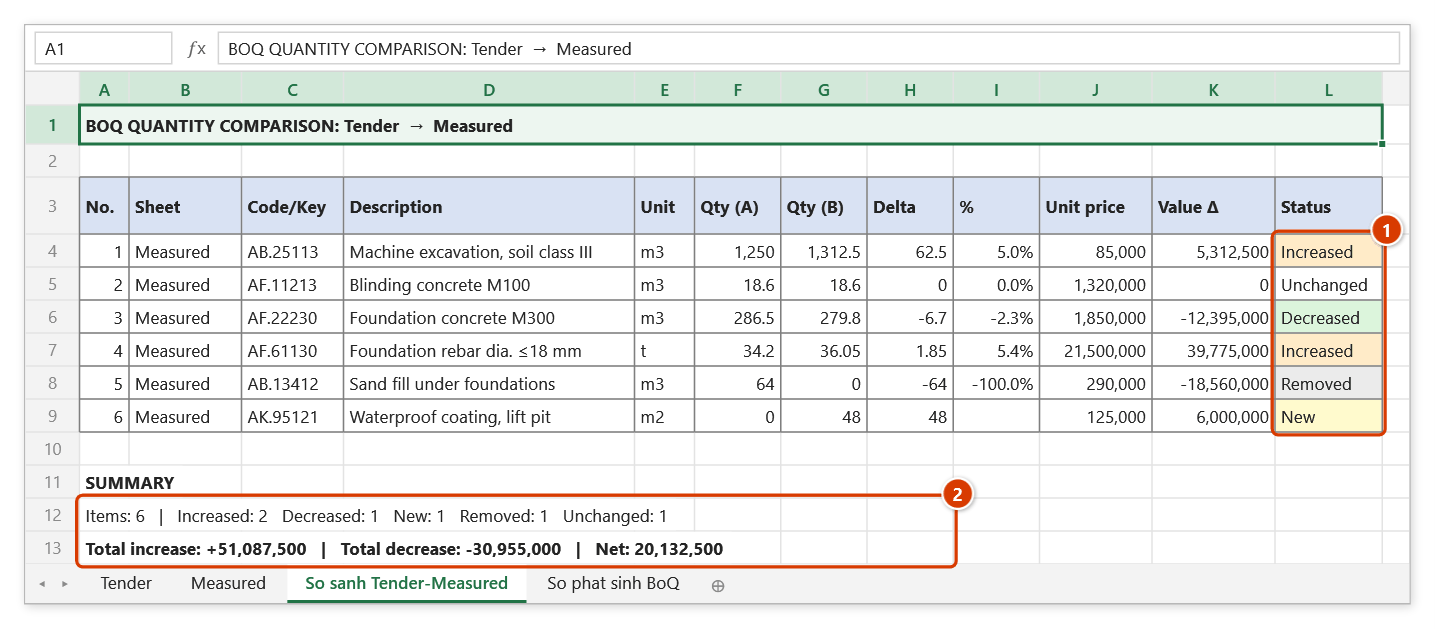
The command matches two bills of quantities by code / key and produces a reconciliation sheet: quantity in version A, quantity in version B, absolute delta, percentage delta and a colour-coded status of Increased / Decreased / New / Removed, plus a summary block. Map a unit-price column as well and you also get the delta expressed in money.
Use it for tender BoQ versus as-built BoQ, original versus revised, or the contractor's copy versus the consultant's copy — exactly the comparisons where a manual row-by-row check tends to miss a new or dropped code.
How to use
Click DVD Cons → QS → Compare BoQ. Nothing has to be open beforehand.
Pick File A (original) and File B (new), either way:
- an already-open workbook: choose it in the combo box;
- a workbook that is not open: press Browse… next to the box and take it from disk — this is how you compare two issues sitting in two folders.
Choose the Scope:
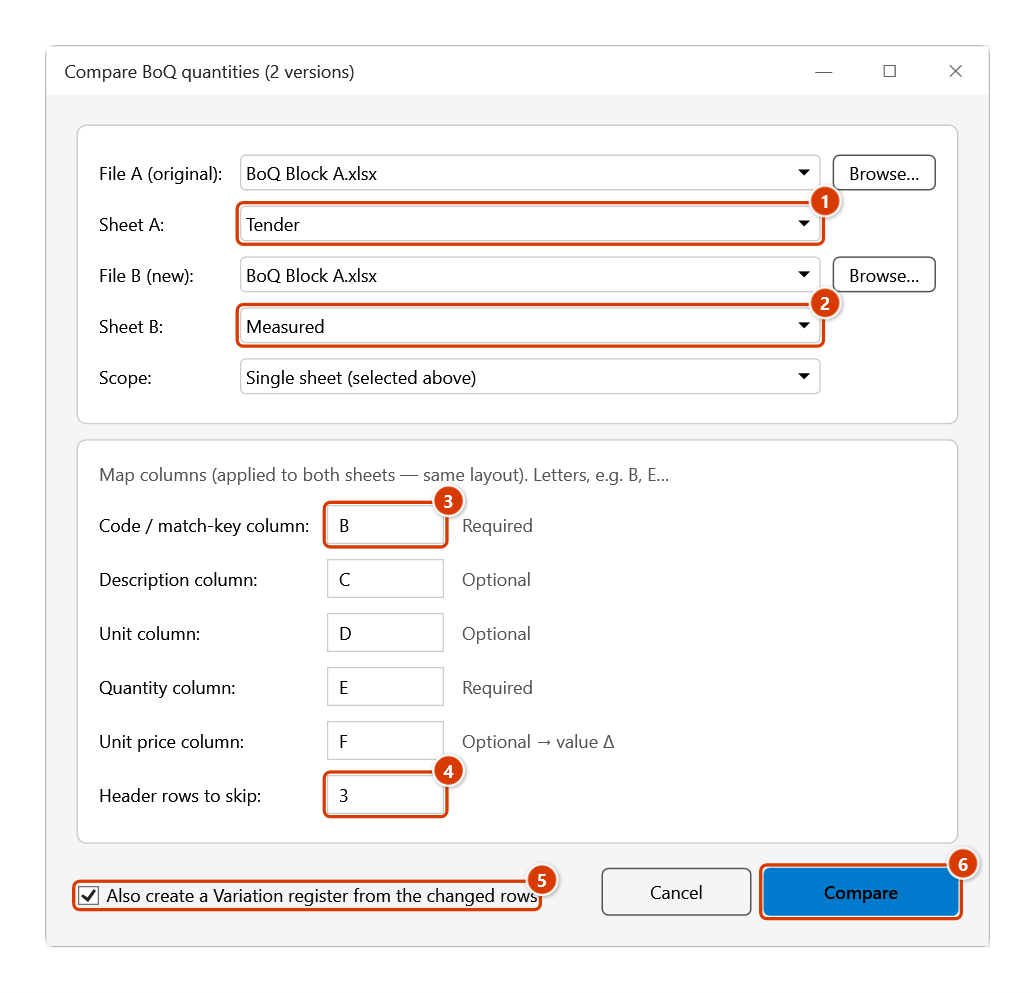
- Single sheet (selected above) — pick Sheet A and Sheet B in the two combo boxes;
- Multiple sheets — tick to choose (default: all) — the window widens and shows a sheet checklist with All / None buttons.
Map the columns by letter; the mapping applies to both sheets (the two versions must share a layout):
- Code / match-key column (required) — default
B - Description column (optional) — default
C - Unit column (optional) — default
D - Quantity column (required) — default
E - Unit price column (optional → adds the value delta)
- Code / match-key column (required) — default
Enter Header rows to skip (default
1).Optional: tick Also create a Variation register from the changed rows. The add-in also creates a Variation Register with every Increased / Decreased / New / Removed row. Each row gets:
- variation qty = the difference;
- unit price from version B;
- reason "BoQ change A → B";
- status Proposed.
Once approved, switch rows to Approved and Interim Payment picks them up.
Click Compare — the result sheet is generated. Click Cancel to exit.
Comparing two issued files
Two issues of the same bill almost always carry the same file name (BoQ Package 3.xlsx in Issue 01 and in Issue 02), and Excel refuses to open two workbooks with the same name at once. The add-in copies one of them to a temp folder, opens the copy, and after the comparison closes it and deletes the copy — the issued file itself is untouched (opened read-only).
The result sheet records the full path of both versions under the title, so it can stand as a record. It is written into the workbook that was active when you ran the command; with no workbook open the add-in creates a new one — press Ctrl+S to keep it.
Video tutorial
Narrated in Vietnamese, with Vietnamese subtitles. AI Báo giá, So sánh BoQ và Cầu nối dự toán · 6 min 26 s · 13 cases · Download the video · Practice workbook for the video
Commands in this video: AI Construction Estimate · Compare BoQ · Estimate bridge
Chapters (19)
- Giới thiệu
- Mở lệnh
- 1 · Đủ tên, đơn vị, khối lượng
- 2 · Không có khối lượng
- 3 · Công bố giá Sở XD
- 4 · Sửa tay, hạng mục lạ
- 5 · Khi không hỏi được AI
- So sánh BoQ
- 6 · Hai sheet cùng một tệp
- 7 · Hai tệp trùng tên
- 8 · Nhiều sheet, Sổ phát sinh
- 9 · Bẫy: mã lệch, số dạng chữ
- Cầu nối dự toán
- 10 · Bản xuất chuẩn
- 11 · Mất dấu, tiêu đề 2 dòng
- 12 · Đoán nhầm cột
- 13 · Font cũ TCVN3
- Mẹo
- Kết thúc
Illustrated walkthrough
Practice
Download this command's sample workbook — the data matches the pictures below (sheet Measured), so you can follow each step right away.
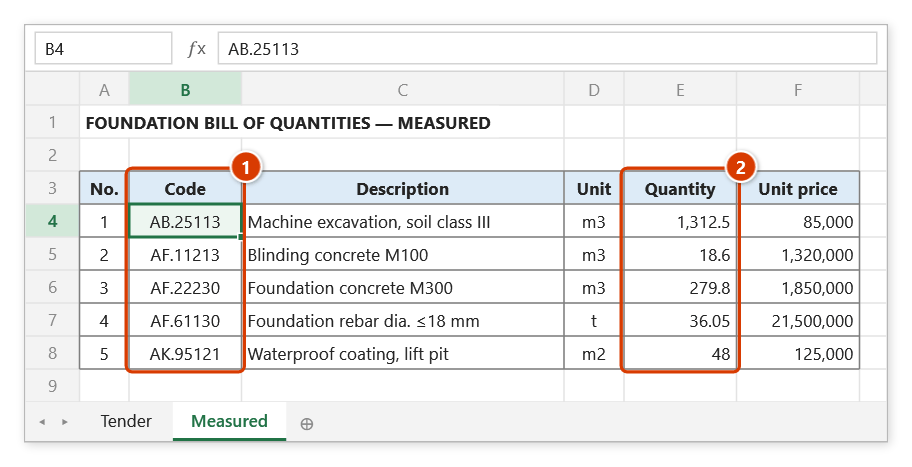
Step 1. Both BoQ versions must share the same column layout, e.g. the Tender and Measured sheets in one workbook: column B holds the code used as the match key (1) and column E the quantity (2). No selection is needed.
Step 2. On the ribbon, open the DVD Cons tab → QS group → click Compare BoQ.
Step 3. Pick File A (original) / Sheet A (1) and File B (new) / Sheet B (2) — for a workbook that is not open, click Browse…. Enter the column letters (3) (add the Unit price column to get value differences) and the Header rows to skip (4) (3 here: title, blank row, column headings). Tick Also create a Variation register from the changed rows (5) if needed, then click Compare (6).
Step 4. The add-in creates the sheet So sanh Tender-Measured: one row per code with Qty (A), Qty (B), delta, %, value difference and a colour-coded Status Increased / Decreased / New / Removed (1); the SUMMARY block counts each kind and totals the increases and decreases (2). With box (5) ticked you also get the sheet So phat sinh BoQ holding the 5 changed rows with status Proposed.
Example
Workbook "BoQ Zone A" has sheets Tender and AsBuilt with the same layout: B = code, C = description, D = unit, E = quantity, F = unit price.
Set File A = File B = "BoQ Zone A", Scope = Single sheet, Sheet A = Tender, Sheet B = AsBuilt, map Key = B, Description = C, Unit = D, Qty = E, Unit price = F, header rows = 1, then click Compare.
| Code | Qty (A) | Qty (B) | Delta | Status |
|---|---|---|---|---|
| AF.11110 | 120.0 | 132.5 | +12.5 (+10.4%) | Increased |
| AE.22110 | 850.0 | 812.0 | −38.0 (−4.5%) | Decreased |
| AK.31120 | — | 45.0 | +45.0 | New |
| AB.10100 | 260.0 | — | −260.0 | Removed |
Notes
- Matching relies entirely on the code / key: a one-character difference shows as "Removed" in A and "New" in B, so normalise codes before running.
- Repeated codes inside the same sheet are aggregated, not compared row by row.
- One column mapping serves both versions, so the two sheets must share the same column layout; if they differ, copy one onto an intermediate sheet first.
- Selecting the exact same sheet for A and B is blocked with "Pick two DIFFERENT versions".
- The output goes to a new sheet; both source BoQ sheets are left unchanged.
Related
- Interim Payment — once the quantity delta is agreed, build the period payment table.
- Variation Register — turn the increased/new items into a priced variation register.
- AI Construction Estimate — estimate rates for codes that only appear in version B.
- Autosum — total the quantity groups quickly on the result sheet.