
RFI
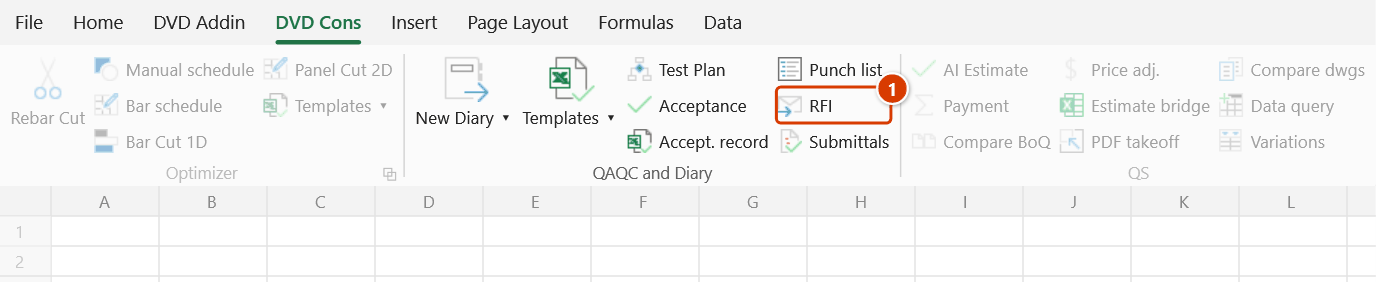
Ribbon location: DVD Cons tab → QAQC and Diary group
Command ID: btnRfiRegister
What it does
A register of RFIs — the requests you raise when a drawing or specification is unclear, contradicts itself, or does not match what is on site.
It exists to answer two questions that are almost impossible to keep straight by hand once you are a few hundred documents in:
- Who is holding it? You, because it is unsent or unclosed, or the reviewer, because they have not answered. That is the only number the progress meeting needs.
- How long has the reviewer had it? The contract sets a reply period; going past it is your basis for an extension of time. So the days-pending count is written into a column on the sheet, printable, not just shown on screen.
How to use it
- Click RFI in the DVD Cons tab → QAQC and Diary group.
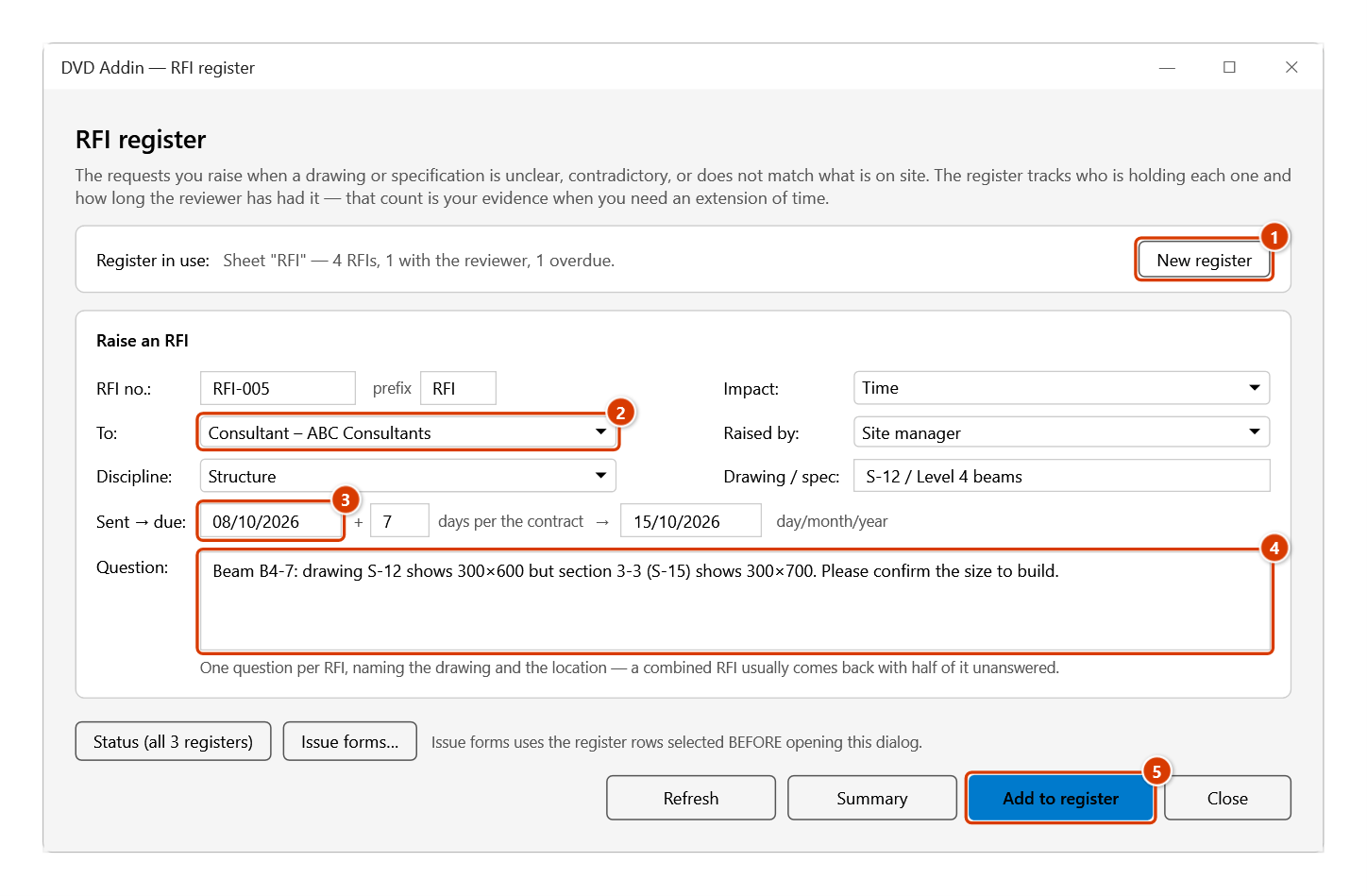
- The first time, click New register — a sheet is created with 15 standard columns, a frozen header, filtering switched on and drop-downs for Status and Impact.
- Fill in the form. Type the sent date and the contract reply period (7 by default) and the deadline fills itself in; you can still type over it.
- Click Add to register. The reference is generated; To, Raised by and Discipline suggest what you have entered before.
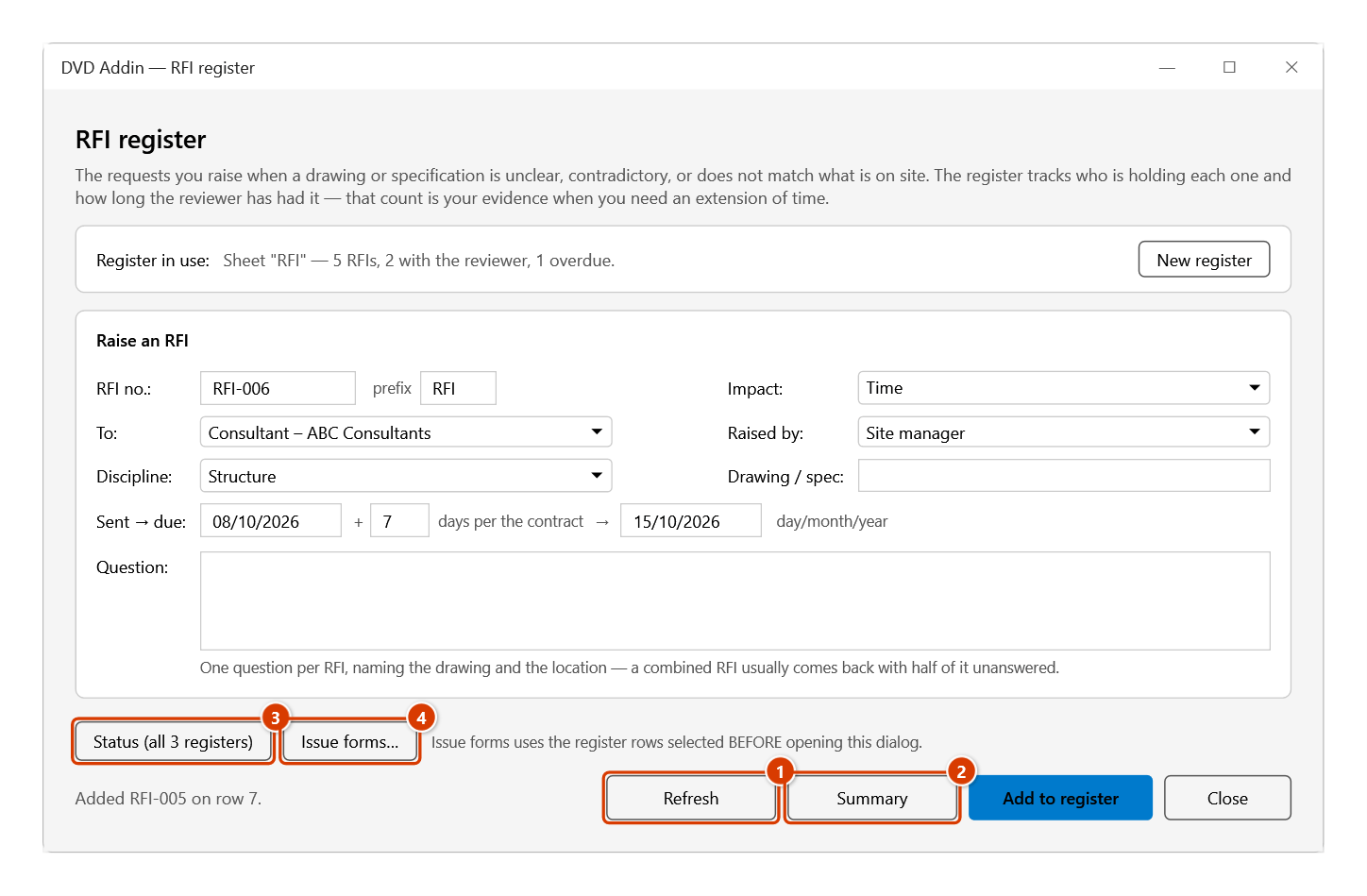
- Refresh recolours by status, rewrites the Days pending column and reports data contradictions.
- Summary writes a sheet that opens with ball in court, and includes a chase list of overdue RFIs.
Video tutorial
Narrated in Vietnamese, with Vietnamese subtitles. Tồn tại, RFI và Trình duyệt · 6 min 25 s · 16 cases · Download the video · Practice workbook for the video
Commands in this video: Punch list · RFI · Submittals
Chapters (21)
- Giới thiệu
- Mở lệnh
- 1 · Tạo sổ lần đầu
- 2 · Sổ đã có – không tạo trùng
- 3 · Thêm tồn tại kèm ảnh
- 4 · Mã không trùng, tiền tố
- 5 · Cập nhật màu – quá hạn
- 6 · Đóng mục – mâu thuẫn
- 7 · Bảng tổng hợp, lọc
- 8 · Thông báo kèm ảnh
- 9 · RFI: số hiệu, hạn trả lời
- 10 · RFI: chờ, trả lời, quá hạn
- Sổ Trình duyệt
- 11 · Tính ngược hạn phải trình
- 12 · Trình lại – Rev
- 13 · Mã A/B/C/D, Tình trạng
- 14 · Giao ban cả 3 sổ
- 15 · Sheet bảo vệ, Ctrl+Z
- 16 · Khi nhập sai
- Mẹo
- Kết thúc
Illustrated walkthrough
Step 1. On the ribbon, open the DVD Cons tab → QAQC and Diary group → click RFI.
Step 2. The first time in a workbook, click New register (1): the add-in adds an RFI sheet with 15 standard columns, a frozen header, filters and drop-down lists for Status / Impact. Fill in the form: the RFI no. is generated; To, Raised by, Discipline (2) suggest what you typed before; type the sent date (3) and the days per the contract and the reply deadline fills itself (you can overwrite it); the Question (4) is required — one question per RFI. Click Add to register (5).
Step 3. An RFI with a sent date is recorded as Sent; without one it stays a Draft. The question and drawing are cleared for the next one while To / Raised by / Discipline are kept. Refresh (1) recolours the rows, rewrites the Days pending column and lists data conflicts; Summary (2) writes a sheet that opens with Ball in court plus the list of overdue RFIs to chase; Status (all 3 registers) (3) and Issue forms… (4) (an RFI form for each row selected before opening the dialog) are shared by the three registers.
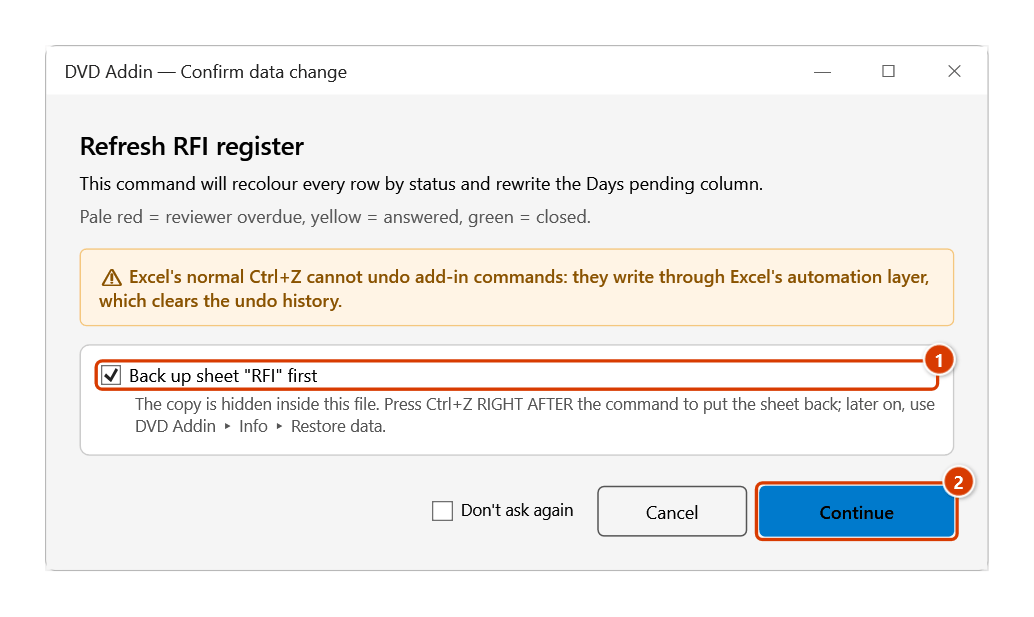
Step 4. Click Refresh: the Confirm data change window appears because the command repaints the rows and rewrites the Days pending column. Keep Back up sheet "RFI" first ticked (1) and click Continue (2).
Step 5. The RFI sheet after Refresh: Reply by (1) = sent date + contract days; the pale red row (2) is an RFI the reviewer has not answered in time, pale yellow = answered and waiting for the contractor to close, green = closed, grey-blue = draft not yet issued. To the right (outside the picture) are Answer, Answered, Status, Impact, Days pending (RFI-003: 13 days) and Note.
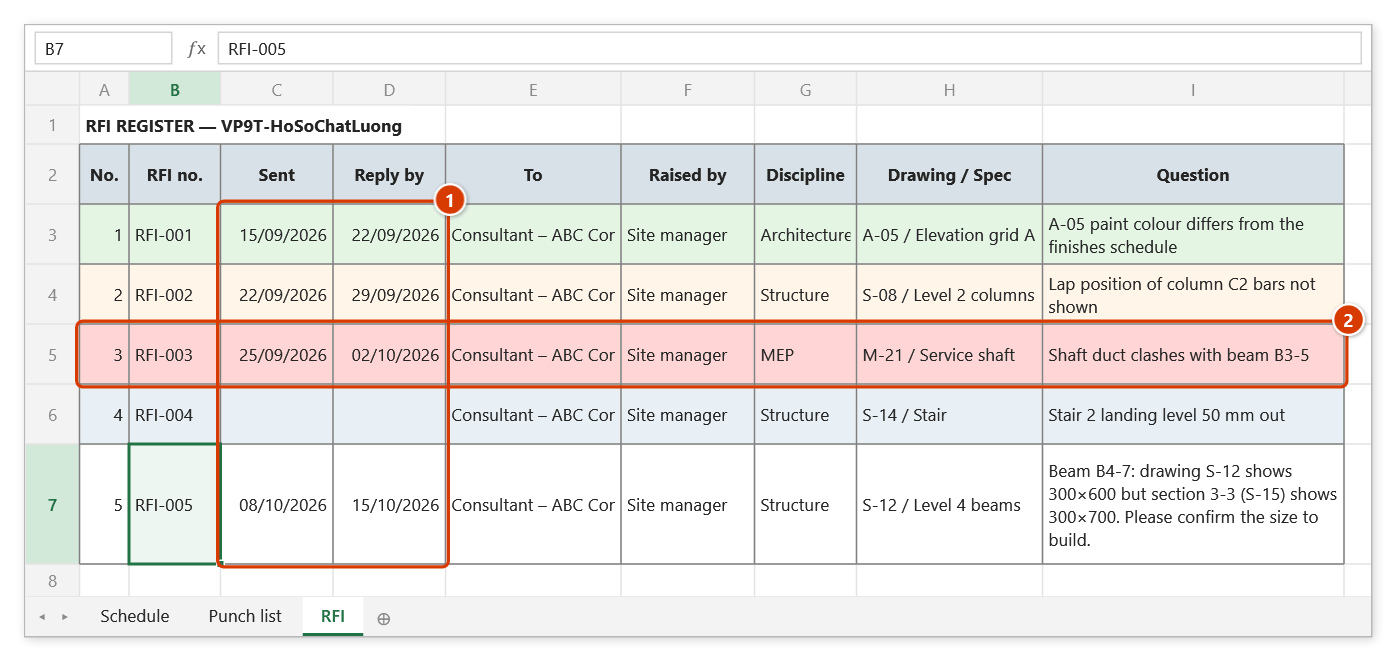
The register columns
| Column | Note |
|---|---|
| No. · RFI no. | Generated as RFI-001; the prefix is configurable |
| Sent · Reply by | Deadline = sent date + the contract period |
| To · Raised by | Used to group the summary |
| Discipline · Drawing / Spec | What the question is about |
| Question | Required |
| Answer · Answered | Filled in when the reply arrives |
| Status | Draft / Sent / Answered / Closed / Void |
| Impact | None / Cost / Time / Cost + time |
| Days pending | Worked out by Refresh — do not type here |
| Note |
Conventions that matter
Overdue = status Sent, no answer date, there is a deadline, and it has passed.
- A deadline of today is not yet overdue.
- Once an answer date is filled in the item stops counting as awaiting, even if the status was never changed — but Refresh reports that contradiction.
- An RFI with no deadline is never overdue. To track it, give it one.
Days pending counts from the sent date to the answer date, or to today if there is no answer yet. Once answered the number stops; it does not keep climbing.
References take the highest existing number plus one, not the row count. Delete a row in the middle and the next reference still moves forward, so it never clashes with one already issued to the consultant.
With no sent date it stays a Draft — an unissued document counted as awaiting an answer is a false report.
Status colours
| Colour | Meaning |
|---|---|
| Pale red | Reviewer past the reply deadline |
| Pale yellow | Answered, waiting for you to read and close |
| Pale green | Closed |
| Pale blue-grey | Draft, not issued |
| Grey | Void |
What the summary gives you
- Ball in court — reviewer / contractor / settled.
- By status, by recipient, by discipline.
- Average turnaround (over answered RFIs only) and the longest one still pending.
- How many were answered after the deadline.
- How many may become a variation — those flagged as having a cost or time impact and not yet settled. Carry them across to the Variation register from here.
- A chase list of overdue RFIs, worst first.
Status and issuing forms
The button row at the top of the dialog (the same in all three registers: Punch list, RFI, Submittals):
- Status (all 3 registers) — writes a
Giao ban yyyy-MM-ddsheet across the three registers in the workbook:- per register, how many items are open, overdue, due soon (7 days), and held by the reviewer or the contractor;
- a chase list sorted by days overdue — click a reference to jump to its row in the register;
- a table by responsible party / addressee. An RFI only counts as overdue while it is awaiting a reply.
- Issue forms… — for the rows selected in the register before you opened the dialog, creates RFI forms — one per RFI: sending details, question, answer box, signatures on new A4 sheets ready to print. The dialog asks:
- project, issuing organisation, prepared by, place of issue — remembered for next time;
- whether to export PDFs to a
Phieufolder next to the workbook; - whether to draft an Outlook e-mail with the PDFs. It opens a draft only: you add recipients and press Send; the add-in never sends.
The documents are in Vietnamese.
Notes
- The register is recognised by its column headers, not by the sheet name — rename the sheet after a work package and it still works.
- Dates are read as day/month/year regardless of the machine's language, even when the cell holds text.
- A date typed in an unreadable format is rejected rather than silently left blank.
- Refresh reports data contradictions (sent without a sent date, closed with no answer on record, an answer date before the sent date, duplicate references…) but does not fix them — this register is what you reconcile against the consultant.
- Recolouring overwrites existing fill; the add-in confirms (the Confirm data change window) and backs the sheet up first — Ctrl+Z right after the command puts the register back, and later you can still recover it from Restore data.
- Press ESC to stop part way through a long register.
See also
- Submittals — the submittal register, the other half of the pair.
- Punch list · Variation register · Acceptance plan