
Create Folder
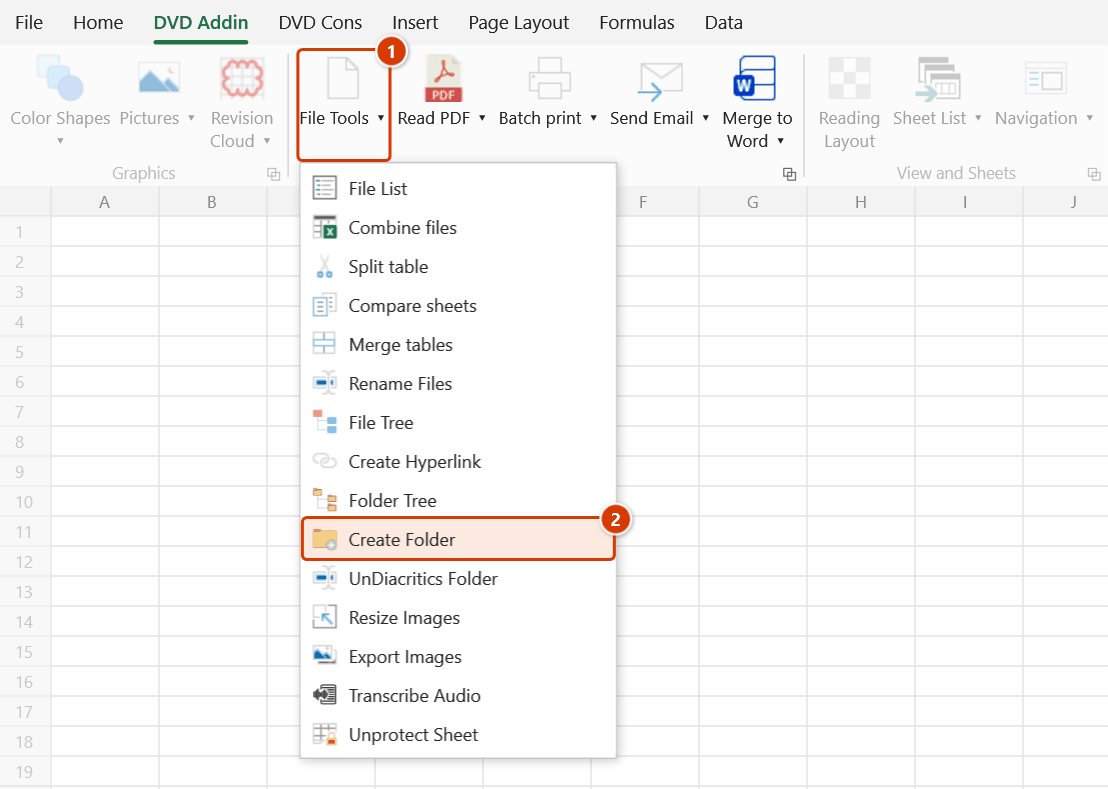
Location on ribbon: Tab DVD Addin → Group File and Print → Menu File Tools
Command ID: btnCreateFolder
License required
This command needs an active DVDAddin account (Standard or PRO). It is fully available during the Trial period.
What it does
Reads the folder names you typed on the sheet and creates that entire folder tree for real under a parent directory you pick. There is no depth limit — as many data columns as the sheet uses, that many nesting levels get created.
It is the fastest way to lay down the document skeleton at project kick-off: 01_Legal, 02_IFC_Drawings, 03_Inspection and dozens of sub-folders per discipline, instead of right-click → New folder for an hour.
How to use
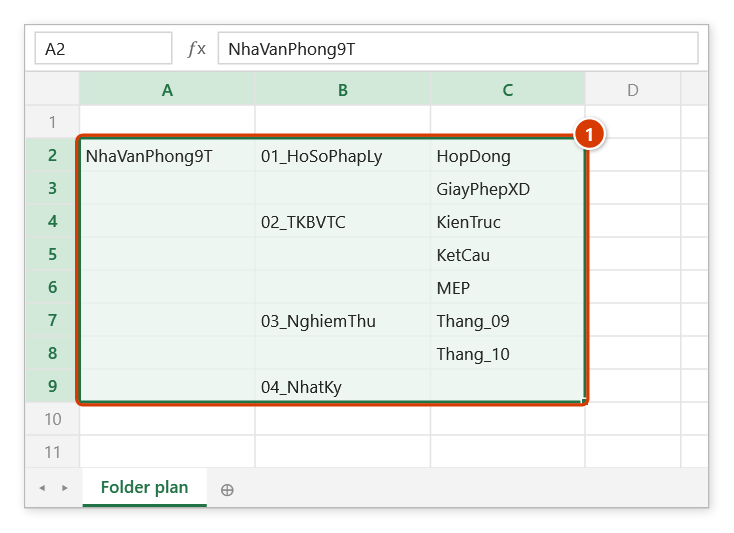
- On the sheet, type the folder names from row 2 downwards. Two layouts both work:
- Flat: column A = level 1, column B = level 2, column C = level 3, and so on.
- Indented: one name per row, pushed right with Tab according to its depth.
- Go to tab DVD Addin → group File and Print → menu File Tools → click Create Folder.
- The "Pick parent folder" browser opens → choose the root directory → OK.
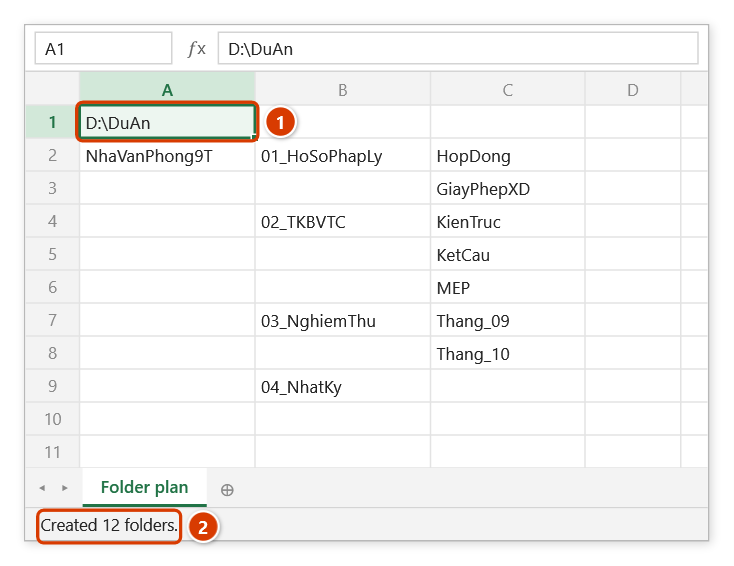
- The command writes the root path into cell A1, then walks each row: an empty cell means "keep the level from the previous row", so you never have to repeat parent names.
- While it runs, hold ESC to stop early; folders already created are kept.
- A toast reports "Created N folders." (plus the number of failed rows, if any).
If the sheet has no data from row 2 down, the command inserts a small sample layout into A2:E5 so you can see the expected shape, then stops — edit the names for your project and run it again.
Video tutorial
Narrated in Vietnamese, with Vietnamese subtitles. Đổi tên file, Tạo folder, Bỏ dấu folder · 5 min 47 s · 15 cases · Download the video · Practice workbook for the video
Commands in this video: Rename Files · Create Folder · UnDiacritics Folder
Chapters (23)
- Giới thiệu
- Mở lệnh
- Hai hộp hỏi
- 1 · Đổi tên ảnh nghiệm thu
- 2 · Không ghi đuôi file
- 3 · Tên mới có dấu chấm
- 4 · Bảng có dòng lỗi
- 5 · Đổi chéo hai tên
- 6 · File đang mở
- 7 · Đổi ngược lại
- Lệnh Tạo Folder
- 8 · Khung thư mục dự án
- 9 · Nhân bản cây thư mục cũ
- 10 · Chạy lại, thêm thư mục
- 11 · Ký tự cấm, gạch ngược
- 12 · Sheet trống – bảng mẫu
- Lệnh Bỏ dấu Folder
- 13 · Bỏ dấu cả cây hồ sơ
- 14 · Mục bị bỏ qua
- 15 · Khi chọn sai
- Hoàn tác
- Mẹo
- Kết thúc
Illustrated walkthrough
Practice
Download this command's sample workbook — the data matches the pictures below (sheet Folder plan), so you can follow each step right away.
Step 1. Type the folder list from row 2 down (1): column A = level 1, column B = level 2, column C = level 3… An empty cell keeps the parent from the row above, so you never repeat a parent name. Leave A1 empty — the command writes the parent folder path there.
Step 2. On the ribbon, open the DVD Addin tab → File and Print group → open File Tools → choose Create Folder.
Step 3. In the Pick parent folder box choose the folder that will hold the tree (for example D:\DuAn) and click OK. If A1 holds something else, the add-in asks before overwriting it.
Step 4. The parent path is written to A1 (1) and the whole tree is created on disk, for example D:\DuAn\NhaVanPhong9T\02_TKBVTC\KetCau. Existing folders are skipped, so running it again is safe. The status bar reports how many folders were created (2).
Example
Building the document skeleton for a package. Type on the sheet:
| A | B | C |
|---|---|---|
| Project A | 01_IFC | Architectural |
| Structural | ||
| 02_PM_Records | SiteOffice | |
| 03_Site_Diary | Month_05 |
Pick D:\Records as parent, run the command, and you get D:\Records\Project A\01_IFC\Architectural, …\Structural, D:\Records\Project A\02_PM_Records\SiteOffice, D:\Records\Project A\03_Site_Diary\Month_05.
Notes
- Cell A1 is overwritten with the parent path — do not keep anything important there. If A1 holds something else, the Confirm data change window asks before overwriting it.
- Characters Windows forbids in folder names (
< > : " / \ | ? *) are stripped automatically; what remains becomes the folder name. - Existing folders are skipped without error and their contents are untouched, so re-running the command is safe.
- A failing row (invalid name, no write permission) only increments the "failed rows" count; the rest of the batch keeps going.
- There is no undo: folders that were created must be deleted manually in Windows Explorer.
- Accented Vietnamese names create accented folders; run UnDiacritics Folder afterwards if you need plain ASCII names.
Related
- Folder Tree — the reverse direction: read an existing tree into a sheet.
- UnDiacritics Folder — strip Vietnamese accents from the tree you just created.
- File Tree — verify the structure once documents have been filed into it.
- Rename Files — batch-rename documents before moving them into the new folders.