
UnDiacritics Folder
Location on ribbon: Tab DVD Addin → Group File and Print → Menu File Tools
Command ID: btnUnDiacriticsFolder
What it does
Walks a folder recursively and renames every file and subfolder to an accent-free form (Báo cáo → Bao cao, Nghiệm thu → Nghiem thu). The root folder you picked is renamed last, so its own name gets cleaned too.
This matters whenever documents leave the office: uploads to a tendering portal, transfers to a Linux server, handover discs, or any system that mangles Vietnamese diacritics in file names.
How to use
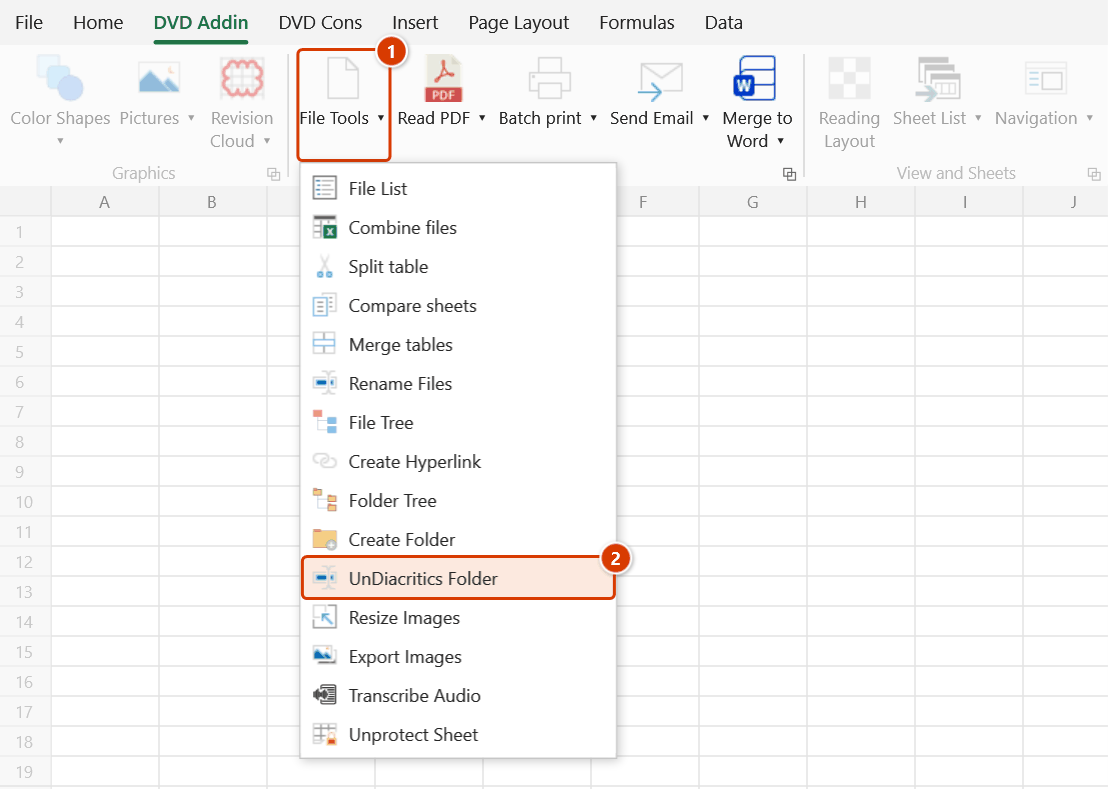
- Go to tab DVD Addin → group File and Print → menu File Tools → click UnDiacritics Folder.
- The "Pick folder" browser opens → choose the root directory to clean → OK.
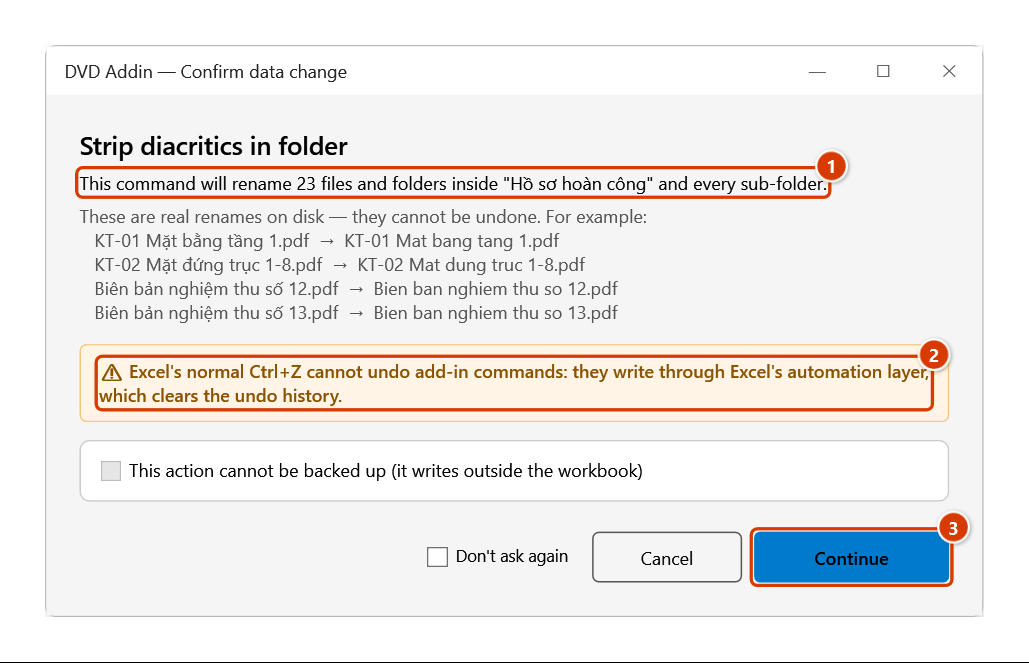
- The Confirm data change window shows how many items will be renamed plus up to 4 examples (
old name → new name); this action cannot be backed up — check it is the right folder and click Continue. - The command works from the deepest branch upwards: files first, then subfolders, and finally the root folder itself — so no path breaks halfway through.
- When it finishes, the status bar reports "Stripped diacritics from N/M items (files + folders).". If any items were skipped because the accent-free name already exists or could not be renamed (file open, access denied), that line appears in a separate message that lists those items.
Video tutorial
Narrated in Vietnamese, with Vietnamese subtitles. Đổi tên file, Tạo folder, Bỏ dấu folder · 5 min 47 s · 15 cases · Download the video · Practice workbook for the video
Commands in this video: Rename Files · Create Folder · UnDiacritics Folder
Chapters (23)
- Giới thiệu
- Mở lệnh
- Hai hộp hỏi
- 1 · Đổi tên ảnh nghiệm thu
- 2 · Không ghi đuôi file
- 3 · Tên mới có dấu chấm
- 4 · Bảng có dòng lỗi
- 5 · Đổi chéo hai tên
- 6 · File đang mở
- 7 · Đổi ngược lại
- Lệnh Tạo Folder
- 8 · Khung thư mục dự án
- 9 · Nhân bản cây thư mục cũ
- 10 · Chạy lại, thêm thư mục
- 11 · Ký tự cấm, gạch ngược
- 12 · Sheet trống – bảng mẫu
- Lệnh Bỏ dấu Folder
- 13 · Bỏ dấu cả cây hồ sơ
- 14 · Mục bị bỏ qua
- 15 · Khi chọn sai
- Hoàn tác
- Mẹo
- Kết thúc
Illustrated walkthrough
Step 1. On the ribbon, open the DVD Addin tab → File and Print group → open File Tools → choose UnDiacritics Folder.
Step 2. In the Pick folder box choose the root folder to process (for example D:\BanGiao\Hồ sơ hoàn công) and click OK.
Step 3. Before touching the disk, the add-in counts the items to rename (1) and lists a few examples just below. These are real renames that cannot be undone or backed up (2) — check it is the right folder, then click Continue (3).
Step 4. The command works from the deepest branch up: files first, then sub-folders, finally the root folder itself (Hồ sơ hoàn công → Ho so hoan cong). The status bar reports Stripped diacritics from 23/23 items (files + folders).; items skipped because the plain name already exists, or that could not be renamed because a file is open, are listed in a separate message.
Example
An as-built handover folder, right before burning the disc:
| Before | After |
|---|---|
Hồ sơ hoàn công\ | Ho so hoan cong\ |
Hồ sơ hoàn công\Bản vẽ kiến trúc\ | Ho so hoan cong\Ban ve kien truc\ |
…\Biên bản nghiệm thu số 12.pdf | …\Bien ban nghiem thu so 12.pdf |
…\Nhật ký thi công tháng 5.xlsx | …\Nhat ky thi cong thang 5.xlsx |
Every path is now plain ASCII and the portal upload no longer garbles the file names.
Notes
- The command renames files on disk for real and there is no undo — neither Ctrl+Z nor the add-in can revert it. Back up (or test on a copy) before running it on the master document set.
- If the accent-free name already exists in the same folder, that item is skipped rather than overwritten and keeps its old name — for example
Báo cáo.pdfsitting next toBao cao.pdfstaysBáo cáo.pdf. The final message lists these items so you can deal with them by hand. - Files that are open (Excel, Word, PDF) or where access is denied cannot be renamed; the command skips them and carries on, then lists them in the final message — close the file or fix the permission and run it again.
- Any hyperlink, shortcut or formula pointing at the old names will break — run this before creating hyperlinks, not after.
- Only diacritics are removed; spaces, dashes and letter casing are left exactly as they were.
Related
- Remove Accents — strip accents from cell text instead of file names.
- UnDiacritics Vietnamese Sheets — clean the sheet names in a workbook.
- Rename Files — rename files from an old-name/new-name table.
- Create Folder — build the folder tree first, then clean the names.