
Folder Tree
Location on ribbon: Tab DVD Addin → Group File and Print → Menu File Tools
Command ID: btnFolderTree
License required
This command needs an active DVDAddin account (Standard or PRO). It is fully available during the Trial period.
What it does
Scans a folder on a local or network drive and writes the whole subfolder tree into the current sheet, indenting one column per level. Unlike the File Tree command, this one lists folders only — no files.
Use it to build a project document index in seconds, to check that an as-built filing structure matches what the client mandated, or to print a folder map to attach to a handover record.
How to use
- Open (or create) an empty sheet for the output — the command wipes all data on the active sheet.
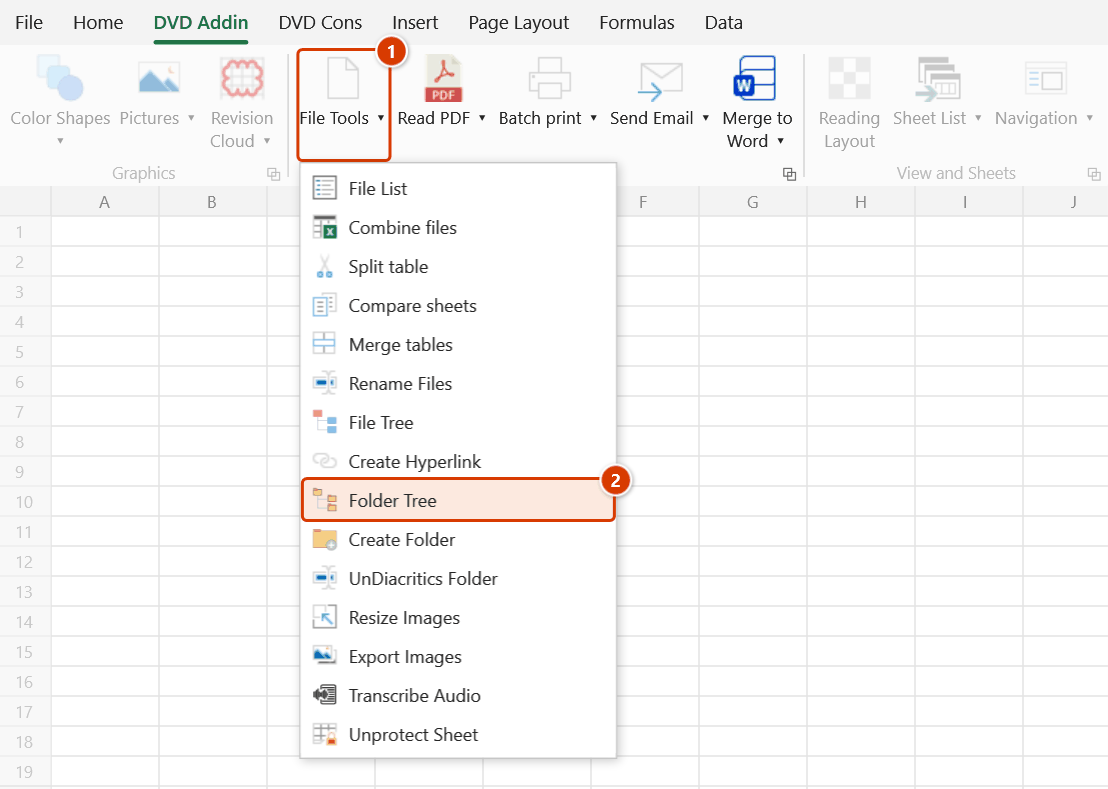
- Go to tab DVD Addin → group File and Print → menu File Tools → click Folder Tree.
- The "Pick parent folder" browser opens → point it at the root folder → OK.
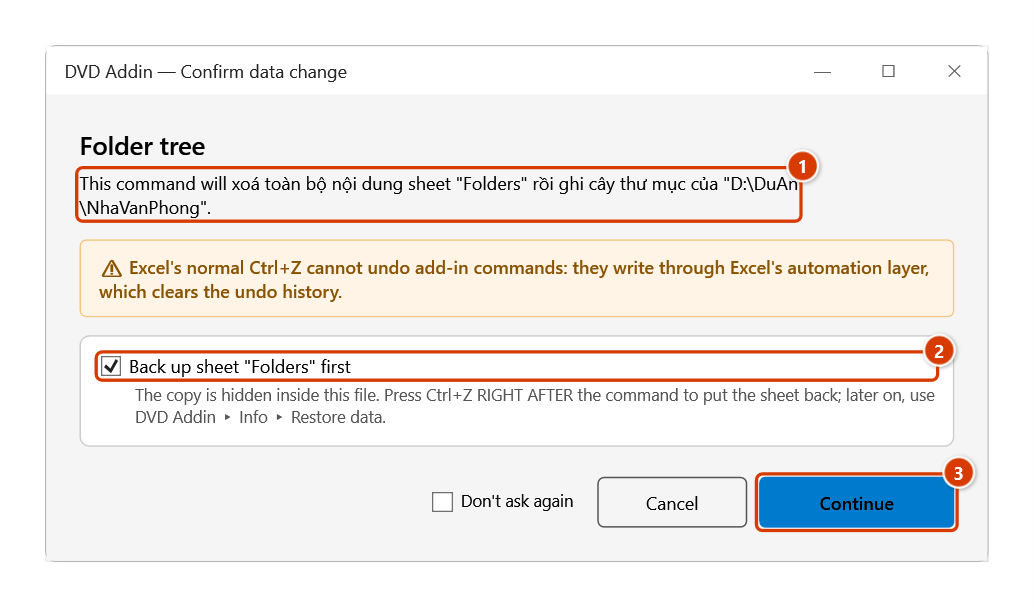
- The Confirm data change window warns that the whole active sheet will be cleared before the folder tree is written → keep Back up sheet ticked and click Continue if you are on the right sheet.
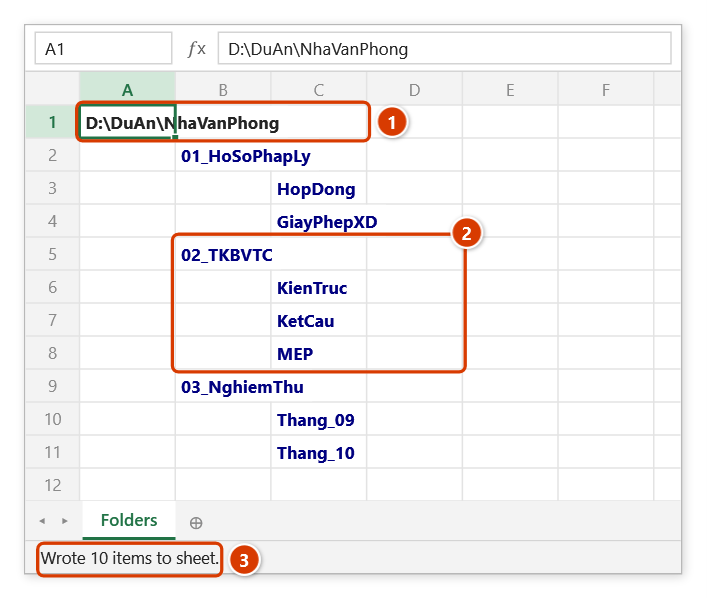
- The root path goes into A1 in bold, then each subfolder is written: level 1 in column B, level 2 in column C, level 3 in column D, and so on, each name bold and coloured blue.
- While the scan runs, hold ESC to stop early; whatever was already written stays.
- A toast reports the result, e.g. "Wrote 128 items to sheet."
Video tutorial
Narrated in Vietnamese, with Vietnamese subtitles. Danh sách file và cây thư mục · 7 min 32 s · 11 cases · Download the video · Practice workbook for the video
Commands in this video: File List · File Tree · Folder Tree
Chapters (17)
- Giới thiệu
- Mở lệnh
- Cửa sổ Liệt kê file
- 1 · Bảng kê bản vẽ PDF
- 2 · Đường dẫn đầy đủ
- 3 · Ghi nối vào bảng có sẵn
- 4 · Gộp tên file vào một ô
- 5 · Thư mục rất nhiều tệp
- 6 · Khi thao tác sai
- Hai lệnh cây thư mục
- 7 · Cây thư mục file
- 8 · Cây thư mục folder
- 9 · Tệp ẩn, thư mục bị khoá
- 10 · Tắt hyperlink cho cây
- 11 · Chạy nhầm sheet – Ctrl+Z
- Mẹo
- Kết thúc
Illustrated walkthrough
Step 1. Open (or add) an empty sheet for the result — the command clears the active sheet before writing.
Step 2. On the ribbon, open the DVD Addin tab → File and Print group → open File Tools → choose Folder Tree.
Step 3. In the Pick parent folder box choose the root folder (for example D:\DuAn\NhaVanPhong) and click OK. The add-in asks again because the whole sheet will be cleared (1): keep Back up sheet (2) so Ctrl+Z right after the command can restore the sheet, then click Continue (3).
Step 4. The root path sits in A1 (bold) (1); level-1 folders go in column B, level 2 in column C… in bold dark blue (2), each a hyperlink that opens the folder. Only folders are listed, no files. The status bar reports how many items were written (3).
Example
Package document folder at D:\Projects\TowerA. After the command runs, the sheet reads:
| A | B | C | D |
|---|---|---|---|
| D:\Projects\TowerA | |||
| 01_Legal | |||
| Contracts | |||
| Permits | |||
| 02_IFC_Drawings | |||
| Architectural | |||
| Structural | |||
| 03_Inspection | |||
| Month_05 |
Print that sheet and it becomes the folder-level index for the document file.
Notes
- The command erases the active sheet before writing — always run it on a blank sheet. Ctrl+Z right after the command puts the sheet back as it was (thanks to the backup); see Restore data.
- Folders only; use File Tree when you also need the file names.
- Whether folder names become hyperlinks depends on the FileTreeHyperlinks option in Preferences (File and Print section); the default is on.
- Folders you have no permission to read are skipped silently instead of aborting the scan.
- A deep tree spreads across many columns (one per level) — hold ESC if you accidentally point it at a whole drive or a slow network share.
Related
- File Tree — same engine, but lists the files inside as well.
- Create Folder — the reverse direction: build real folders from a sheet layout.
- File List — a flat listing of every file instead of a tree.
- Preferences — turn folder-tree hyperlinks on or off.