
Add accents (AI)
Location on ribbon: Tab DVD Addin → Group Text and Number → Menu Text ops
Command ID: btnAddAccents
What it does
The command sends the content of each selected unaccented cell to the AI (the provider you picked in the AI Assistant section of Preferences), asks for it back as fully accented Vietnamese, and writes the answer over the original cell — but only when the AI truly only added accents. It rescues tables typed without diacritics: hurried site diaries, worker lists exported from a time-clock, abbreviated material names.
The result is the model's contextual guess. It is usually very good on ordinary Vietnamese sentences, but proper names, product codes and technical jargon should always be reviewed.
How to use
- Select the cells holding unaccented text.
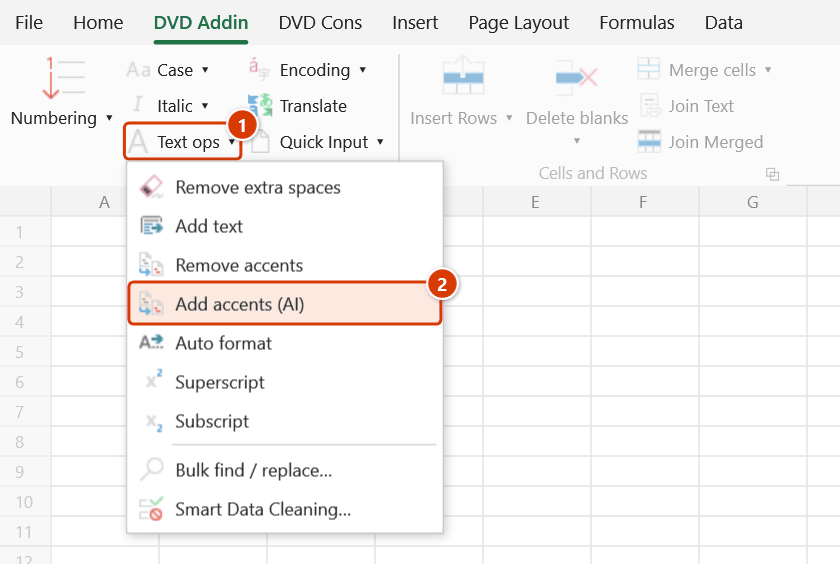
- Go to tab DVD Addin → group Text and Number → menu Text ops → Add accents (AI).
- The status bar shows "Adding Vietnamese accents to N cells via …" with the name of the selected AI provider. N counts only text cells that have no accents yet; formula cells and cells that already carry Vietnamese accents are skipped. The work runs in the background, so Excel stays usable.
- Cells are updated one by one. When the run finishes, the command reports the total number of cells accented and, if any, how many results were rejected (see Notes).
- If the selection contains no unaccented text cell, the command says so and tells you how many already-accented and formula cells it skipped.
Video tutorial
Narrated in Vietnamese, with Vietnamese subtitles. Xoá dấu và thêm dấu tiếng Việt · 6 min 04 s · 12 cases · Download the video · Practice workbook for the video
Commands in this video: Remove accents · Add accents (AI)
Chapters (17)
- Giới thiệu
- Mở lệnh
- 1 · Tên hạng mục làm tên thư mục
- 2 · Chữ HOA, chữ Đ và ký hiệu
- 3 · Chọn cả bảng: số, ngày, ô gộp
- 4 · Ô công thức – làm email
- 5 · Dòng ẩn, danh sách lọc
- 6 · Chữ chép từ PDF
- 7 · Ghi đè và hoàn tác
- Lệnh Thêm dấu (AI)
- 8 · Thêm dấu (AI) cho nhật ký
- 9 · Ô đã có dấu được bỏ qua
- 10 · Khi AI làm quá tay
- 11 · Chạy nền, dừng, hoàn tác
- 12 · Khi không có gì để làm
- Mẹo
- Kết thúc
Illustrated walkthrough
Practice
Download this command's sample workbook — the data matches the pictures below (sheet Site diary), so you can follow each step right away.
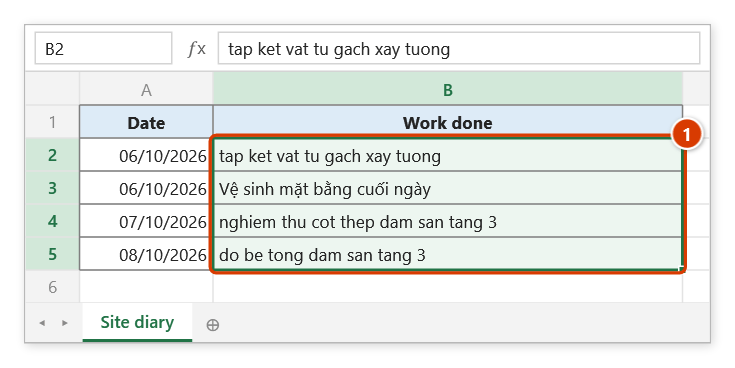
Step 1. The command needs an AI service and API key configured in Preferences. Select the column typed without Vietnamese accents, for example a site diary typed on a phone (1); cells that already have accents are skipped.
Step 2. On the ribbon, open the DVD Addin tab → Text and Number group → open Text ops → choose Add accents (AI).
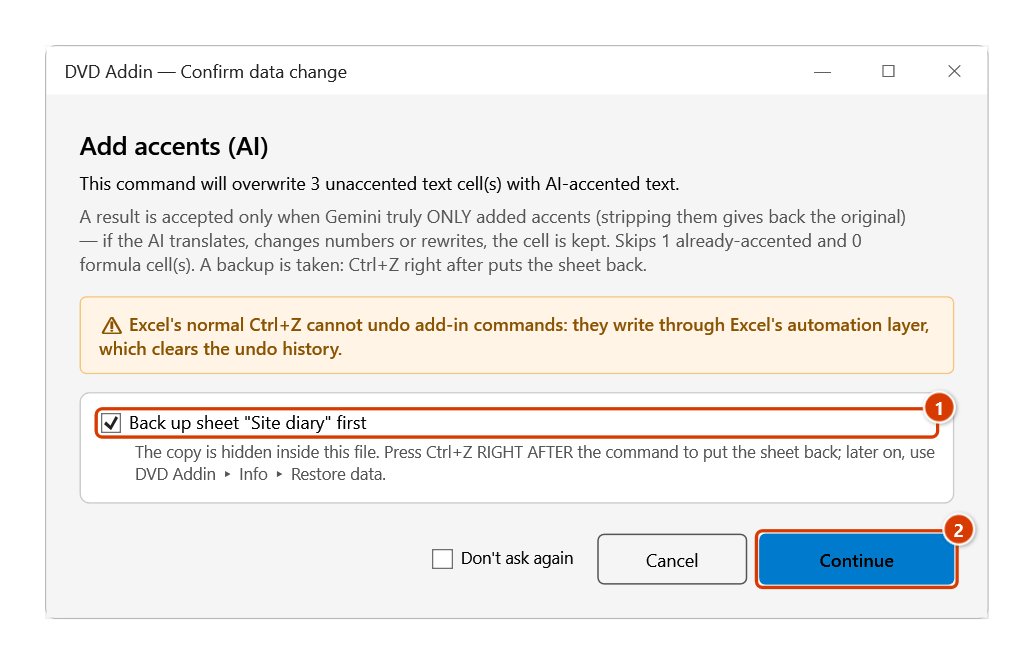
Step 3. The add-in shows how many cells go to the AI (3 unaccented, 1 already-accented cell skipped) and how results are checked. Keep the sheet backup ticked (1), then click Continue (2).
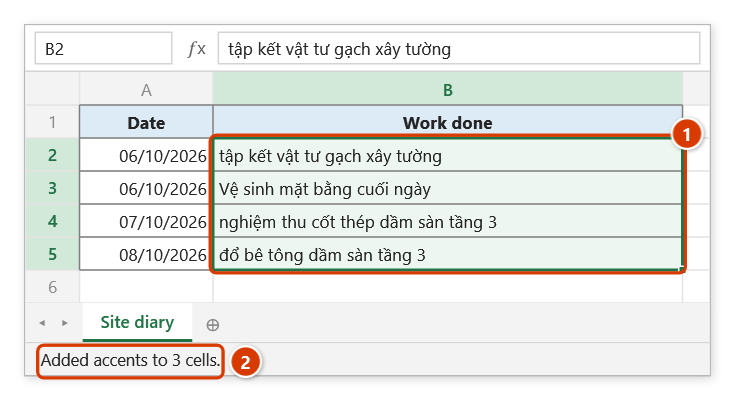
Step 4. The status bar shows Adding Vietnamese accents to 3 cells via Gemini…; the work runs in the background so Excel stays usable. Results are written cell by cell and the already-accented cell is left alone (1). When done, the status bar reports the total (2) — check proper names and codes.
Example
A site diary typed quickly on a phone by the field engineer, with the whole column unaccented. Select the activity column and run the command.
| Before | After |
|---|---|
| do be tong dam san tang 3 | đổ bê tông dầm sàn tầng 3 |
| nghiem thu cot thep truoc khi do | nghiệm thu cốt thép trước khi đổ |
| tap ket vat tu gach xay tuong | tập kết vật tư gạch xây tường |
Afterwards, scan the rows containing personal names or contractor names to be sure the AI did not guess wrong.
Notes
- Requires an internet connection and a configured API key for the selected AI provider; without either, the cells stay unchanged.
- An AI result is accepted only when it only adds accents: stripping the accents again must give back exactly the letters of the original cell. If the AI translates, changes numbers, adds an explanation or rewrites the content, the cell is kept as it was and counted among the rejected cells in the final message.
- Formula cells and cells that already have Vietnamese accents are not sent, so they use no AI calls and cannot be "corrected" by the AI.
- Each cell is a separate AI call, so a few hundred cells takes a long time and consumes quota. Work in smaller blocks.
- Results overwrite the original cells. The add-in backs the sheet up before calling the AI, but the results arrive seconds later, so Ctrl+Z cannot undo them — get the old version back from Restore data.
- Cells the AI cannot answer for keep their original content, with no per-cell error message.
- The model can misread proper names, material codes and abbreviations, so review before the sheet goes into a signed record.
Related
- Remove accents — the reverse operation, stripping Vietnamese diacritics.
- Grammar — AI spelling and grammar fixes for the selected range.
- Translate — translate cell content into another language.
- Smart Data Cleaning… — normalise casing once the accents are back.