
Text Reverse
Location on ribbon: Tab DVD Addin → Group Text and Number → Menu Italic
Command ID: btnTextReverse
What it does
The command splits each selected cell on a delimiter you type, then reverses the order of the parts. A - B becomes B - A. This is handy when a supplier or consultant sends a schedule written as "Work item - Code" and your own template expects "Code - Work item", or when you need to flip Last name / First name in a crew list.
For multi-line cells (Alt+Enter), the command swaps lines in pairs: line 1 with line 2, line 3 with line 4, and so on — exactly what a bilingual Vietnamese/English handover sheet needs when the language order has to change.
How to use
- Select the cells containing the text to reverse.
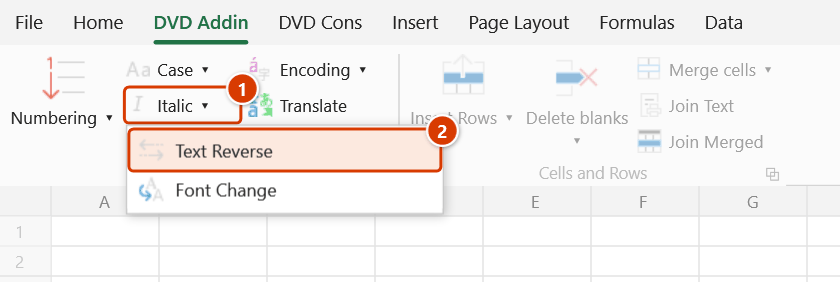
- Go to tab DVD Addin → group Text and Number → menu Italic → Text Reverse, or press Ctrl+Shift+R.
- The DVD Addin — Reverse text input box appears and asks for the delimiter. The default is
Chr(10), meaning the in-cell line break. - Keep
Chr(10)to swap lines inside the cell, or type the real delimiter, for example-,/,,. - Click OK, then Continue in the Confirm data change box. Values are written back in place and the Excel status bar reports how many cells changed.
Video tutorial
Narrated in Vietnamese, with Vietnamese subtitles. In nghiêng, Đảo ngược, Đổi Font · 6 min 53 s · 13 cases · Download the video · Practice workbook for the video
Commands in this video: Italic · Font Change · Text Reverse
Chapters (20)
- Giới thiệu
- Mở lệnh
- Hộp nhập
- 1 · Song ngữ hai dòng
- 2 · Nghiêng xen kẽ nhiều đoạn
- 3 · Dấu / trên cùng một dòng
- 4 · Ô đã in nghiêng sẵn
- Lệnh Đảo ngược
- 5 · Tên – mã hiệu đổi chỗ
- 6 · Ba phần trở lên
- 7 · Đổi chỗ từng cặp dòng
- 8 · Bẫy: gõ - thiếu dấu cách
- Lệnh Đổi Font
- 9 · Tiêu đề Việt / Anh
- 10 · Hai kiểu ngăn cách
- 11 · Chiều cao dòng bị tính lại
- 12 · Ký tự ngăn cách không nhận
- 13 · Ghi đè và hoàn tác
- Mẹo
- Kết thúc
Illustrated walkthrough
Practice
Download this command's sample workbook — the data matches the pictures below (sheet Work items), so you can follow each step right away.
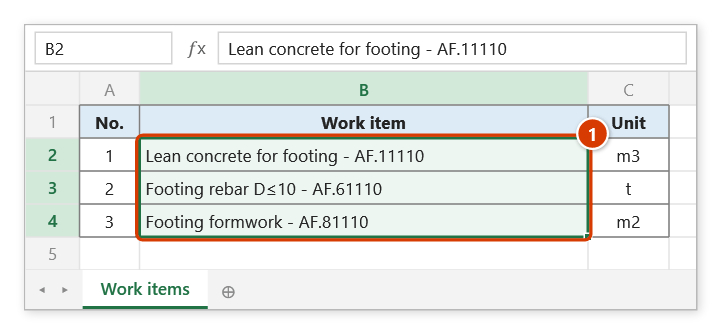
Step 1. Select the cells to reverse, for example a list written as "Work item - Code" where you want the norm code first (1).
Step 2. On the ribbon, open the DVD Addin tab → Text and Number group → open the Italic menu → choose Text Reverse (or press Ctrl+Shift+R).
Step 3. The Excel input box DVD Addin — Reverse text asks for the separator, pre-filled with Chr(10) (the in-cell line break). Replace it with - (space, hyphen, space) and click OK.
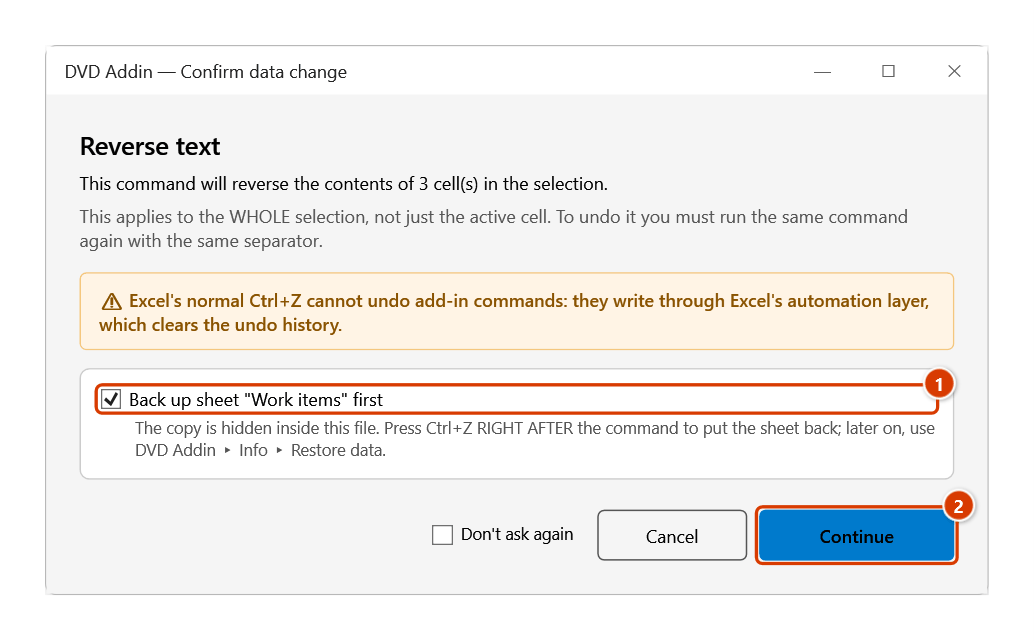
Step 4. The add-in asks again because the command overwrites the whole selection. Keep the sheet backup ticked (1), then click Continue (2).
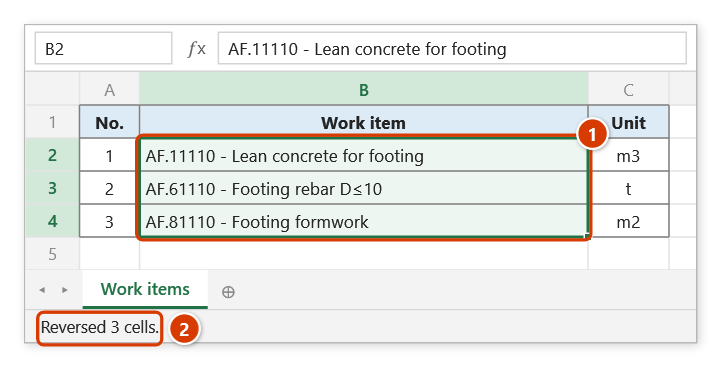
Step 5. The parts of each cell are put in reverse order: code first, work item after (1). The status bar reports how many cells were reversed (2).
Example
A bill of quantities where the norm code has to lead the description. Select column B, run the command and enter - as the delimiter.
| Before | After |
|---|---|
| Blinding concrete for footing - AF.11110 | AF.11110 - Blinding concrete for footing |
| Footing rebar D≤10 - AF.61110 | AF.61110 - Footing rebar D≤10 |
| Footing formwork - AF.81110 | AF.81110 - Footing formwork |
Notes
- Cell values are overwritten. Ctrl+Z right after the command puts the sheet back as it was (thanks to the backup); see Restore data.
- Only text cells are touched; numbers, dates and empty cells are skipped.
- A formula that returns text is replaced by the reversed static value, so the formula is lost. Avoid selecting formula cells.
- With
Chr(10)as the delimiter the lines are swapped in pairs, not fully reversed. - If the delimiter does not appear in a cell, that cell is left unchanged.
Related
- Italic — same delimiter-based family, italicises alternating segments.
- Font Change — changes the font of the text after the delimiter in the same cell.
- Add text — add a prefix or suffix once the order is correct.
- Remove extra spaces — clean stray spaces around the delimiter before reversing.