
Merge similar
Location on ribbon: Tab DVD Addin → Group Cells and Rows → Menu Merge cells
Command ID: btnMergeSimilarCells
What it does
The command walks the selection left→right then top→bottom; adjacent cells holding the same value (or a run of empty cells) are collected into one group and merged into a single cell. As soon as a different value appears, the current group is merged and a new one starts.
Use it to tidy repeating columns in bill-of-quantity sheets, rebar schedules or programme tables: instead of "Footing M1" repeated ten times in the Item column, you get one merged cell spanning ten rows.
Unlike Excel's Merge & Center, every cell of the group keeps its value — including the cells hidden under the merged cell — so AutoFilter, COUNTIF and SUMIF by column still see each row. Row heights stay as they were before the merge. For a log that grows every day, just select the whole column again and re-run: areas merged earlier are merged together with the new rows that share their value.
How to use
- Select the range. To merge down a column, select one column only — a multi-column range is scanned across first, which easily merges into the neighbouring column.
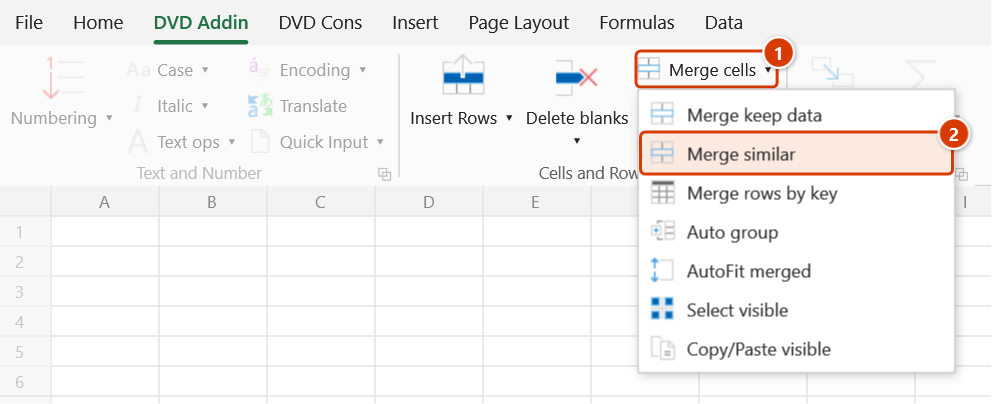
- Click DVD Addin → Cells and Rows → Merge cells → Merge similar.
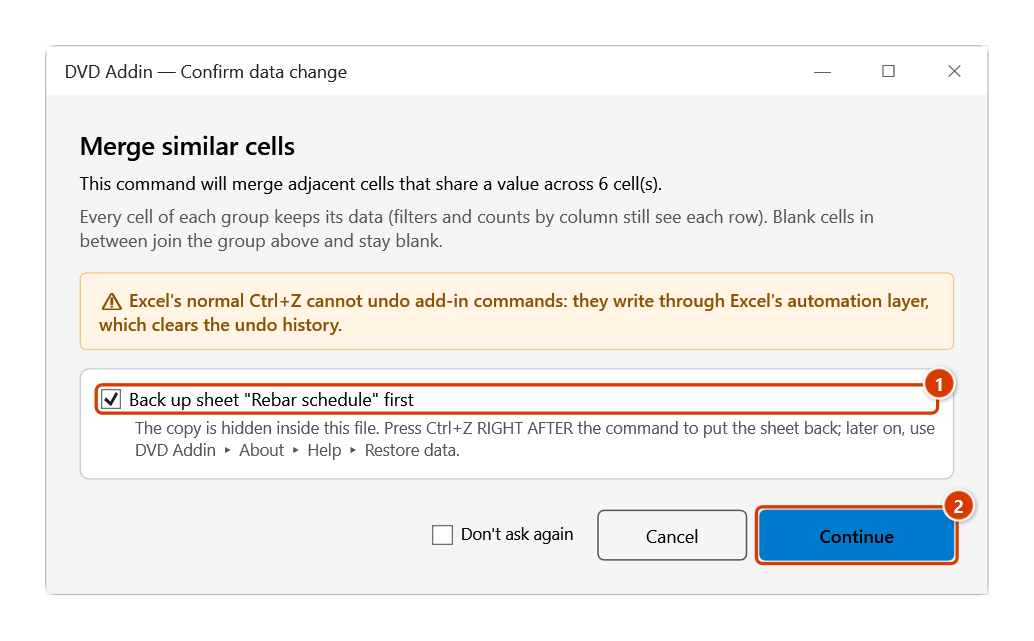
- The Confirm data change window reminds you that every cell of each group keeps its data and that blank cells in between join the group above. Keep the backup ticked and click Continue.
- The command runs quietly (Excel alerts are suppressed) and merges each group of two or more cells, keeping every cell's data.
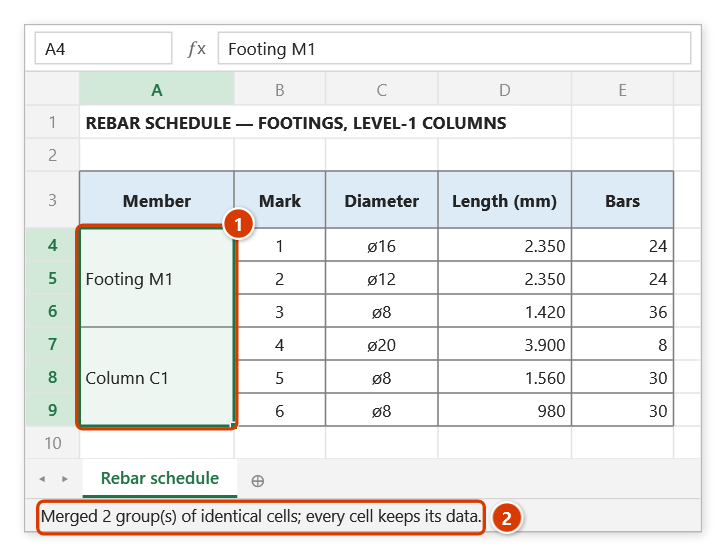
- The status bar reports the result, e.g. "Merged 12 group(s) of identical cells; every cell keeps its data."
- Hold ESC to stop early; the group being collected is still merged before the command stops.
Video tutorial
Narrated in Vietnamese, with Vietnamese subtitles. Gộp giữ data, Gộp ô giống nhau, Gộp dòng theo key · 7 min 18 s · 16 cases · Download the video · Practice workbook for the video
Commands in this video: Merge keep data · Merge rows by key · Merge similar
Chapters (22)
- Giới thiệu
- Mở lệnh
- 1 · Diễn giải nhiều dòng
- 2 · Gạch đầu dòng, ô trống
- 3 · Ô số, ngày, công thức
- 4 · Nhiều vùng rời (Ctrl)
- 5 · Có ô gộp sẵn, dòng ẩn
- 6 · Bấm lại để tách gộp
- Gộp ô giống nhau
- 7 · Cột lặp tên cấu kiện
- 8 · Ô trống, khác dấu cách
- 9 · Gộp tiêu đề theo hàng
- 10 · Cột con và cột cha
- Gộp dòng theo key
- 11 · Tổng hợp theo mã công tác
- 12 · Công thức, ô có chữ
- 13 · Khoá trống, dư dấu cách
- 14 · Dòng đang ẩn
- 15 · Hoàn tác, sheet khoá
- 16 · Khi lệnh không chạy
- Mẹo
- Kết thúc
Illustrated walkthrough
Practice
Download this command's sample workbook — the data matches the pictures below (sheet Rebar schedule), so you can follow each step right away.
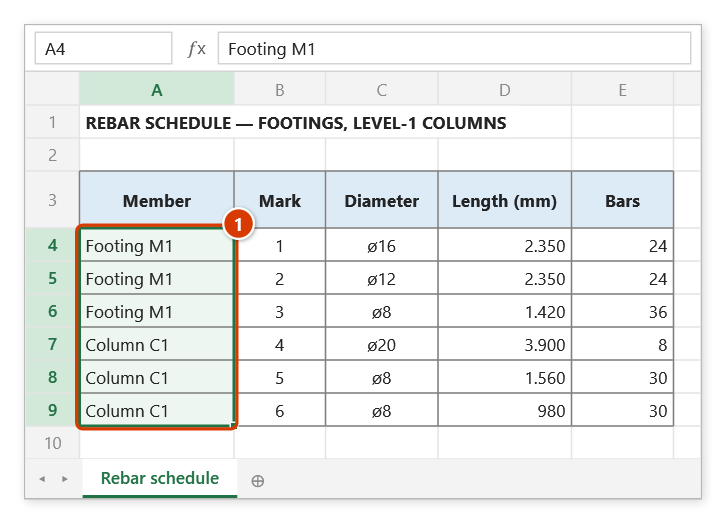
Step 1. Select the range to merge — preferably a single column, such as the member column A4:A9 (1). A multi-column range is walked row by row, so cells can get merged with their neighbours.
Step 2. On the ribbon, open the DVD Addin tab → Cells and Rows group → open Merge cells → choose Merge similar.
Step 3. The confirmation box reminds you that every cell of each group keeps its data. Keep the backup ticked (1) and click Continue (2).
Step 4. Each run of adjacent equal cells becomes one merged cell: Footing M1 over A4:A6, Column C1 over A7:A9 (1) — every cell of the run still holds its value (filters and counts by column see every row) and row heights stay as they were. The status bar reports how many groups were merged (2). Note: a blank cell in between counts as equal to the cell above and joins its group (it stays blank).
Example
A rebar schedule exported from another program repeats the member name in column A:
| Before (A2:A7) | After Merge similar |
|---|---|
| Footing M1 | Footing M1 (merged A2:A4) |
| Footing M1 | |
| Footing M1 | |
| Column C1 | Column C1 (merged A5:A7) |
| Column C1 | |
| Column C1 |
Notes
- Excel's normal Ctrl+Z cannot undo the result; if you kept the backup ticked in the confirmation window, press Ctrl+Z right after the command to put the sheet back. For an issued acceptance record, still work on a copy.
- Empty cells count as "same as the previous value" and are pulled into the running group (the cell stays blank — it does not take the group's value), so fill any gaps before running the command.
- Every cell of a group keeps its value: the command briefly inserts an empty column to the right of the range and deletes it again — no clipboard. An existing merge lying wholly inside a group (even one made by Excel, whose hidden cells are empty) gets its value filled back in and is merged together. A group with an existing merge reaching outside it, a group that is not a rectangle (multi-column ranges), or a sheet that blocks inserting columns gets a plain merge — only the first cell is kept, and the status bar says how many groups that happened to.
- Scanning is row-major; on multi-column tables run the command one column at a time for predictable results.
- Cells inside an Excel Table cannot be merged; those groups are skipped silently.
Related
- Merge keep data — merges and concatenates different values instead of collapsing duplicates.
- AutoFit merged — fixes row heights after merging.
- Auto group — build outline groups on the table you have just tidied.