
Auto group
Location on ribbon: Tab DVD Addin → Group Cells and Rows → Menu Merge cells
Command ID: btnAutoGroup
License required
This command needs a valid DVDAddin account (Standard or PRO). It is fully available during the trial period.
What it does
The command reads a column of outline numbers (1, 1.1, 1.1.1…) or plain integer levels (1, 2, 3) and builds Excel's row Grouping (Outline) to match, optionally indenting the description column so the tree structure is visible at a glance.
It pays off on bills of quantities organised by section — substructure / superstructure / finishes — or on multi-level programme tables: as long as the numbering column is consistent, you get +/- outline buttons to collapse each section.
How to use
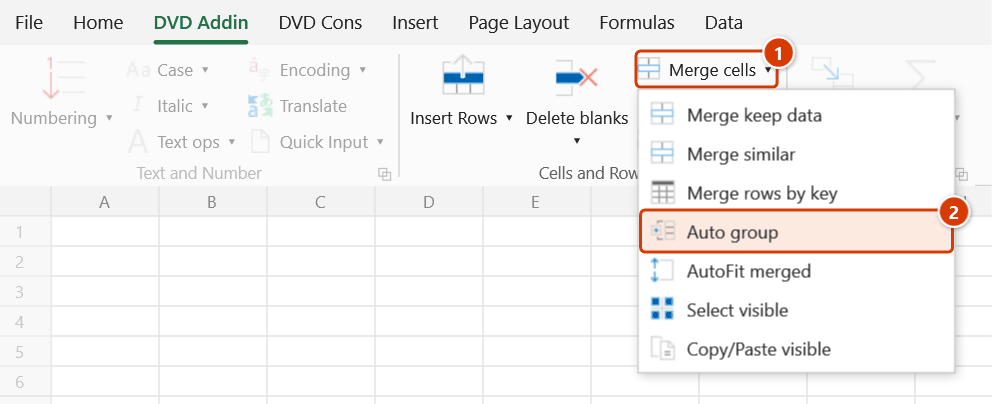
- Click DVD Addin → Cells and Rows → Merge cells → Auto group. The Auto group rows window opens.
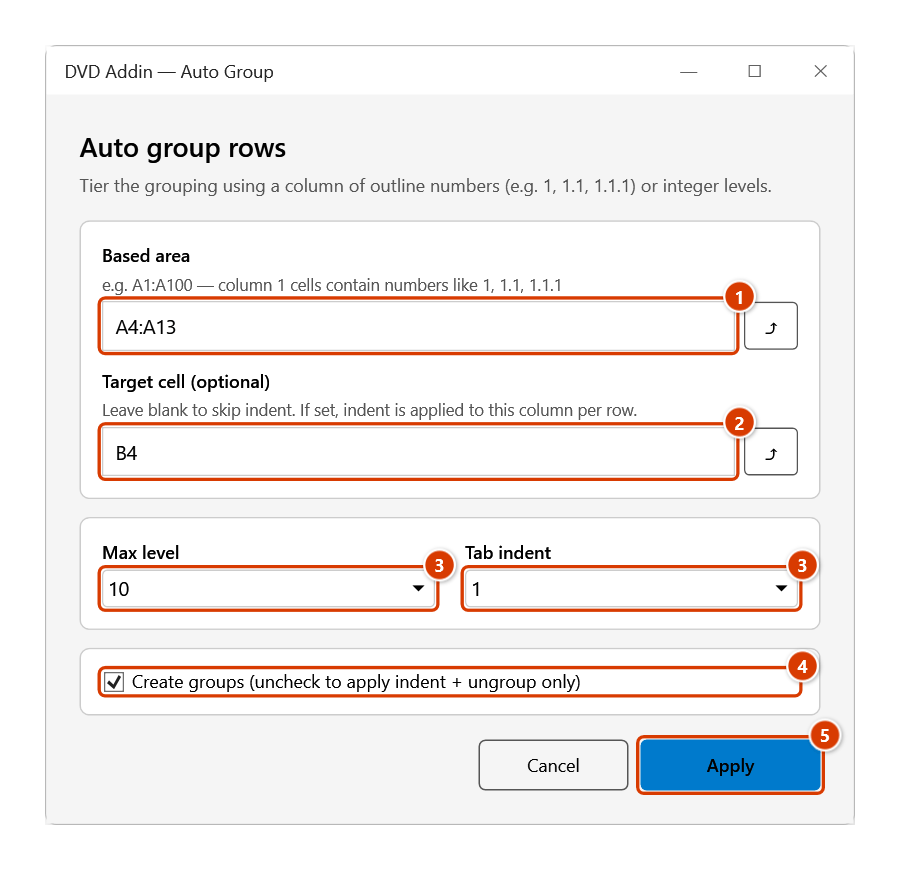
- Based area — type the address or click the ⤴ button to pick the column holding the outline numbers (e.g.
A5:A120). It must be 1 column × N rows. - Target cell (optional) — the first cell of the column to indent (usually the "Description" column). Leave blank to skip indenting.
- Max level — the deepest level that will be grouped.
- Tab indent — how many indent steps are added per level.
- Untick Create groups if you only want to apply the indent and remove existing groups.
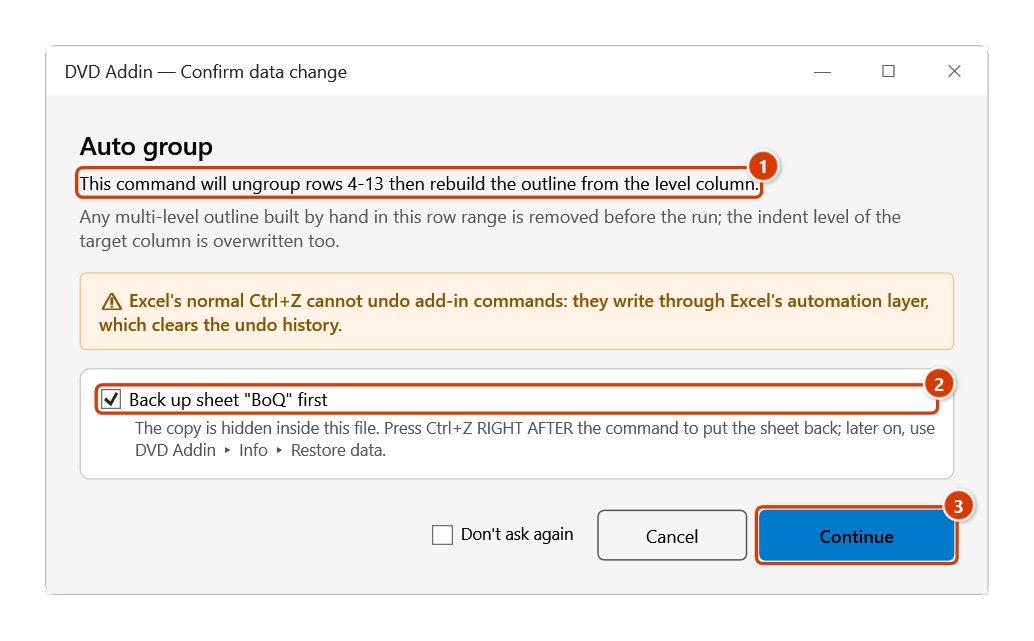
- Click Apply. The Confirm data change window says the command will remove every existing group in those rows and rebuild the outline from the level column; keep the backup ticked and click Continue. The outline +/- buttons appear in the left margin of the sheet.
Video tutorial
Narrated in Vietnamese, with Vietnamese subtitles. Tự nhóm theo cấp · 6 min 20 s · 11 cases · Download the video · Practice workbook for the video
Chapters (16)
- Giới thiệu
- Mở lệnh
- Cửa sổ Tự động nhóm dòng
- 1 · Số mục lục
- 2 · Dòng diễn giải không số
- 3 · Cột cấp 1, 2, 3
- 4 · Cấp tối đa
- 5 · Ký hiệu chữ a), b)
- 6 · Số có dấu chấm cuối
- 7 · Chạy lại khi đã có nhóm
- 8 · Chỉ thụt lề, gỡ nhóm
- 9 · Chọn nhầm cột và hoàn tác
- 10 · Sheet đang khoá
- 11 · Khi chọn sai vùng
- Mẹo
- Kết thúc
Illustrated walkthrough
Practice
Download this command's sample workbook — the data matches the pictures below (sheet BoQ), so you can follow each step right away.
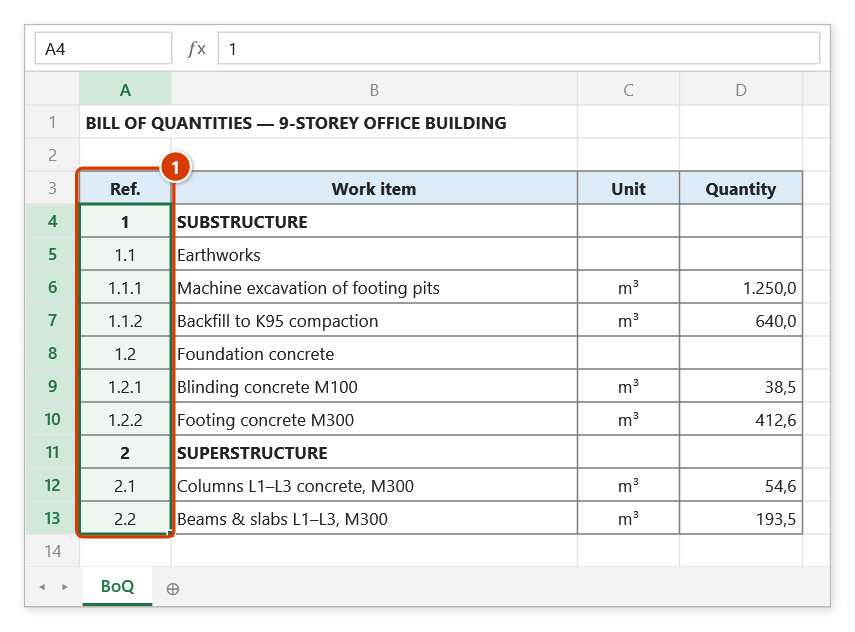
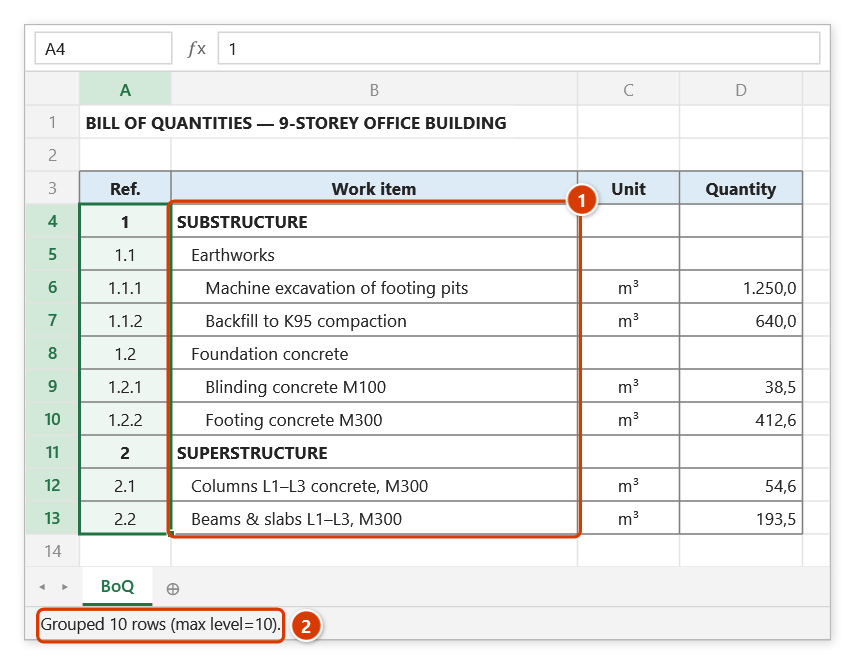
Step 1. The table needs a column of outline numbers (1, 1.1, 1.1.1…) or integer levels (1, 2, 3). Select that column first, for example A4:A13 (1), so the window fills the range in for you.
Step 2. On the ribbon, open the DVD Addin tab → Cells and Rows group → open Merge cells → choose Auto group.
Step 3. In the Auto group rows window: check the Based area (1 column × N rows) (1); enter the Target cell — the first cell of the work-item column, here B4 (2) (leave blank to skip indenting); pick Max level and Tab indent (3); keep Create groups ticked (4) and click Apply (5). The ⤴ button next to each box lets you pick the range on the sheet.
Step 4. A confirmation box says the command will remove every existing group in rows 4–13 and rebuild the outline from the level column (1). Keep the backup ticked (2) and click Continue (3).
Step 5. Work items in column B are indented by level (1) and the child rows are grouped: rows 1.1.x sit inside the group of 1.1, which sits inside item 1. The sheet's left margin gets the +/− buttons and level numbers 1 2 3 to collapse each section. The status bar reports the result (2).
Example
The Package 03 bill of quantities numbers column A as 1, 1.1, 1.1.1, 1.1.2, 1.2, 2… and holds the work description in column C.
Set Based area = A6:A250, Target cell = C6, Max level = 4, Tab indent = 1, keep Create groups ticked and click Apply → Continue. Row 1.1.1 now sits inside the group of 1.1, which sits inside 1; the descriptions in column C are indented by level; pressing outline button 2 collapses the sheet to section level for a summary printout.
Notes
- The level is derived from the value: a dotted string (
1.1.1) gives level = number of dots + 1; a plain number (3) is used as the level itself. Inconsistent numbering produces an incorrect tree. - Based area must be 1 column × N rows. A 1 row × N columns range reports "Column-grouping mode is not ported yet"; any other shape reports an invalid range.
- A malformed address (missing sheet, bad syntax) raises "Invalid 'Based area' range".
- The command overwrites the existing grouping of those rows. Ctrl+Z right after the command puts the sheet back as it was (thanks to the backup); see Restore data.
- Holding ESC while the values are being read aborts the whole operation and leaves the sheet untouched.
- This window does not block Excel: you can keep working on the sheet while it is open. The ⤴ button opens a range picker that does not lock Excel — the window steps aside, and while picking you can scroll, switch sheets or workbooks; click OK or press Enter on the sheet to take the range, Cancel or Esc to keep the old one.
Related
- Merge similar — collapse the repeating section column before building the outline.
- Multilevel numbering — generates the 1, 1.1, 1.1.1 column this command reads.
- Merge rows by key — summarise quantities per code before building the tree.