
Encoding
Location on ribbon: Tab DVD Addin → Group Text and Number
Command ID: btnConvert
What it does
The command opens the Convert Font encoding window, which converts Vietnamese text between three encodings: Unicode, VNI and TCVN3. The source encoding is detected automatically — first from the text content of each cell, then from its font name — so you only choose the target.
This comes up constantly when taking over legacy documentation: drawings, estimates and specifications produced in the .VnTime (TCVN3) or VNI-Times era open on a modern machine as gibberish such as C«ng tr×nh. Converting to Unicode makes the text readable, searchable and safe to copy again.
How to use
- Select the cells to convert, if you only want to work inside one range.
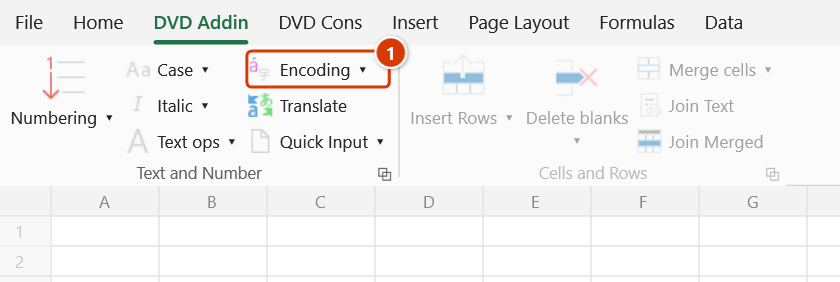
- Go to tab DVD Addin → group Text and Number → Encoding.
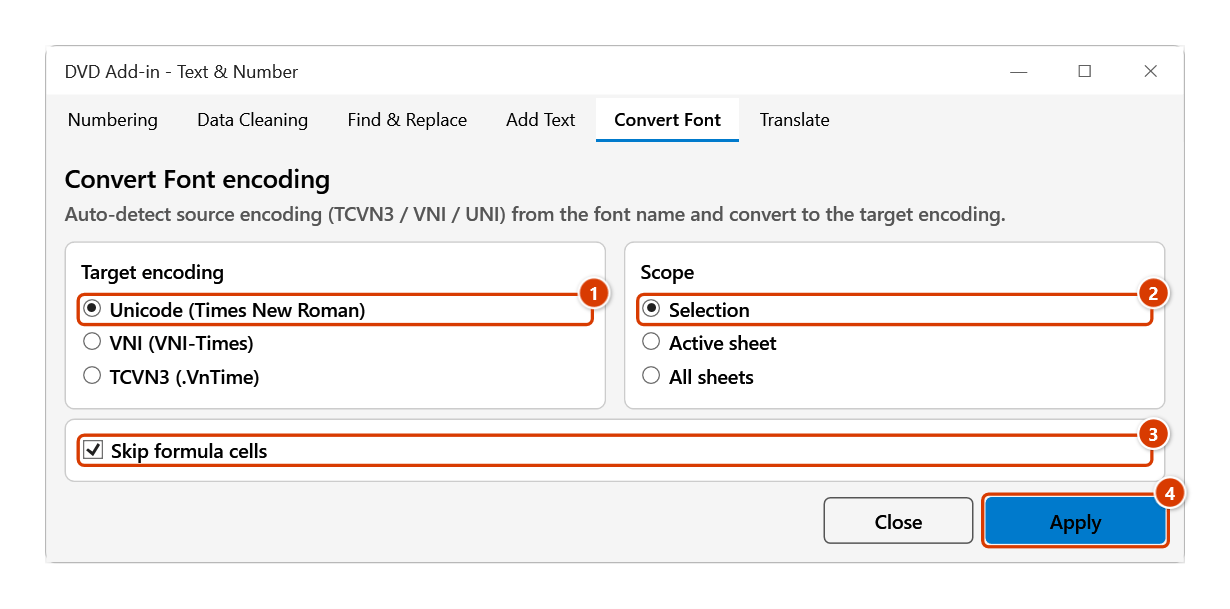
- In the Convert Font encoding window, choose:
- Target encoding — Unicode (Times New Roman), VNI (VNI-Times) or TCVN3 (.VnTime).
- Scope — Selection, Active sheet or All sheets.
- Skip formula cells — ticked by default, leaving formula cells untouched.
- Click Apply.
- The window does not lock Excel: select another range and click Apply again. Click Close when finished.
Video tutorial
Narrated in Vietnamese, with Vietnamese subtitles. Chuyển mã · 6 min 05 s · 12 cases · Download the video · Practice workbook for the video
Commands in this video: Encoding · To TCVN3 · To Unicode · To VNI
Chapters (18)
- Giới thiệu
- Mở lệnh
- Cửa sổ Chuyển mã
- 1 · Bảng VNI-Times → Unicode
- 2 · Nút nhanh: TCVN3 → Unicode
- 3 · Sang VNI để nộp mẫu cũ
- 4 · Chữ HOA có dấu
- Tự nhận bảng mã
- 5 · Chữ đã là Unicode
- 6 · Ô ngắn mơ hồ
- 7 · Phông gốc bị đổi mất
- 8 · Ô công thức
- 9 · Cả sheet, cả tệp
- 10 · Dòng ẩn, danh sách lọc
- 11 · Ghi đè và hoàn tác
- 12 · Khi không có gì để chuyển
- Mẹo
- Kết thúc
Illustrated walkthrough
Practice
Download this command's sample workbook — the data matches the pictures below (sheet Du toan), so you can follow each step right away.
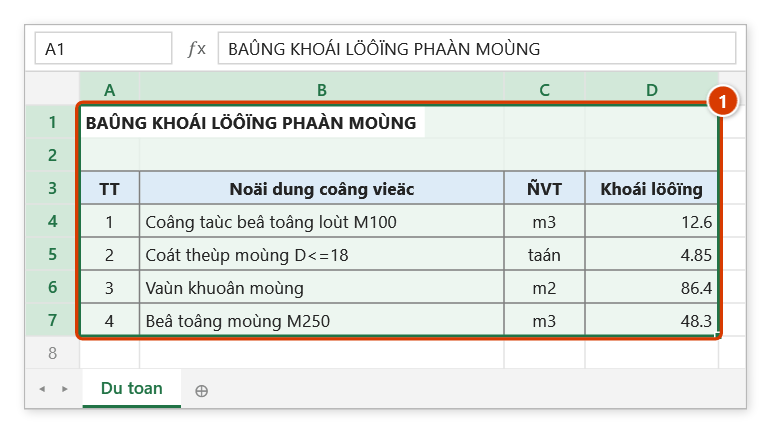
Step 1. Select the range to convert (1). This old quantity table was typed in the VNI-Times font; on a machine without that font the text shows up as garbled characters.
Step 2. On the ribbon, open the DVD Addin tab → Text and Number group → click Encoding.
Step 3. The Convert Font tab opens. Choose Unicode (Times New Roman) as the Target encoding (1) and Selection as the Scope (2), keep Skip formula cells ticked (3), then click Apply (4). The source encoding (VNI here) is detected automatically.
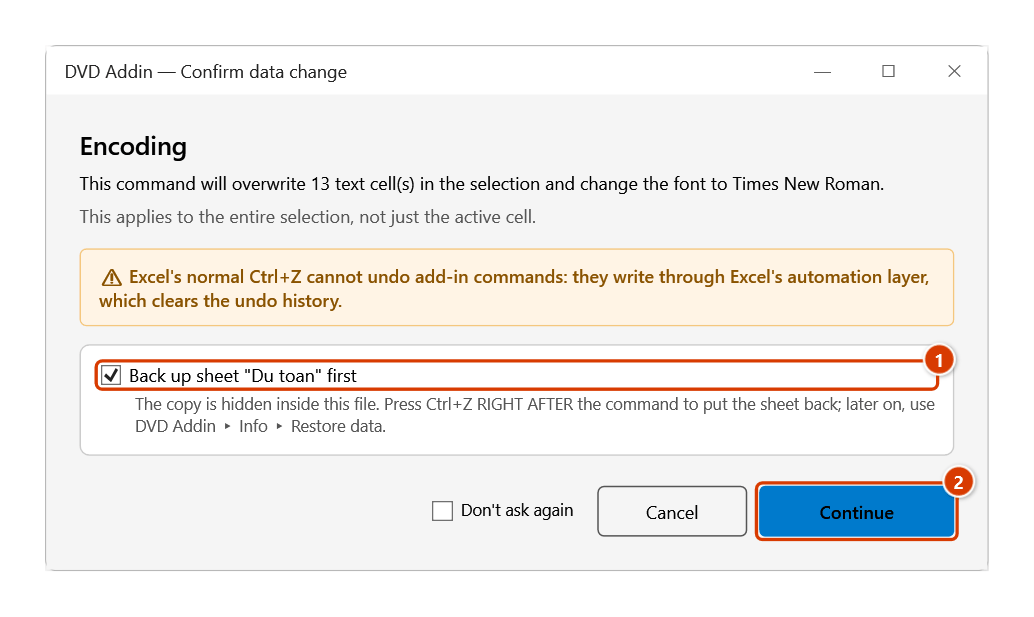
Step 4. The add-in asks before overwriting: keep the sheet backup ticked (1) and click Continue (2).
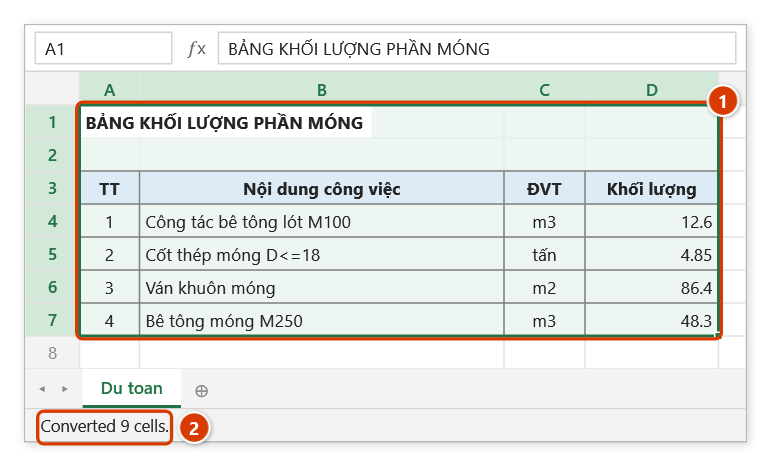
Step 5. The text is readable Unicode Vietnamese again and the range font is now Times New Roman (1). The status bar reports how many cells actually changed (2) — numbers and cells such as TT or m3 did not change, so they are not counted.
Example
You receive the old estimate workbook of a refurbishment project and the specification sheet reads Bª t«ng cèt thÐp because it was written in the .VnTime (TCVN3) font.
Open the command, set Target encoding to Unicode (Times New Roman), Scope to All sheets, keep Skip formula cells ticked and click Apply. The whole workbook returns to readable Unicode Vietnamese, usable in lookup formulas and safe to copy into new documents.
The reverse direction works too: when a counterpart still requires TCVN3 templates, pick TCVN3 (.VnTime) as the target encoding.
Notes
- The source encoding is decided from the cell's content first, and only then from its font name:
- Text that is already Unicode but still carries a
.Vn…font is not converted again —Bê tông móng, for example, stays correct instead of turning into gibberish. - TCVN3 text whose font was changed to a Unicode font (Arial, for example) is still recognized by its typical TCVN3 symbols such as
ª,«,©. - VNI text under a Unicode font is recognized when it contains typical VNI mark characters such as
ø,û,ï,ö,ñ. VNI text carrying only acute-type marks cannot be told apart reliably, so it is treated as Unicode: converting to Unicode leaves those cells unchanged, converting to VNI/TCVN3 re-encodes the text as it stands (still wrong) — set their font back toVNI-Timesand convert.
- Text that is already Unicode but still carries a
- Unicode output is always normalized to precomposed form (NFC).
- The count reported at the end includes only cells that actually changed; cells where nothing changes are not counted.
- The All sheets scope touches the entire open workbook — check before clicking Apply.
- Unticking Skip formula cells lets the conversion rewrite formula cells, which can break them; untick only when you really need it.
- Results are written straight into the cells. With the Selection or Active sheet scope, Ctrl+Z right after the command puts the sheet back as it was (thanks to the backup); see Restore data. The All sheets scope takes no backup and Ctrl+Z cannot undo it — keep a copy of the original file.
- Each target encoding comes with its standard font (Times New Roman / VNI-Times / .VnTime), so column widths may look different once character widths change.
Related
- To Unicode — one-click conversion to Unicode without opening the window.
- To VNI — one-click conversion to the VNI encoding.
- To TCVN3 — one-click conversion to the TCVN3 encoding.
- Smart Data Cleaning… — repairs
Cống-style mojibake, a different problem from legacy font encodings.