
Unhide All
Location on ribbon: Tab DVD Addin → Group View and Sheets → the ▾ arrow of Sheet List
Command ID: btnUnhideAllSheets
What it does
Reveals every hidden sheet in the workbook in a single click. Stock Excel only unhides one sheet at a time through the Unhide dialog, which is painful on a submission file with dozens of hidden tabs.
Use it when a cost estimate, quantity take-off or handover file arrives from another party and you want to see all of it, or to restore the workbook after running Hide Unselected.
How to use
- Open the workbook (the command works on the active workbook).
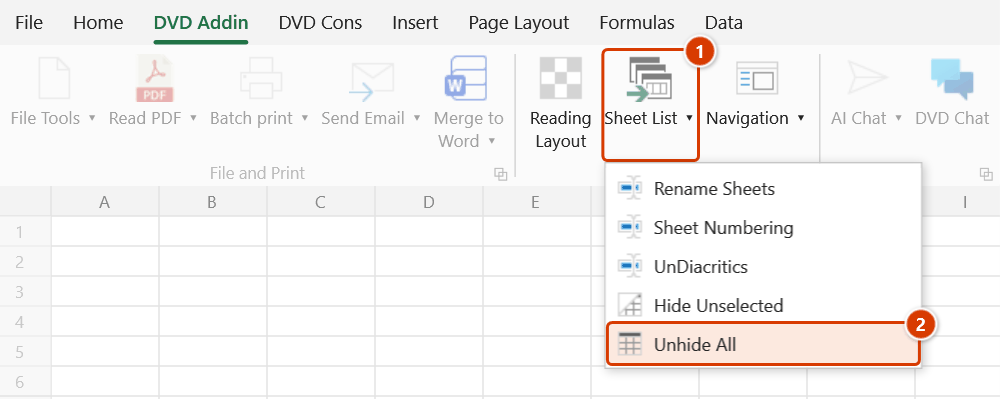
- Go to tab DVD Addin → group View and Sheets → the ▾ arrow of Sheet List → Unhide All.
- The add-in walks every sheet and restores the ones marked as ordinarily hidden.
- The status bar reports "Unhid N hidden sheets." A result of 0 means there were no ordinarily hidden sheets.
Video tutorial
Narrated in Vietnamese, with Vietnamese subtitles. Ẩn sheet khác và Hiện tất cả · 5 min 13 s · 10 cases · Download the video · Practice workbook for the video
Commands in this video: Hide Unselected · Unhide All
Chapters (14)
- Giới thiệu
- Mở lệnh
- 1 · Chọn nhóm bằng Ctrl
- 2 · Chọn dải liền bằng Shift
- 3 · Quên chọn nhóm
- 4 · Hiện tất cả: file nhận về
- 5 · Sheet vốn đã ẩn
- 6 · Sheet biểu đồ
- 7 · Sổ khoá cấu trúc
- 8 · Sheet Rất ẩn
- 9 · Bẫy: Rất ẩn thành ẩn thường
- 9 · Cách tránh
- Mẹo
- Kết thúc
Illustrated walkthrough
Practice
Download this command's sample workbook — the data matches the pictures below (sheet Tonghop), so you can follow each step right away.
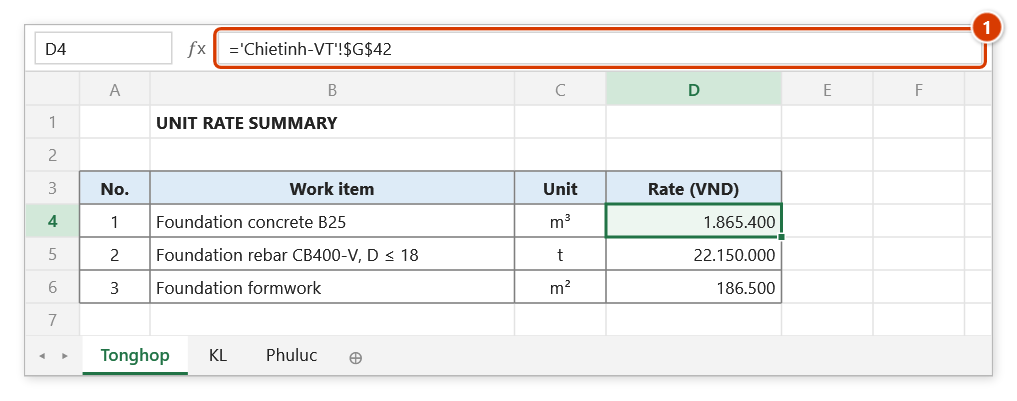
Step 1. Open the workbook to unhide. Here an estimate received from the consultant shows only 3 sheets, yet the unit rate refers to a Chietinh-VT sheet that is not in the tab bar (1) — a sure sign of hidden sheets.
Step 2. On the ribbon, open the DVD Addin tab → View and Sheets group → open Sheet List → choose Unhide All.
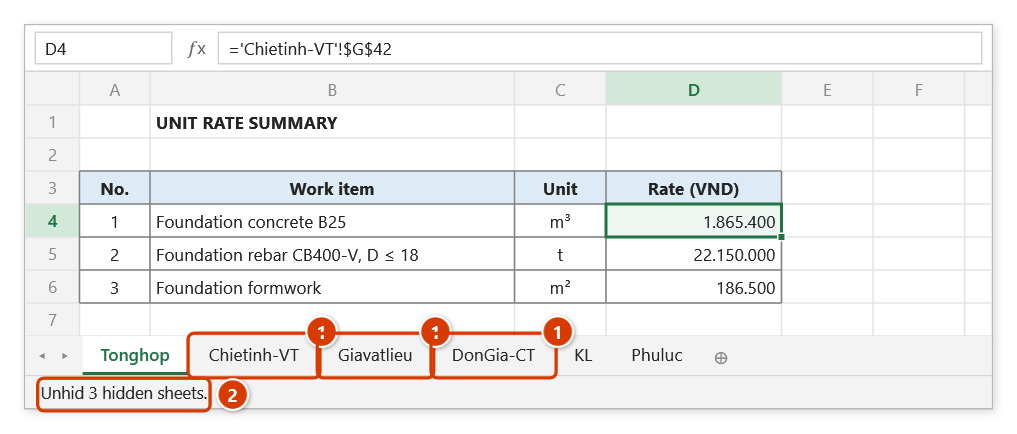
Step 3. The command runs at once with no prompt: every ordinarily hidden sheet comes back in its original position in the tab bar (1) (Very Hidden sheets stay hidden). The status bar reports how many sheets were unhidden (2).
Example
You receive Dutoan-GoiThau-02.xlsx from a consultant: the tab bar shows only Tonghop, KL and Phuluc, yet the summary sheet references Chietinh-VT, Giavatlieu and DonGia-CT — a sure sign of hidden sheets.
Run Unhide All and the tab bar expands to all 21 sheets, letting you follow the full rate build-up and check where each unit price comes from.
Notes
- Only ordinarily hidden sheets are restored. Sheets set to Very Hidden (changeable only in the VBA editor) stay hidden.
- If the workbook structure is protected (Protect Workbook → Structure), Excel blocks unhiding; remove the protection first.
- Hold ESC to stop partway; sheets already revealed stay visible.
- The change cannot be undone with Ctrl+Z — to hide them again, select the sheets you want to keep and use Hide Unselected.
- Revealed sheets return to their original positions in the tab bar rather than being pushed to the end.
Related
- Hide Unselected — the reverse operation, keeps only the selected group.
- Navigation — inspect and toggle individual sheets from the manager pane.
- Sheet List — build the index once every sheet is visible.
- Unprotect Sheet — deal with locked files before working on them.