
Reset Note
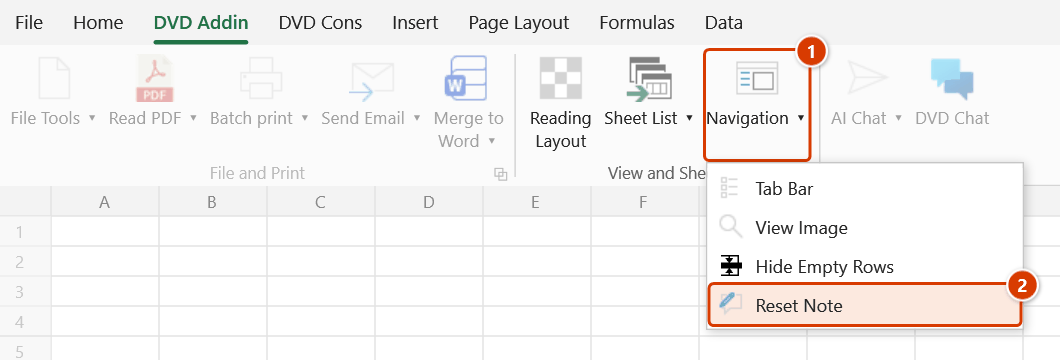
Location on ribbon: Tab DVD Addin → Group View and Sheets → the ▾ arrow of Navigation
Command ID: btnResetNote
What it does
Resets the comment boxes (Comments/Notes) in a sheet to one uniform width, with the height auto-fitting the text, and moves every box back next to its cell (to the right of the cell, like Excel's default). After rounds of editing and copying, note boxes in a shared file end up misshapen or adrift — some too flat to show their text, some so large they cover the table, some far away from their cell — and this command normalises them all in one step.
Use it when reviewing files that carry many annotations: quantity sheets with take-off breakdowns, inspection forms with consultant remarks, design-change trackers.
How to use
- Switch to the sheet you want to process (if you plan to use the current-sheet scope).
- Go to tab DVD Addin → group View and Sheets → the ▾ arrow of Navigation → Reset Note.
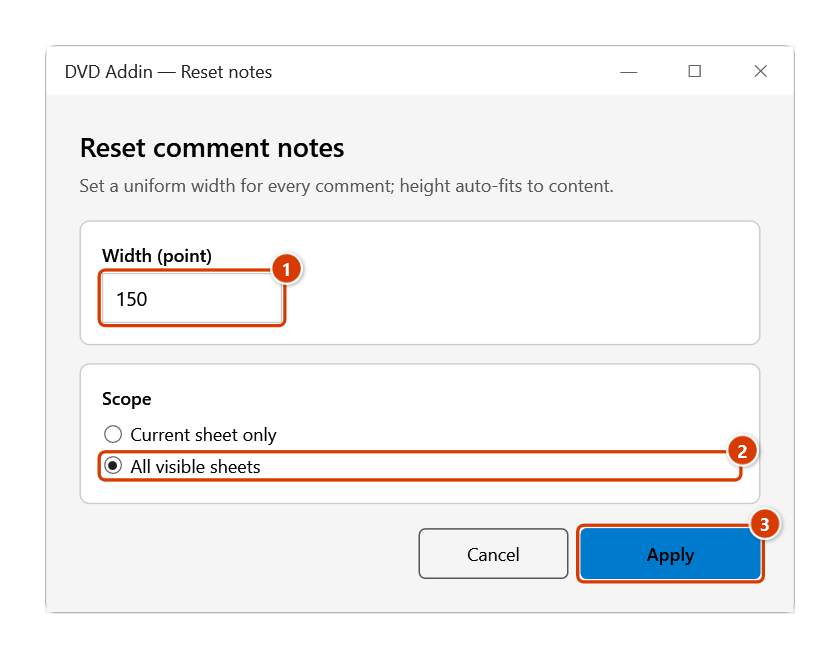
- The DVD Addin — Reset notes window opens with two settings:
- Width (point) — a text box pre-filled with Picture comment width from Preferences ▸ Graphics (default
150). - Scope — either Current sheet only (default) or All visible sheets.
- Width (point) — a text box pre-filled with Picture comment width from Preferences ▸ Graphics (default
- Enter the width you want and choose the scope.
- Click Apply (or Cancel to exit).
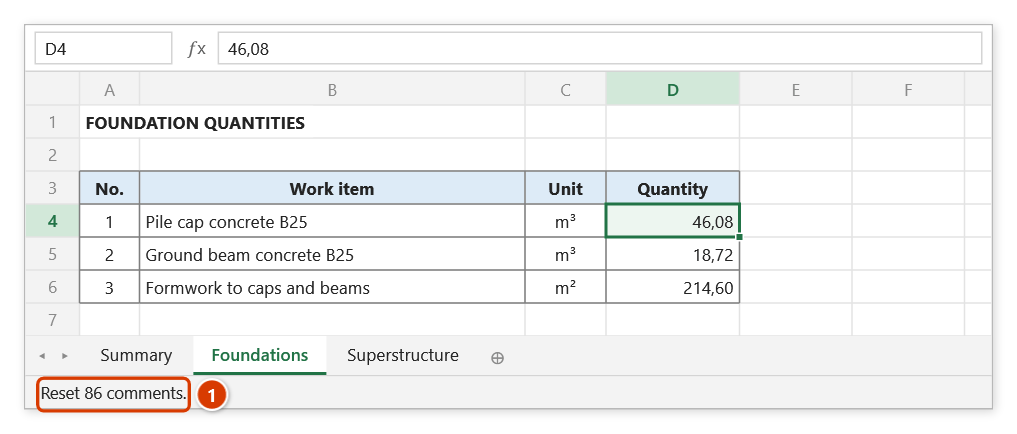
- Every comment box (except picture notes) gets that width with auto-fit height, every box is moved back to the right of its cell, and a message reports "Reset N comments."
Video tutorial
Narrated in Vietnamese, with Vietnamese subtitles. Đặt lại Note · 5 min 14 s · 10 cases · Download the video · Practice workbook for the video
Chapters (16)
- Giới thiệu
- Mở lệnh
- Cửa sổ Đặt lại ghi chú
- Lệnh làm gì
- 1 · Ghi chú trôi xa, méo mó
- 2 · Ô gộp
- 3 · Ghi chú ảnh
- 4 · Ghi chú dài – chọn chiều rộng
- 5 · Ghi chú ẩn và đang hiện
- 6 · Vùng chọn không giới hạn
- 7 · Tất cả các sheet
- 8 · Sheet đang bảo vệ
- 9 · Không hỏi, không Ctrl+Z
- 10 · Khi nhập sai
- Mẹo
- Kết thúc
Illustrated walkthrough
Open the sheet whose classic Comments/Notes are misshapen or have drifted away from their cells — for example a take-off sheet that explains each quantity in a note.
Step 1. On the ribbon, open the DVD Addin tab → View and Sheets group → open Navigation → choose Reset Note.
Step 2. In the Reset comment notes window, enter the Width (point) (1) (default 150 pt ≈ 5.3 cm), choose the scope — here All visible sheets (2) — and click Apply (3).
Step 3. Every note box gets the same 150 pt width, its height fits the text, and it is moved back right next to its cell; notes holding a picture are only moved, never resized. Hidden sheets are skipped. The status bar reports how many notes were reset (1).
Example
A foundation quantity sheet carries 86 notes explaining the take-off (= 2 × 1.2 × 0.8 × 24 pile caps). The file has passed through three people: some boxes are a single line high and cut the formula in half, others fill half the screen.
You open Reset Note, keep the width at 150 points, choose All visible sheets, and click Apply. All 86 notes across the visible sheets take the same width with heights fitted to the text, each sitting right next to its cell — every explanation now reads in full on hover.
Notes
- The command handles classic Comments/Notes (the yellow box shown on hover), not the Microsoft 365 threaded comments.
- Width is measured in points (1 point ≈ 0.353 mm); the default
150points is about 5.3 cm. - The All visible sheets scope skips hidden sheets — unhide them first if they need processing too.
- Height is calculated by Excel from the content; you only control the width.
- Every box is moved back to the right of its cell, Excel's default position.
- Notes that hold a picture (made with Picture Comment or Picture Comment by Name) are only moved back next to their cell and never resized — the picture keeps its proportions.
- Hold ESC to stop partway; notes already processed keep their new size. The change cannot be undone with Ctrl+Z.
Related
- Picture Comment — put an image inside a cell's comment box.
- Picture Comment by Name — fill comments with images matched by file name.
- List Shapes — inventory the graphic objects on a sheet for review.