
2-Week Lookahead
Location on ribbon: Tab DVD Cons → Group Schedule → Menu Reports
Command ID: btnLookahead2W
PRO feature
This command is part of the PRO plan. STANDARD accounts activated before 01/07/2026 keep access until their licence expires; other Standard accounts get an upgrade prompt when they click it.
What it does
Slices a short-term plan out of the master schedule following Lean Construction practice: a 21-day grid covering the past week plus the next two weeks. The generated sheet is pre-formatted as A3 landscape, ready to print and pin on the site board. This is the site manager's and supervisor's tool — nobody reads a 300-line master programme on site, but everyone reads a 21-day grid.
How to use
- Open the schedule sheet with status updated to today (Start / Finish dates required; Actual Start / Actual Finish columns are auto-detected if present).
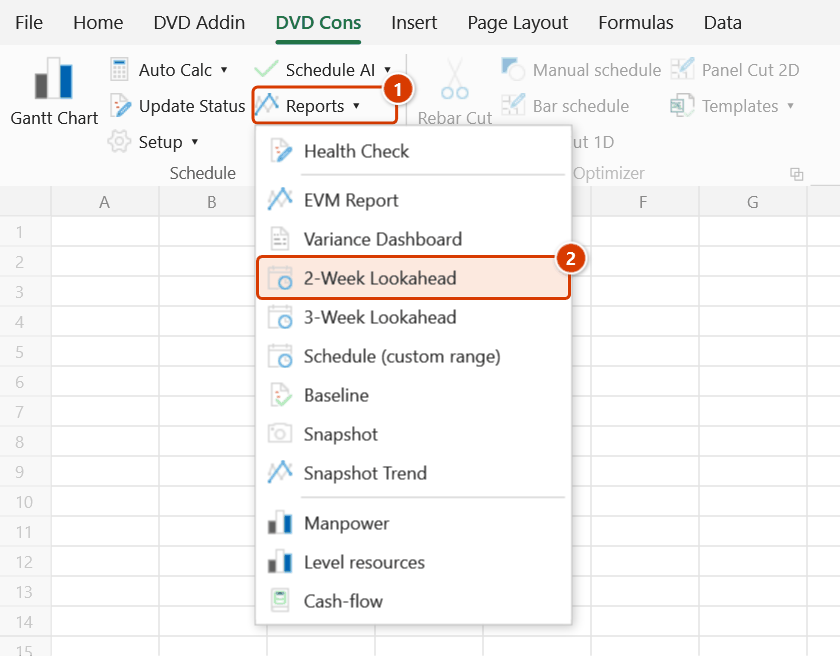
- Go to Tab DVD Cons → group Schedule → menu Reports → click 2-Week Lookahead.
- A data date prompt appears, pre-filled with the date saved in the file (today if none) — click OK. The window is anchored on the week containing that date.
- A new lookahead sheet appears with the activity list on the left and the 21-day grid on the right. Overdue unfinished activities are listed first.
- Read the cell colours: dark green means complete, green means in progress, yellow means late or not yet updated, light blue means upcoming, red means overdue and unfinished (from the window start to the data date). Non-working days of the workbook calendar are shaded grey instead of a status colour.
- Ctrl+P, choose A3 landscape and print it for the site board, or export a PDF for the site chat group.
Video tutorial
Narrated in Vietnamese, with Vietnamese subtitles. Kế hoạch 2 tuần, 3 tuần và khoảng tùy chọn · 6 min 29 s · 12 cases · Download the video · Practice workbook for the video
Commands in this video: 3-Week Lookahead · 2-Week Lookahead · Schedule (custom range)
Chapters (16)
- Giới thiệu
- Mở lệnh
- 1 · Kế hoạch 2 tuần
- 2 · Kế hoạch 3 tuần, chạy lại
- 3 · Ngày dữ liệu giữa tuần
- 4 · Việc nào được đưa vào
- 5 · Ngày nghỉ, ngày lễ
- 6 · Thiếu cột thực tế
- 7 · In A3 và cột Ghi chú
- 8 · Khi không sinh được
- 9 · Khoảng tùy chọn: Gantt thật
- 10 · Giữ ngày thật, không cắt
- 11 · Sheet thiếu cột Cấp
- 12 · Khi nhập sai
- Mẹo
- Kết thúc
Illustrated walkthrough
Practice
Download this command's sample workbook — the data matches the pictures below (sheet Schedule), so you can follow each step right away.
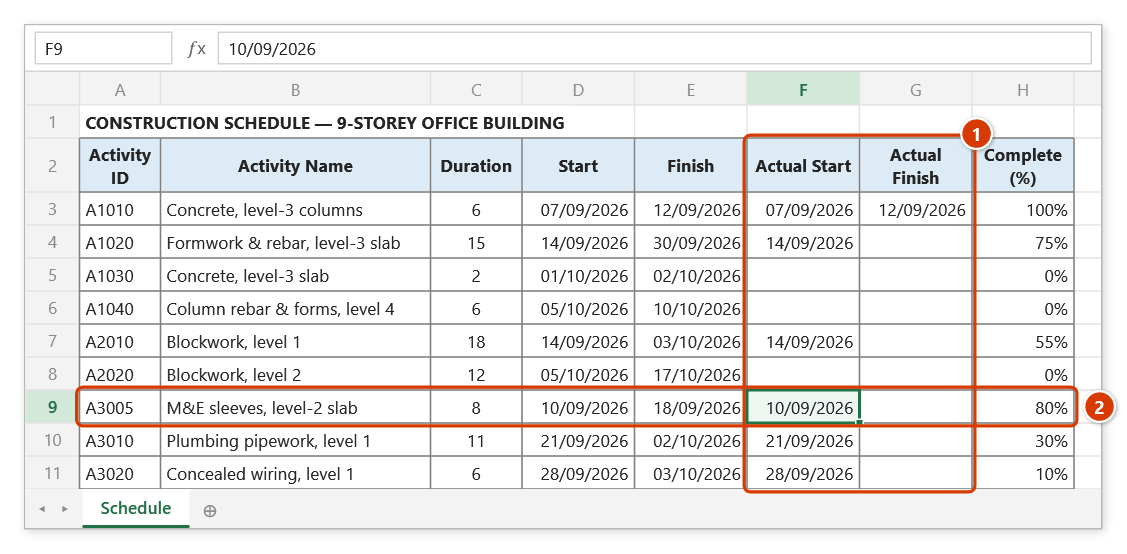
Step 1. Open the schedule sheet with actual dates (1) and % complete updated to today. Activity A3005 (2) was due on 18/09 but is only 80% done — overdue work like this still makes it into the plan.
Step 2. On the ribbon, open the DVD Cons tab → Schedule group → open Reports → choose 2-Week Lookahead.
Step 3. Excel asks for a date in the 2-Week Lookahead box: Status Date (typically today, start of the week): — the box is pre-filled with the data date stored in the file (today if none). Type 28/09/2026 and click OK; the date is saved as the shared data date for the other schedule reports.
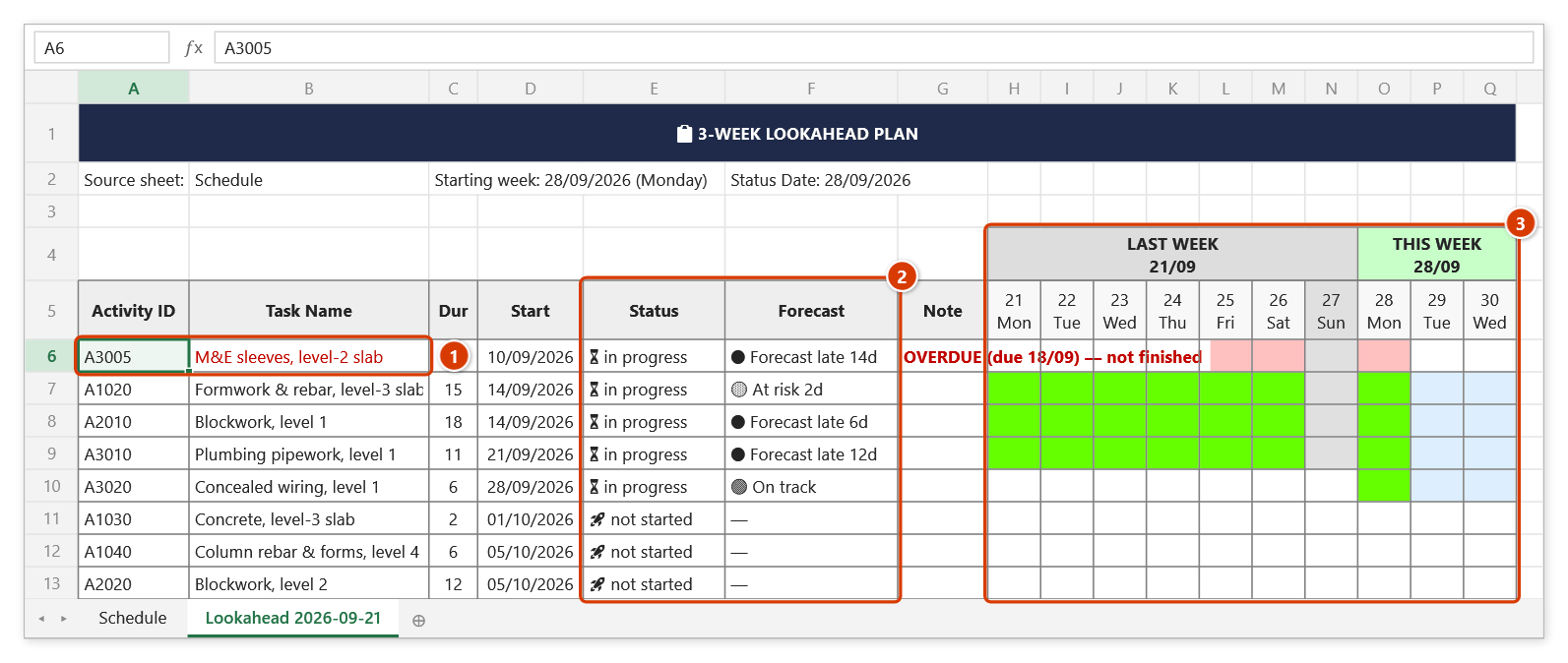
Step 4. The Lookahead 2026-09-21 sheet opens, already set up for A3 landscape on one page. Overdue work comes first with a red note (1); the Status / Forecast columns show which tasks will finish late at the current pace (2); in the day grid (3) green = in progress, light blue = coming up, red = overdue, grey = non-working day. The 21-day grid covers last week (21/09), this week (28/09) and next week (05/10 — scroll right).
Step 5. Press Ctrl+P to print it for the site notice board or export a PDF for the weekly meeting minutes — as the message box reminds you.
Example
Monday morning, the superstructure manager on an apartment project runs the command before the weekly coordination meeting. The grid shows the level-12 slab formwork crew in yellow (it should have finished last Friday), blocking the level-12 rebar activity that is due to start on Wednesday (light blue). The A3 print goes straight on the site office wall, so every crew can see what their next two weeks look like.
Notes
- Shared data date: the date prompt is pre-filled with the data date stored in the workbook (name
dvdDataDate, today if none) and saves the date you pick — the other schedule reports (EVM, Variance, Health Check, Lookahead, Snapshot, Update Status, Recovery) share it, so weekly reports no longer drift apart. - The lookahead sheet is a snapshot taken at run time; it does not refresh itself, so rerun it each week.
- Yellow means "late or not yet updated" — an activity with no progress entered will also come out yellow.
- Overdue work does not drop off the sheet: an activity whose finish falls before the window but has no Actual Finish and is under 100% is kept, listed first with a red note "OVERDUE (due dd/MM) — not finished", and its cells from the window start to the data date are red.
- Weekly rest days and holidays come from the workbook calendar and are shaded grey, so they are not misread as late or in-progress days.
- Without Actual Start / Actual Finish columns the command still runs, but the complete-versus-in-progress split is less reliable.
- The command is read-only against the master schedule. Each run creates a new Lookahead + date sheet (
(2),(3)… on a name clash); manual edits on an older sheet are not carried over to the new one. - Page setup is prepared for A3 landscape — printing to A4 shrinks it to a size that is hard to read on site.
Related
- 3-Week Lookahead — same workflow with a 28-day grid, better for longer cycle work.
- Schedule (custom range) — when you need a real Gantt for an arbitrary date window.
- Update Status — refresh progress first so the grid colours match reality.
- New Diary — record what the past week's work actually delivered.