
Diary Template
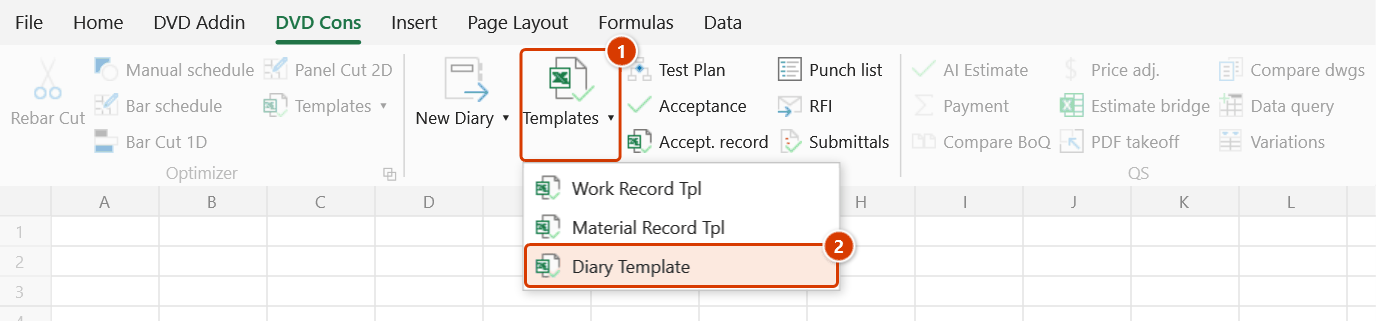
Location on ribbon: Tab DVD Cons → Group QAQC and Diary → Menu Templates
Command ID: btnDiaryTpl
What it does
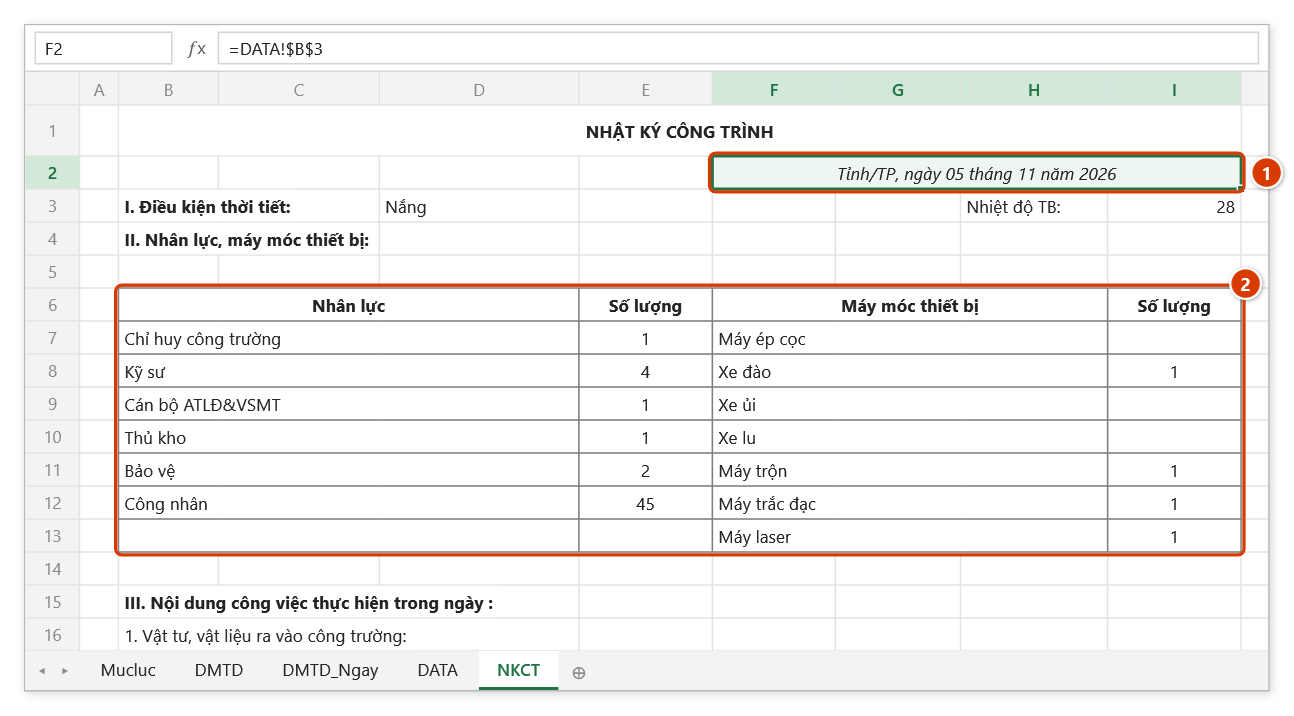
Opens FormNKCT.xlsx, the daily construction diary template shipped with DVDAddin. The form already contains the sections a site diary has to record: date, weather, labour, plant, materials, work carried out that day and the supervision consultant's remarks.
Use it when starting a new diary for a project or a package, so you get the standard layout immediately instead of drawing up the table yourself.
How to use
- Click Templates ▸ Diary Template in the QAQC and Diary group.
- The add-in looks for
Template\FormNKCT.xlsxin the add-in install folder (C:\DVDAddin\Template\), then in aTemplate\folder next to the active workbook. - The template opens in Excel.
- Keep the diary on sheet DATA, one row per day: weather, manpower, equipment, safety and environment, work carried out and work accepted that day. Type the day number in cell A3 of DATA to show that day on the NKCT diary page; materials in and out are tracked on sheets DMTD / DMTD_Ngay. The template has no general-information sheet — edit the signatory names directly at the foot of the NKCT page.
- Save As with a project-specific name so the shipped template stays untouched.
Video tutorial
Narrated in Vietnamese, with Vietnamese subtitles. Nhật ký công trình · 7 min 50 s · 14 cases · Download the video · Practice workbook for the video
Commands in this video: New Diary · Diary Template · Export Category · Pick Rest Days
Chapters (18)
- Giới thiệu
- Mở lệnh
- 1 · Tạo nhật ký từ danh mục
- 2 · Chọn ngày nghỉ trên lịch
- 3 · Sửa ngày nghỉ đã có
- 4 · Nghỉ chung nhiều công tác
- 5 · Công tác vắt qua kỳ
- 6 · Dòng chỉ có ngày nghiệm thu
- 7 · Ngày gõ dạng chữ
- 8 · Quên dòng tiêu đề
- 9 · Chạy lại: ghi đè và Ctrl+Z
- 10 · Xuất danh mục hồ sơ
- 11 · Bảng lọc, xuất lại
- 12 · Mẫu Nhật ký và in A4
- 13 · Sheet đang bảo vệ
- 14 · Khi nhập sai
- Mẹo
- Kết thúc
Illustrated walkthrough
Practice
Download this command's sample workbook — the data matches the pictures below (sheet NKCT), so you can follow each step right away.
Step 1. On the ribbon, open the DVD Cons tab → QAQC and Diary group → open Templates → choose Diary Template.
Step 2. The add-in opens the template FormNKCT.xlsx from C:\DVDAddin\Template\ (or a Template\ folder next to the open workbook) on sheet NKCT — the diary page for one day. Every cell on the page comes from sheet DATA: the date (1), weather, manpower and equipment (2), materials in and out, work carried out and accepted that day. The date line uses a cell format with the place name "Tỉnh/TP" built in — change it in Format Cells for your project.
Step 3. On sheet DATA each row is one day: weather, headcount by role, equipment, safety and environment, work carried out and work accepted that day — paste columns B and C of the DM_NKTC sheet produced by New Diary here instead of typing. Cell A3 of DATA holds the number of the day shown on the NKCT page; sheets DMTD / DMTD_Ngay track materials and equipment in and out.
Step 4. Use Save As with your own name, for example D:\DuAn\VP9T\NKTC-PhanThan-2026.xlsx — the file you opened is the original in the install folder. The construction diary is a legal record that must be kept continuously and signed by the parties; the template only provides the layout.
Example
Starting the superstructure diary for a build package: click Diary Template and save as NKTC-PhanThan-2026.xlsx. Then use New Diary to expand the work-item catalog day by day and paste columns B and C of the DM_NKTC sheet into the work carried out / work accepted columns of sheet DATA instead of typing each day by hand.
Notes
- If the file is not found the add-in shows a warning listing the paths it searched — usually a sign the
Template\folder is missing from the installation. - For workbooks on OneDrive or SharePoint the add-in also checks for a
Template\folder beside the locally synced copy. - The file that opens is the master copy in the install folder — always Save As before editing.
- A site diary is a legal record that must be kept continuously and signed by all parties; the template helps with layout, not with the project's own procedural rules.
Related
- New Diary — expands the work-item catalog into day-by-day diary content.
- Pick Rest Days — records the days each task is not worked on.
- Work Record Tpl — the acceptance record that accompanies the diary package.