
Pick Rest Days
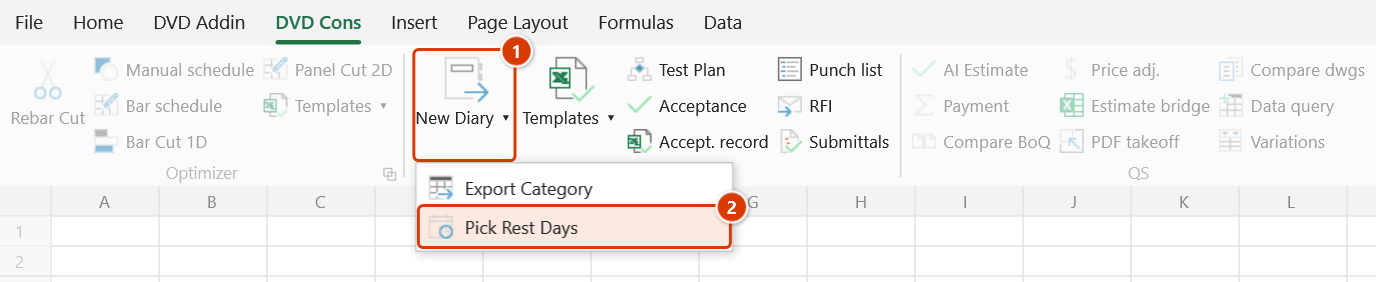
Location on ribbon: Tab DVD Cons → Group QAQC and Diary → the ▾ arrow of New Diary
Command ID: btnRestDays
What it does
Opens a calendar so you can tick the days a task is not worked on, then writes those dates into the selected cells as dd/MM/yyyy values joined with + — exactly the format the New Diary generator reads from its rest-days column.
Use it to avoid typing long date strings by hand, especially when a task pauses on scattered days for rain, material shortages or public holidays.
How to use
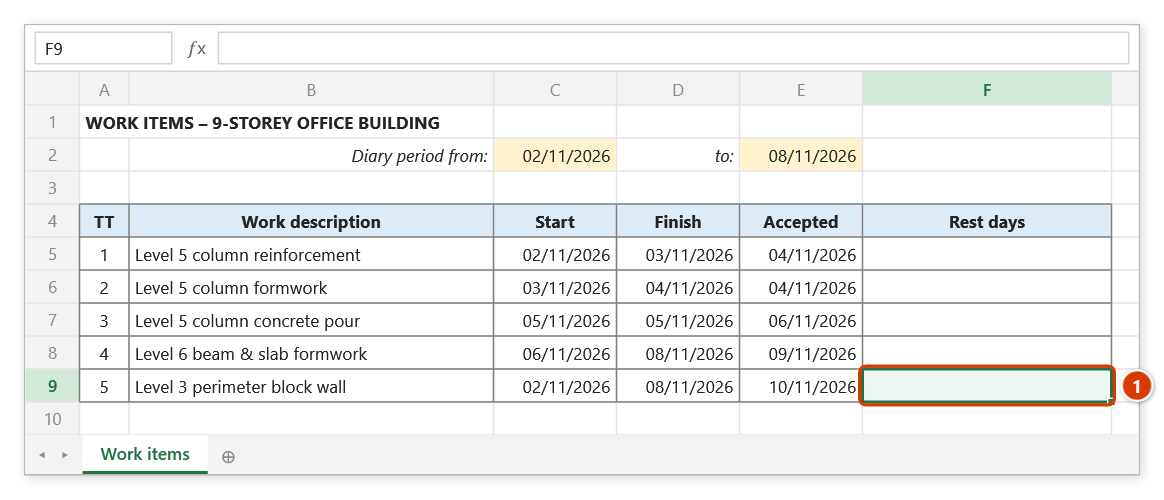
- Select one or more cells in the rest-days column of your work-item catalog.
- Click the ▾ arrow of New Diary ▸ Pick Rest Days.
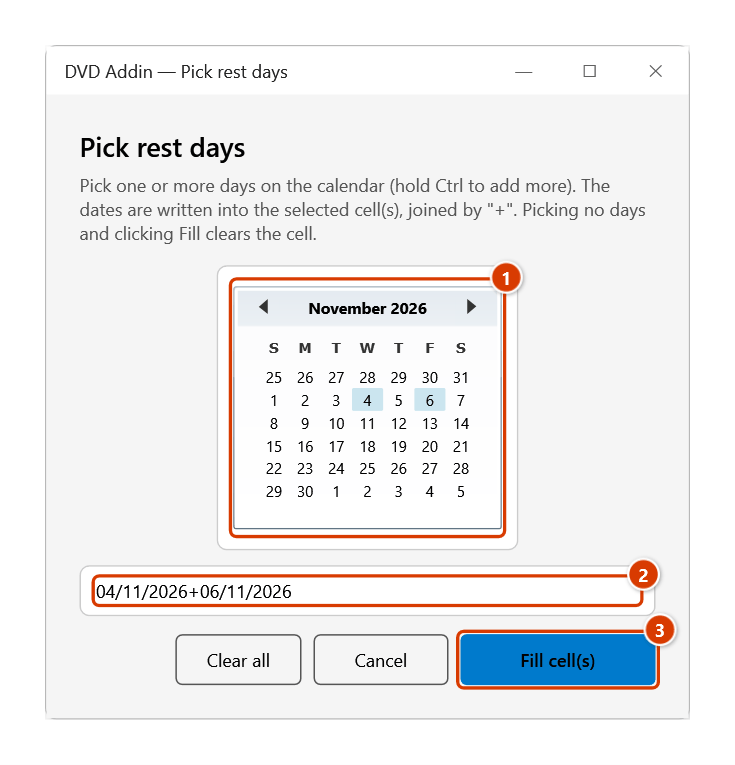
- The Pick rest days window opens. If the active cell already holds a date list, those days come back ticked so you can edit rather than retype.
- Click days on the calendar; hold Ctrl to add more. Clear all unticks everything.
- Click Fill cell(s). The joined date string is written into every cell you selected in step 1.
- Run New Diary to expand the catalog day by day with those rest days excluded.
Video tutorial
Narrated in Vietnamese, with Vietnamese subtitles. Nhật ký công trình · 7 min 50 s · 14 cases · Download the video · Practice workbook for the video
Commands in this video: New Diary · Diary Template · Export Category · Pick Rest Days
Chapters (18)
- Giới thiệu
- Mở lệnh
- 1 · Tạo nhật ký từ danh mục
- 2 · Chọn ngày nghỉ trên lịch
- 3 · Sửa ngày nghỉ đã có
- 4 · Nghỉ chung nhiều công tác
- 5 · Công tác vắt qua kỳ
- 6 · Dòng chỉ có ngày nghiệm thu
- 7 · Ngày gõ dạng chữ
- 8 · Quên dòng tiêu đề
- 9 · Chạy lại: ghi đè và Ctrl+Z
- 10 · Xuất danh mục hồ sơ
- 11 · Bảng lọc, xuất lại
- 12 · Mẫu Nhật ký và in A4
- 13 · Sheet đang bảo vệ
- 14 · Khi nhập sai
- Mẹo
- Kết thúc
Illustrated walkthrough
Practice
Download this command's sample workbook — the data matches the pictures below (sheet Work items), so you can follow each step right away.
Step 1. In the work-item catalog, select the rest-days cell of the task (1) — select several cells if several tasks stop on the same days (up to 500 cells).
Step 2. On the ribbon, open the DVD Cons tab → QAQC and Diary group → click the ▾ arrow of the large New Diary button (1) → choose Pick Rest Days (2).
Step 3. The Pick rest days window shows a calendar (1): click a day, hold Ctrl and click to add more (dates already in the cell come back ticked). The preview line (2) shows the exact string that will be written. Click Fill cell(s) (3); Clear all followed by Fill empties the cells.
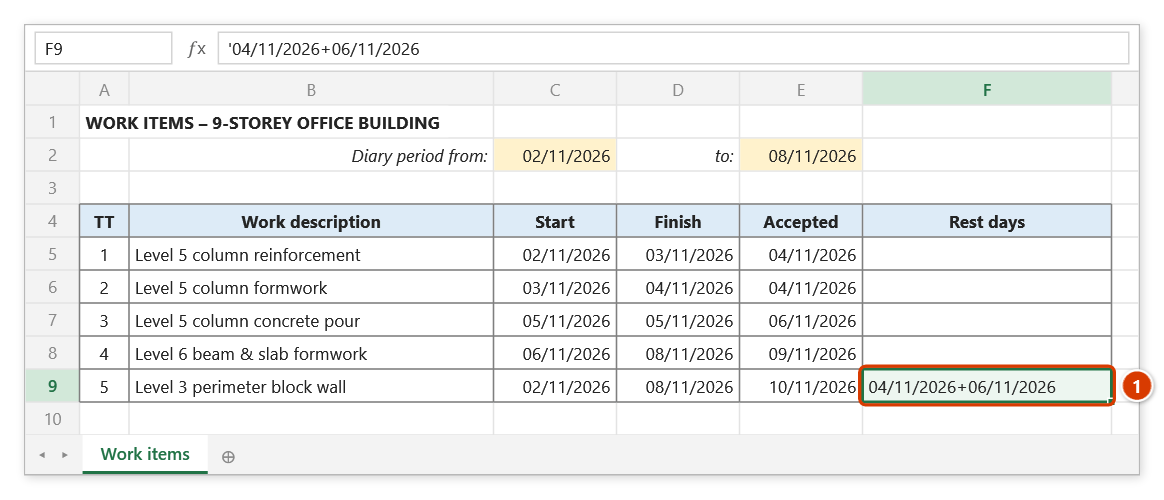
Step 4. The cell receives 04/11/2026+06/11/2026 (1), stored as text (with a leading apostrophe) so Excel does not turn it into a date number. New Diary then leaves this task out on those two days.
Example
"Block work, level 3 perimeter" runs from 20 to 30 November but stops on two rainy days, 23 and 25 November. Select that row's rest-days cell, click Pick Rest Days, Ctrl-click 23 and 25 on the calendar, then click Fill cell(s) — the cell receives 23/11/2021+25/11/2021. When New Diary runs, the block work does not appear on those two days.
Notes
- Select cells before running the command; if a shape, chart… is selected instead of cells, the add-in reports "Select cell(s) in the rest-days column first."
- The selection is capped at 500 cells — anything larger is refused with a prompt to select just the rest-day cells.
- Ticking nothing and then clicking Fill cell(s) clears the selected cells.
- Values are stored as text (with a hidden leading apostrophe) so a single date is not converted into a locale-dependent date value.
- The pre-ticked days come from the active cell of the selection, while the fill applies the same string to every cell in that selection.
Related
- New Diary — reads this rest-days column when generating the daily diary.
- Diary Template — the standard construction diary form.
- Export Category — extracts columns from the record catalog into a form layout.