
Strip junk styles
Location on ribbon: Tab DVD Addin → Group Cells and Rows → the ▾ arrow of Delete blanks
Command ID: btnDeleteCellStyles
What it does
The command opens an Excel file on disk (an xlsx is just a zip) and strips the junk Cell Styles out of xl/styles.xml — every cellStyle entry that is not one of Excel's built-in styles. These pile up when sheets are copied back and forth between workbooks, leaving a Cell Styles gallery thousands of entries long, a bloated file and painfully slow opening.
Use it when a quantity or programme workbook received from another party takes a minute to open, scrolls in jerks, or when Excel reports "Too many different cell formats".
How to use
- Close the file you want to clean in Excel — the command works on the file on disk, so it must not be open.
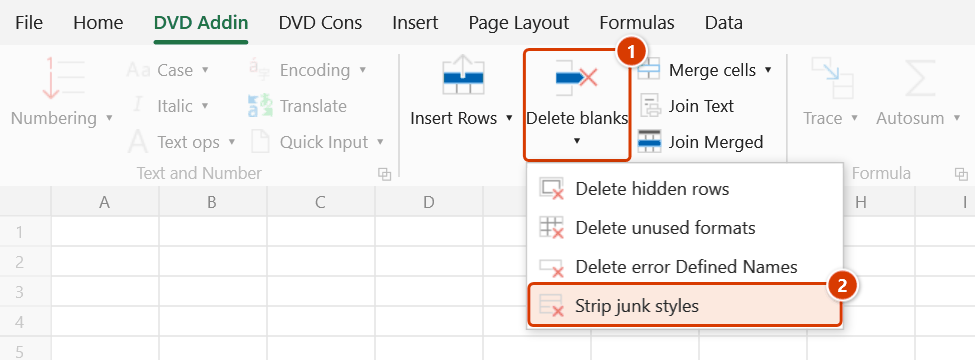
- Click DVD Addin → Cells and Rows → the ▾ arrow of Delete blanks → Strip junk styles.
- A file picker titled "Pick xlsx file" appears, filtered to
*.xlsx; *.xlsm; *.xlam. Select one file and click OK. - The command processes the file and reports the result: "Removed n junk styles" with the path of the kept original, or "No junk styles found".
- Reopen the file and check Home → Cell Styles — the gallery is back to normal.
Video tutorial
Narrated in Vietnamese, with Vietnamese subtitles. Xoá dòng trống, dòng ẩn, format, Name lỗi, Cell Style · 6 min 22 s · 14 cases · Download the video · Practice workbook for the video
Commands in this video: Delete blanks · Strip junk styles · Delete error Defined Names · Delete hidden rows · Delete unused formats
Chapters (18)
- Giới thiệu
- Mở lệnh
- 1 · Bảng xuất từ dự toán
- 2 · Cột công thức kéo dài
- 3 · Ghi chú ngoài vùng chọn
- 4 · Dòng trống đang ẩn
- 5 · Ô gộp nhiều dòng
- 6 · Chọn cả cột
- 7 · Xoá dòng ẩn: bảng đã lọc
- 8 · Xoá dòng ẩn: nhóm thu gọn
- 9 · Xoá format không dùng
- 10 · Ô lạc làm dọn hụt
- 11 · Xoá Defined Names lỗi
- 12 · Xoá Cell Style ngoại lai
- 13 · Ghi đè và hoàn tác
- 14 · Sheet khoá, lệnh không chạy
- Mẹo
- Kết thúc
Illustrated walkthrough
Step 1. Close the file to clean in Excel — the command works on the file on disk, so it must not be open (OneDrive-synced files included).
Step 2. On the ribbon, open the DVD Addin tab → Cells and Rows group → open Delete blanks → choose Strip junk styles.
Step 3. A file picker titled Pick xlsx file opens, filtered to *.xlsx; *.xlsm; *.xlam. Pick one file, for example D:\DuAn\NhaVanPhong9Tang\Tien do thi cong - Goi thau 02.xlsx, and click OK.
Step 4. The command cleans a temporary copy and only then swaps it in for the original, then reports Removed 3874 junk styles. together with the name of the untouched original kept next to it (Tien do thi cong - Goi thau 02_backup-20261008-143015.xlsx). With no junk styles it says No junk styles found. and changes nothing.
Step 5. Reopen the file and check that Home ▸ Cell Styles only lists Excel's built-in styles. Once satisfied, delete the _backup-… copy yourself.
Example
Construction programme - Package 02.xlsx is 42 MB and takes over a minute to open because sheets from six subcontractors were merged into it. Close the file, run the command, pick the file in the dialog — the message reads "Removed 3,874 junk styles". Reopen it: the Cell Styles gallery holds only Excel's standard styles and the file opens in a few seconds.
Notes
- The command does not edit the original in place: it cleans a temporary copy in the same folder and only then swaps it in; the original (uncleaned) file is kept next to it as
<file name>_backup-<date-time>.xlsx. Delete that copy yourself once you have checked the result. (Before the next release the command overwrote the original directly — a failure half-way broke the file.) - A file with an open password (Encrypt with Password) cannot be read as a zip package — the command says so and touches nothing.
- A file currently open in Excel is refused with a message asking you to close the workbook first (OneDrive-synced files are matched by their local path too).
- Only
.xlsx,.xlsmand.xlamare supported. Legacy.xlsfiles must be saved as.xlsxfirst. - Only the surplus style definitions are removed; direct cell formatting (font, fill, borders) is untouched.
- If the file has no
xl/styles.xmlor no junk styles, the command reports that and leaves the file unchanged.
Related
- Delete error Defined Names — clears broken named ranges, the other half of slimming a file down.
- Delete unused formats — shrinks the used range of the open sheet.
- Sync format — re-standardise formatting once the styles are cleaned.