
Filled diamond
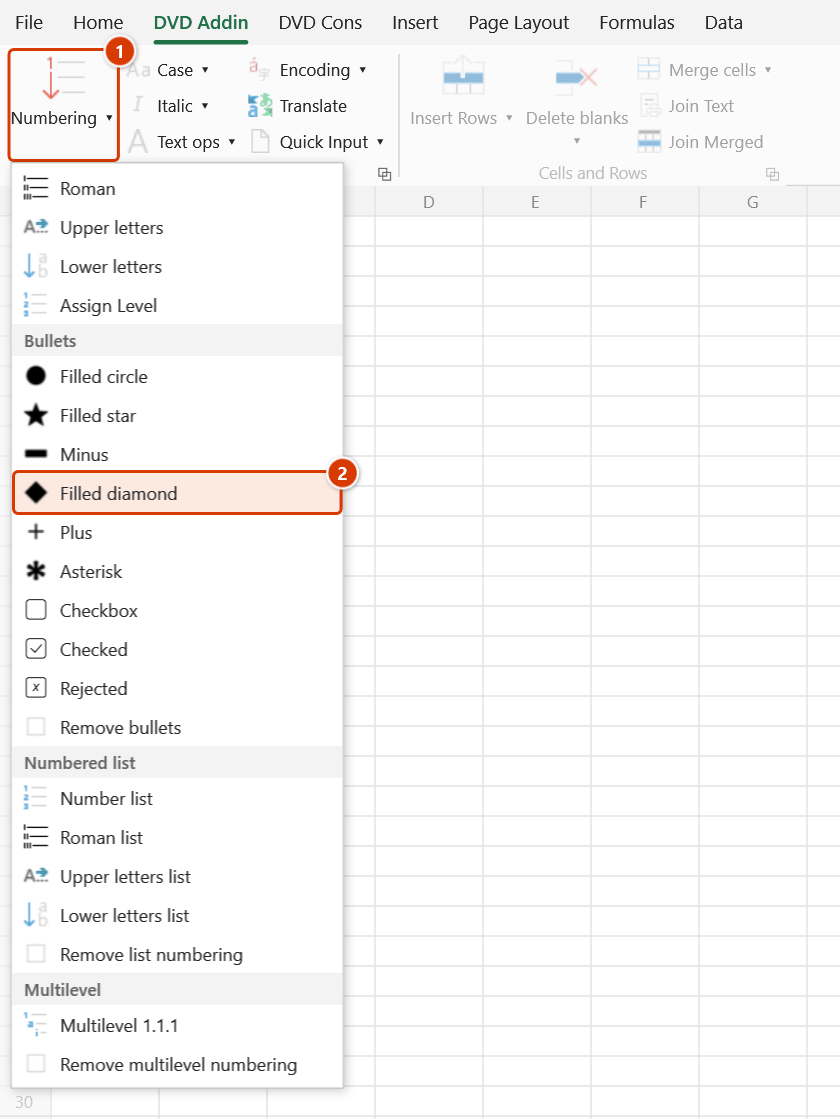
Location on ribbon: Tab DVD Addin → Group Text and Number → arrow on Numbering → section Bullets
Command ID: btnBlackDiamond
What it does
Prepends a filled-diamond bullet ◆ plus a space to every line inside the selected cells. The diamond is a middle level of emphasis — heavier than a plain circle but quieter than a star — which suits programme milestones, the main headings of a method statement, or a sub-heading inside a multi-line cell.
Before inserting, the command runs the bullet-strip step itself, so re-styling a whole range takes a single click.
How to use
- Select the cells that need bullets.
- Go to the DVD Addin tab → Text and Number group → arrow on Numbering → Bullets section → choose Filled diamond.
- The add-in handles each eligible cell:
- Text cell —
◆is added at the start of every line. - Empty cell — just
◆is written. - Formula cell — wrapped as
=""&"◆ "&(original formula), so the diamond shows while the formula stays live.
- Text cell —
- The status bar reports
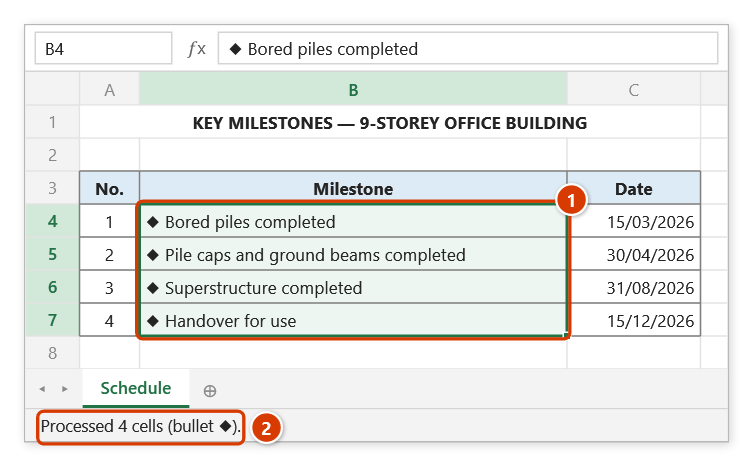
Processed N cells (bullet ◆).
Video tutorial
Narrated in Vietnamese, with Vietnamese subtitles. Dấu đầu dòng · 5 min 03 s · 9 cases · Download the video · Practice workbook for the video
Commands in this video: Filled circle · Asterisk · Filled diamond · Filled star · Checkbox · Minus · Remove bullets · Plus · Checked · Rejected
Chapters (14)
- Giới thiệu
- Mở lệnh
- Chín ký hiệu
- 1 · Ô nhiều dòng
- 2 · Đổi ký hiệu, chọn rời
- 3 · Danh mục kiểm tra đang lọc
- 4 · Ô trống – mẫu in sẵn
- 5 · Ô số, ngày tháng
- 6 · Ô công thức
- 7 · Ô gộp
- 8 · Bỏ ký hiệu đầu dòng
- 9 · Ghi đè và hoàn tác
- Mẹo
- Kết thúc
Illustrated walkthrough
Practice
Download this command's sample workbook — the data matches the pictures below (sheet Schedule), so you can follow each step right away.
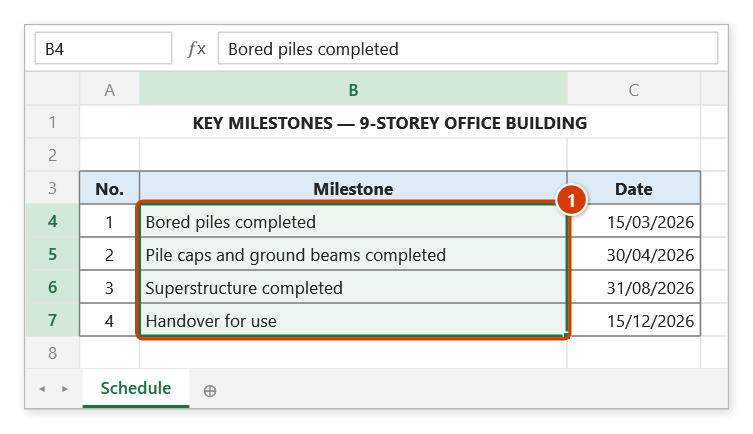
Step 1. Select the cells that need the bullet — here the milestone column (1).
Step 2. On the ribbon, open the DVD Addin tab → Text and Number group → open Numbering → choose Filled diamond.
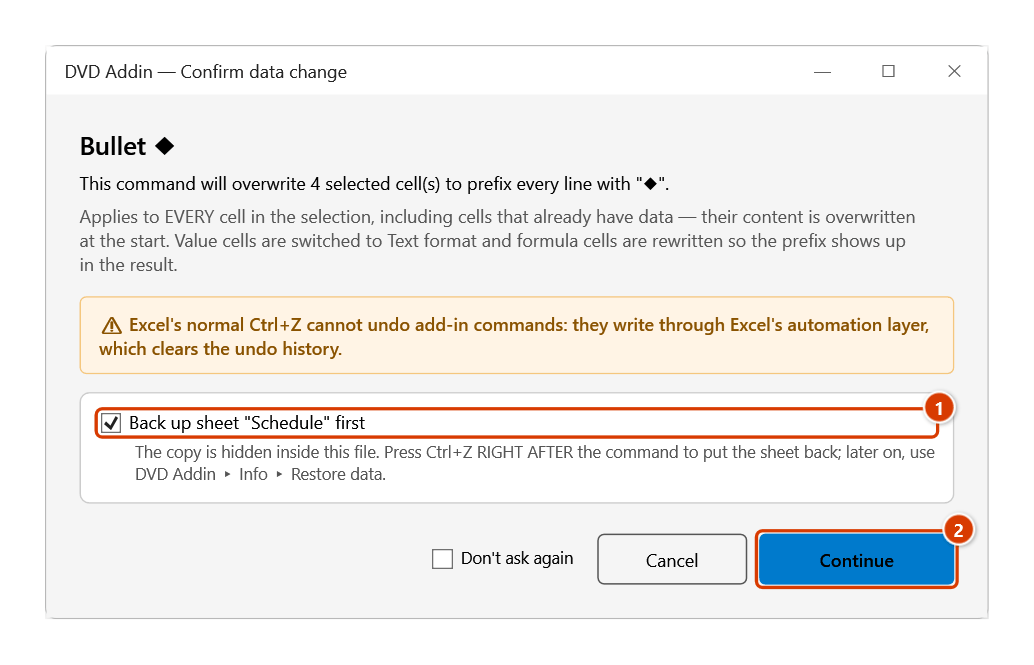
Step 3. The Confirm data change box tells you how many cells will be overwritten. Keep Back up sheet ticked (1) so that Ctrl+Z right after the command restores the sheet, then click Continue (2).
Step 4. Each cell now starts with ◆ (1). The status bar reports how many cells were processed (2). Date and number cells inside the selection are left untouched.
Example
The "Completion milestone" column of a master construction programme:
| Before | After |
|---|---|
| Bored piles complete Pile caps and ground beams complete Superstructure complete Handover for occupation | ◆ Bored piles complete ◆ Pile caps and ground beams complete ◆ Superstructure complete ◆ Handover for occupation |
Marking milestones with ◆ and the detailed activities beneath them with Minus gives a printed programme an immediately readable hierarchy.
Notes
- Cells holding numbers, dates, or TRUE/FALSE are skipped, so programme dates are never turned into strings.
- Text cells are switched to Text format (
@) before writing; formula cells keep their existing format. - Applied by mistake?
Ctrl+Zright after the command puts the cells back (it backs the sheet up first); later on, use Remove bullets to remove the bullets. - Hidden rows and columns are skipped, and each merged area is processed once, at its top-left cell.
◆is a Unicode glyph; if the printout shows an empty box, check the font applied to the cell.
Related
- Filled circle — a lighter marker for routine items.
- Filled star — the strongest emphasis in the menu.
- Remove bullets — strip bullets from the selection.
- Numbered list — swap symbols for
1.,2.,3.when items need to be cited by number.