
Find Cmd
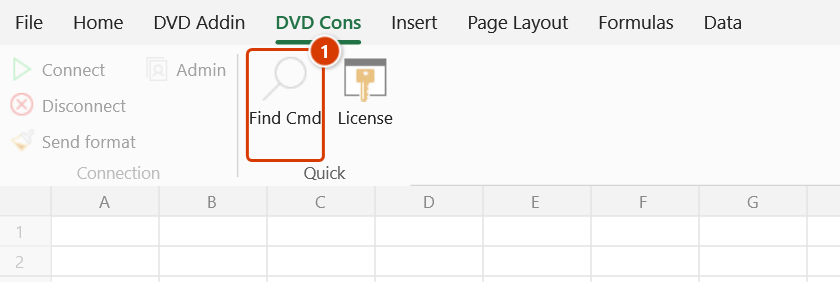
Location on ribbon: Tab DVD Cons → Group Quick (and Tab DVD Addin → Group About → Menu Help)
Command ID: btnQuickActions
What it does
The command opens the Quick Actions search box: type a few letters, get the matching DVDAddin commands, pick one and press Enter to run it — no need to remember which tab or group it lives in.
DVDAddin ships hundreds of commands across several tabs and nested menus. For a regular user, typing "gantt", "pdf" or "numbering" is far faster than hunting for the button; for a newcomer it doubles as a way to discover what the add-in can do.
How to use
- Click Find Cmd (tab DVD Cons → group Quick, or tab DVD Addin → group About → Help menu), or press the shortcut Ctrl+Shift+Q.
- The window opens with the cursor already in the search box. While it is empty, your recently used commands (up to 8, marked 🕘) come first — press Enter to run one again.
- Type a keyword — the list below filters on command name and description as you type; when two commands match equally, the one you used most recently comes first.
- Use ↓ / ↑ to move through the results.
- Press Enter (or click the row) to run the highlighted command, F1 to open the highlighted command's guide page, or Esc to close without running anything.
Video tutorial
Narrated in Vietnamese, with Vietnamese subtitles. Tìm lệnh nhanh và menu Trợ giúp · 4 min 12 s · 10 cases · Download the video
Commands in this video: Find Cmd · About · Export support log · Quick start guide · User guide · Find Cmd (Help menu)
Chapters (13)
- Giới thiệu
- 1 · Hai tab DVD Addin, DVD Cons
- 2 · Mở Tìm lệnh nhanh
- 3 · Lệnh dùng gần đây
- 4 · Gõ không dấu, gõ theo việc
- 5 · Enter, F1, Esc
- 6 · Menu Trợ giúp
- 7 · Sách PDF, file thực hành
- 8 · Hướng dẫn nhanh
- 9 · Xem phiên bản, bản quyền
- 10 · Gửi nhật ký khi gặp lỗi
- Mẹo
- Kết thúc
Illustrated walkthrough
Step 1. On the ribbon, open the DVD Cons tab → Quick group → click Find Cmd — or press Ctrl+Shift+Q anywhere in Excel (the same button is also under the DVD Addin tab → About group → Help menu).
Step 2. The Quick Actions search box appears in the middle of the screen with the cursor already in it. While the box is empty, the commands you used recently are at the top, labelled 🕘 Recently used.
Step 3. Type a few letters, accents optional — e.g. pdf, danh so, gantt: the list filters at once on command names and descriptions, and of two equal matches the one used most recently comes first. Use ↓ / ↑ to pick a row, Enter (or a click) to run it exactly as its ribbon button, F1 to open the guide page of the selected command, Esc to close.
Example
You are assembling a payment submission and need to print several sheets to PDF, but you cannot remember where the button is.
Press Ctrl+Shift+Q and type pdf. The list shows the PDF-related commands with short descriptions. Press ↓ to the one you need and hit Enter — the window closes and the command runs against the open workbook without you ever switching ribbon tabs.
Notes
- The window is modal: run a command or press Esc before you can work in Excel again.
- Search covers command names and descriptions — the Vietnamese names too, so
danh sofinds Numbering. Commands whose name contains the whole phrase you typed come before those that only mention it in the description; task words ("print", "merge", "gantt") usually hit better than command IDs. - A command launched here behaves exactly as if clicked on the ribbon — its own prerequisites still apply (selection made, right sheet active, licence valid…).
- If the command fails, the add-in shows an "Error running command: …" dialog with the message.
- The Ctrl+Shift+Q shortcut only works once DVDAddin is loaded; after a fresh install, restart Excel.
Related
- Navigation — jump between sheets and data regions in the workbook.
- Sheet List — look up and jump to a sheet by name.
- Preferences — toggle features and configure the add-in.