
Admin
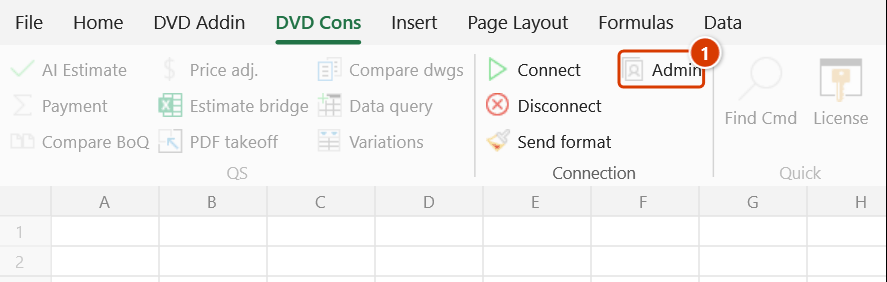
Location on ribbon: Tab DVD Cons → Group Connection
Command ID: btnAdmin
What it does
The command opens the User administration panel for the teamwork session: see who is online, Kick or Ban a member, and assign View / Edit / Range permissions per sheet.
When a whole team shares one file, not everyone should be able to change everything. The lead QS alone edits the rate sheet, site engineers type only inside their own quantity range, and summary sheets stay read-only.
How to use
- Be in a teamwork session where the host set an Admin password when starting the server.
- Click DVD Cons → Connection → Admin (the button is only enabled inside a session).
- If the session has no admin password, the add-in reports "Admin password not set!" and stops.
- A Login window asks for the Admin password — type the one entered when the server was started. A wrong entry gives "Wrong password!".
- The User administration window opens with two areas:
- Online — the member list with Kick and Ban buttons.
- Permissions — a per-sheet table with the columns Sheet / View / Edit / Range.
- Tick the rights for each sheet, type the editable range in the Range column, then click Save permissions — you get "Settings saved!".
- Click Close when done.
Video tutorial
Narrated in Vietnamese, with Vietnamese subtitles. Làm việc nhóm qua mạng · 8 min 19 s · 16 cases · Download the video
Commands in this video: Connect · Admin · Disconnect · Send Format
Chapters (20)
- Giới thiệu
- Mở lệnh
- 1 · Kết nối lần đầu
- 2 · Máy chủ và thành viên
- 3 · Làm việc qua Internet
- 4 · Người vào sau
- 5 · Gõ dữ liệu
- 6 · Dán nhiều ô, chèn dòng
- 7 · Gửi định dạng
- 8 · Vùng lẫn nhiều kiểu
- 9 · Gộp ô và độ rộng cột
- 10 · Phân quyền, Kick, Ban
- 11 · Ngắt kết nối
- 12 · Mất mạng giữa chừng
- 13 · Hai người sửa cùng ô
- 14 · Sổ, sheet khác tên
- 15 · Bảo mật
- 16 · Bản quyền
- Mẹo
- Kết thúc
Illustrated walkthrough
The Admin button is only available while your machine is in a teamwork session, and only works in a session whose host set an Admin password when starting the server.
Step 1. On the ribbon, open the DVD Cons tab → Connection group → click Admin.
Step 2. A Login box asks for the Admin password — type the one set in the Connect window and click OK. If the session has no admin password the add-in says Admin password not set!; a wrong password gives Wrong password! and stops.
Step 3. The User administration window has two parts. Online: pick a machine and click Kick (pushes it out of the session; it can rejoin) or Ban (blocks it). Permissions: a Sheet · View · Edit · Range table — e.g. Don gia with View only, Khoi luong with View + Edit and Range C6:H400, Tong hop with View only.
Step 4. Click Save permissions (it reports Settings saved!) to push the permissions to the whole session. On members' machines: a sheet without View is hidden, an edit on a sheet without Edit is undone with No edit permission!, an edit outside the Range is undone with Wrong input range!. Permissions only apply inside the session — they do not replace Protect Sheet when the file travels on its own.
Example
A LAN session on "Infrastructure package BoQ" has four members. The lead QS started the server with Admin password qs@dvd.
Open Admin and enter qs@dvd. Under Permissions: sheet Don gia gets View only, sheet Khoi luong gets View + Edit with Range set to C6:H400, and sheet Tong hop gets View only. Click Save permissions. A stray machine has joined the session by mistake — select it under Online and click Ban.
Notes
- The panel only opens if the session has an Admin password — the host sets it in the Connect window before clicking ▶ Start Server.
- A wrong password just shows a warning; there is no recovery path, so the host must remember it or reset it by stopping and restarting the server.
- Permissions apply inside the sync session only; they do not replace Excel's own sheet protection once the file is shared offline.
- Kick merely drops a member, who can reconnect; only Ban blocks the next connection.
- Permission changes take effect on other machines only after you click Save permissions.
Related
- Connect — set the Admin password and open the session before assigning rights.
- Disconnect — leave the session when the working meeting ends.
- Send Format — push formatting to the members you have granted rights to.