
Acceptance Record
Location on ribbon: Tab DVD Cons → Group QAQC and Diary
Command ID: btnAcceptanceRecord
License required
This command needs an active DVDAddin account (Standard or PRO). During the Trial period it is fully available.
What it does
The command draws up a construction work acceptance record for the rows you select on an Acceptance Plan sheet. The record contains the main contents required by Article 22 of Decree 207/2026/ND-CP. That decree took effect on 1 July 2026 and replaces Decree 06/2021.
The record contains:
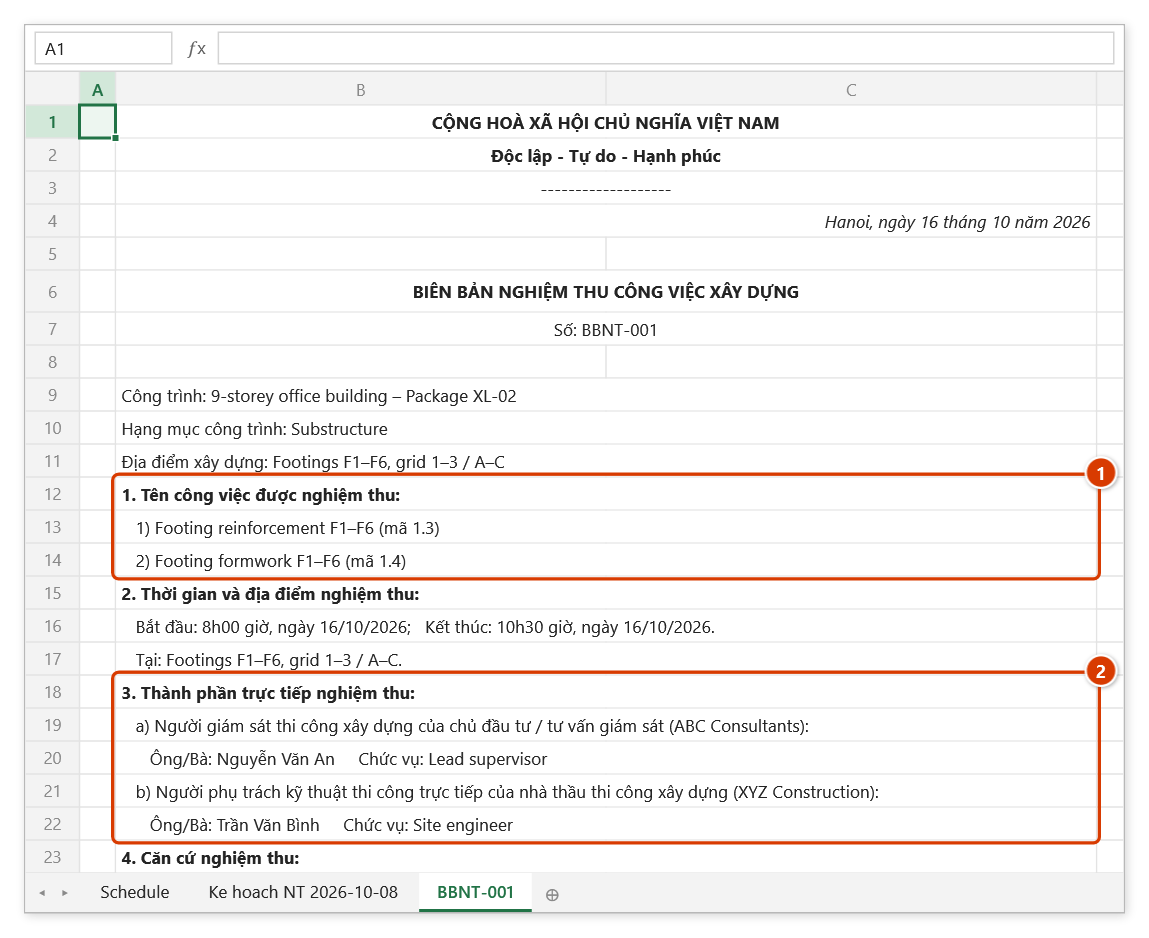
- The work items being accepted, with their codes.
- Time and place of the inspection.
- The inspection parties:
- the client's / supervising consultant's site supervisor;
- the contractor's site engineer in direct charge;
- any other party.
- Basis for acceptance:
- the request for inspection;
- shop drawings and specifications;
- the applicable standards, taken from the plan's column;
- the related test criteria, pulled from the Test Plan sheet, with blanks for the test-report numbers;
- the site diary.
- Assessment of the work done.
- Conclusion: accepted, with permission to proceed to the next work, or not accepted, with the rework required.
- Signatures, names and positions of both parties.
Each record is its own A4-portrait sheet, ready to print or export to PDF. Records are numbered BBNT-001, BBNT-002… with no clashes in the workbook.
The add-in can then update the plan rows:
- Status = Đạt (pass) / Không đạt (fail) — always written in Vietnamese;
- Note = the record number and date.
That way the plan always shows what has been accepted.
How to use
- Open the
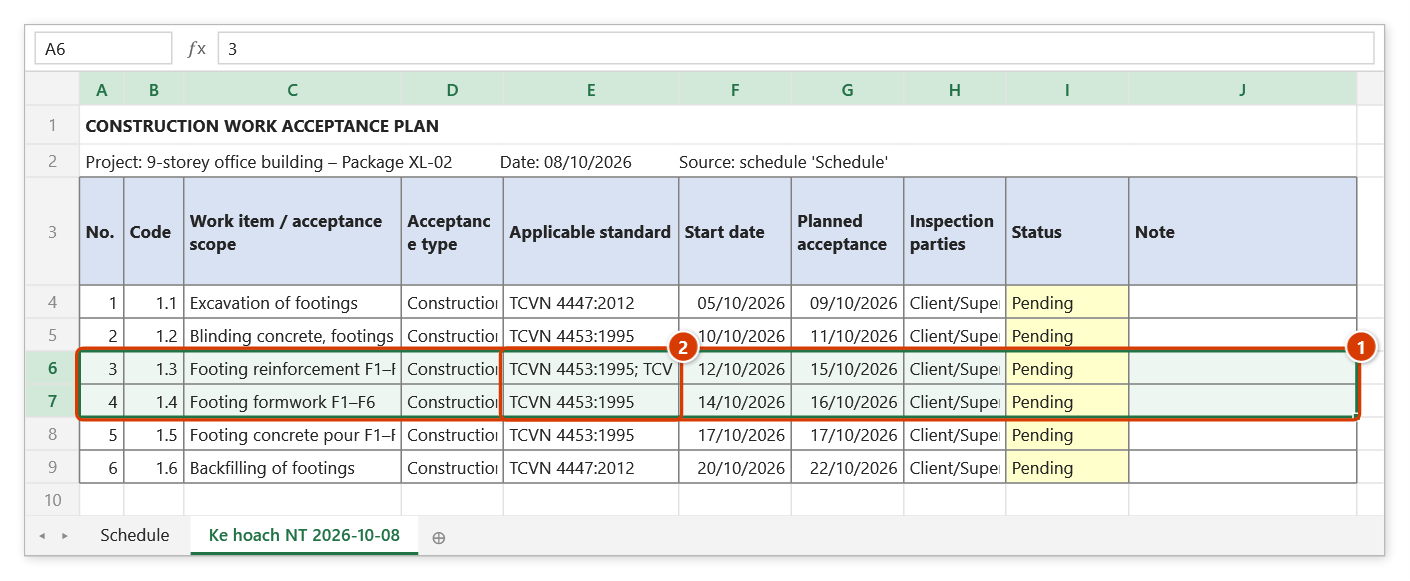
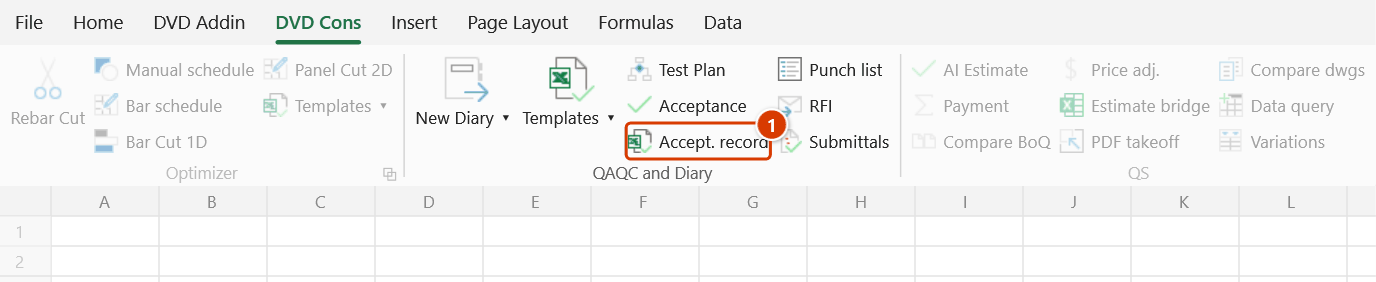
Ke hoach NT …sheet made by the Acceptance command. Select one or more work rows to accept; Ctrl-selecting separate blocks is fine. Review the Applicable standard column first: the Acceptance command fills it with database entry Ids (for exampleMAT-13 Bê tông), and this column is copied into the basis of acceptance, so correct it to the actual standard numbers. - Click DVD Cons → QAQC and Diary → Accept. record. If the active sheet is not an acceptance plan, the add-in tells you and stops.
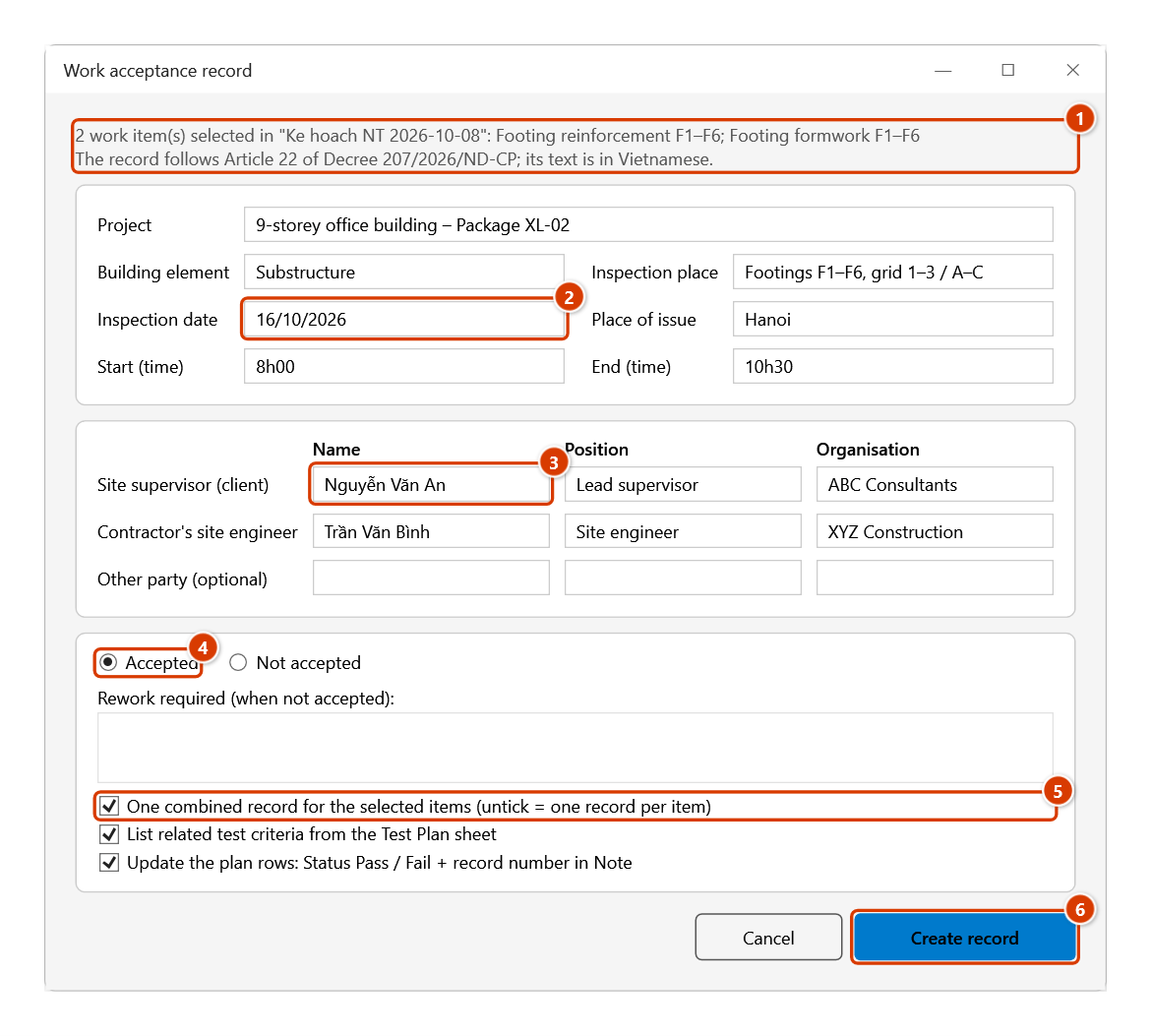
- The Work acceptance record dialog lists the selected items. Fill in:
- Project (pre-filled from the plan), Building element, Inspection place;
- Inspection date (defaults to the first row's planned date), Place of issue, Start / End time;
- the parties: name, position and organisation of the site supervisor, the contractor's engineer and any other party. The place of issue, supervisor and engineer are remembered for next time (the other party is not).
- Choose Accepted or Not accepted. Not accepted requires the rework required.
- Pick the options:
- One combined record for the selected items. Untick it for one record per item.
- List related test criteria from the Test Plan sheet.
- Update the plan rows.
- Click Create record. The message reports the record numbers, how many test criteria were listed and how many plan rows were updated.
Video tutorial
Narrated in Vietnamese, with Vietnamese subtitles. Kế hoạch và Biên bản nghiệm thu · 6 min 59 s · 12 cases · Download the video · Practice workbook for the video
Commands in this video: Acceptance Plan · Acceptance Record · Material Record Tpl · Work Record Tpl
Chapters (17)
- Giới thiệu
- Mở lệnh
- 1 · Lập kế hoạch từ tiến độ
- 2 · Tiêu đề phải cùng một dòng
- 3 · Dòng tổng, cột Cấp, chạy lại
- 4 · Mốc và ngày nghiệm thu
- 5 · Rà cột Tiêu chuẩn áp dụng
- Lệnh Biên bản NT
- 6 · Biên bản cho một công việc
- 7 · Không đạt – nghiệm thu lại
- 8 · Nhiều việc, một biên bản
- 9 · Kèm chỉ tiêu thí nghiệm
- 10 · Mỗi việc một biên bản
- 11 · Mẫu NT công việc, vật liệu
- 12 · Khi nhập sai
- Mẹo
- Kết thúc
Illustrated walkthrough
Practice
Download this command's sample workbook — the data matches the pictures below (sheet Ke hoach NT 2026-10-08), so you can follow each step right away.
Step 1. Open the Ke hoach NT … sheet made by the Acceptance command and select the work rows to accept (1) — Ctrl-select separate blocks if needed. The Applicable standard column (2) is copied into the basis of acceptance, so review it and correct it to the actual standard numbers first.
Step 2. On the ribbon, open the DVD Cons tab → QAQC and Diary group → click Accept. record.
Step 3. The Work acceptance record dialog repeats the selected items (1). Fill in project, building element, place, the Inspection date (2) (defaults to the first row's planned date), place of issue, start / end time, then the parties (3) — the add-in remembers them for next time. Choose Accepted or Not accepted (which requires the rework text) (4), keep or clear the three options (5), then click Create record (6).
Step 4. The add-in adds sheet BBNT-001, A4 portrait and ready to print, and reports how many records were made, test criteria listed and plan rows updated. Section 1 lists every item with its code (1), section 3 the parties you entered (2). Further down (outside the picture) come the basis of acceptance — the plan's standards merged without duplicates, the related test criteria from the Test Plan sheet with blanks for the report numbers — the assessment, conclusion and both signatures. The record text is always Vietnamese; numbers go up BBNT-002, BBNT-003…
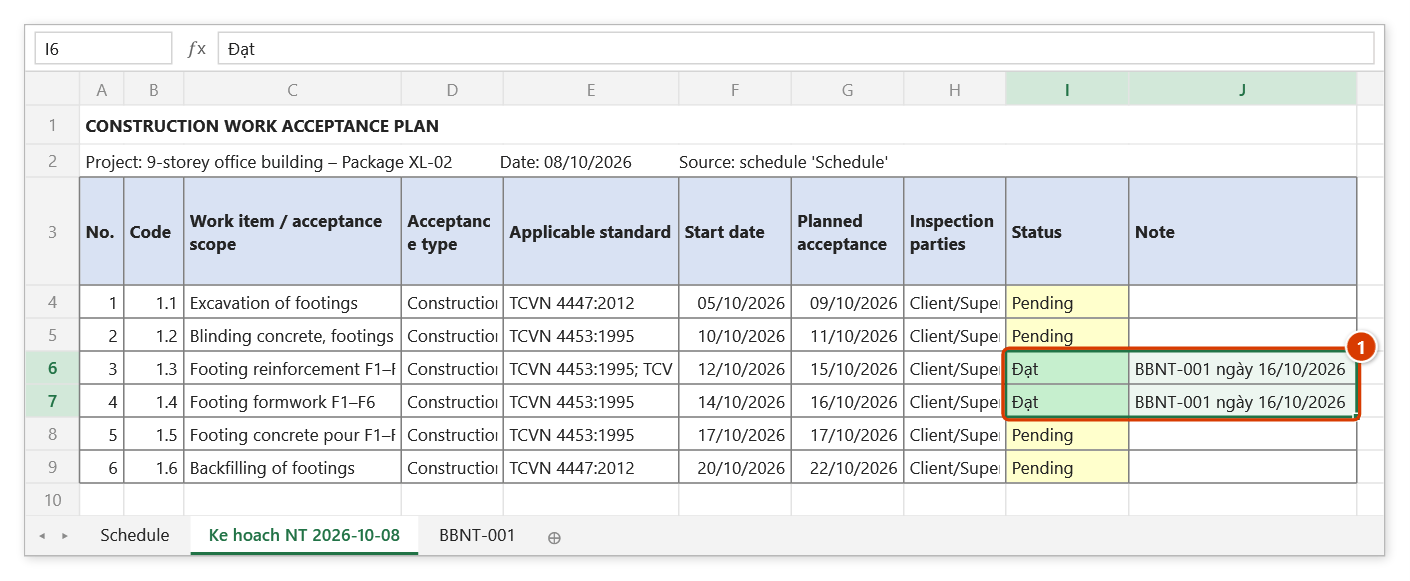
Step 5. On the plan sheet the accepted rows now show Status = Đạt (pass, green; Không đạt = fail, pale red) and Note = the record number and date (1).
Example
The "Nhà xưởng A" acceptance plan has these rows (Applicable standard already corrected to standard numbers):
- Foundation rebar M1 — standard TCVN 4453:1995;
- Foundation concrete M1 grade 300 — standards TCVN 4453:1995; TCVN 5574:2018.
The Test Plan sheet lists concrete, reinforcing steel, bricks and wall paint.
Select both foundation rows, set Place of issue = "Bắc Ninh", supervisor "Nguyễn Văn A — chief supervisor", engineer "Trần Văn B — site manager", and choose Accepted. The result is sheet BBNT-001:
- item 1 lists both works with their codes;
- item 4 merges the standards (TCVN 4453 appears once) and lists concrete compressive strength and slump plus steel yield strength. Bricks and paint are not pulled in;
- both plan rows switch to Đạt (Pass) with the note "BBNT-001 ngày 06/10/2026".
Notes
- The record is a drafting aid following the main contents of Article 22. Check it against the form used on your project before signing; many clients have their own.
- The record text is always in Vietnamese, even with the English UI, because it is a legal document. The dialog is bilingual.
- Test criteria are matched by material name: a material matches when it shares at least two words with the work name ("Thép cốt bê tông" ↔ "Cốt thép móng"), or all of its words if it has only one or two ("Bê tông").
- These are suggestions; report numbers and dates are left blank for you.
- Delete any extra line on the record.
- The plan sheet is recognised by its column header "Công việc / Hạng mục nghiệm thu" (or "Work item / acceptance scope" on a plan made with the English interface), so renaming the sheet is fine. Do not delete or move the plan's columns.
- Each record is a new sheet. Delete the sheet to discard it; the next number still continues from the highest one left.
- The assessment text is pre-written from the conclusion; edit it to match the site before printing.
Related
- Acceptance Plan — builds the acceptance list from the schedule; the input to this command.
- Test Plan — source of the test criteria cited as the basis for acceptance.
- Punch List — record the defects found when an inspection fails.
- Work Record Template — a fixed Excel template for filling in by hand.