
Test Plan
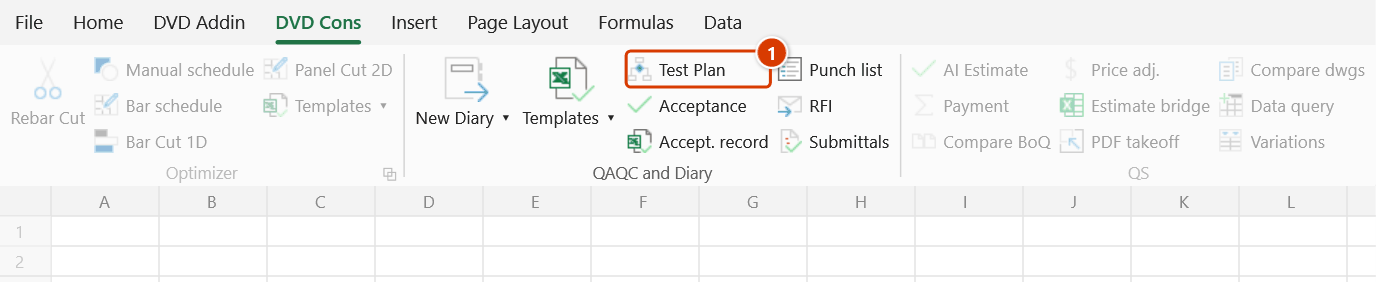
Location on ribbon: Tab DVD Cons → Group QAQC and Diary
Command ID: btnTestPlan
PRO feature
This command is part of the PRO plan. STANDARD accounts activated before 1 July 2026 keep access until their licence expires; other Standard accounts see an upgrade dialog when they click it.
What it does
Reads the text in your current cell selection (material names, work-item names), matches it against the TCVN/QCVN standards database bundled with the add-in, and fans each match out into the mandatory test criteria: test standard, sampling standard, sample specification and frequency.
Use it when drawing up a test plan or ITP at the start of a project, or when the supervision consultant asks which tests a material requires, to which standard, and at what sampling frequency. The output is a seven-column sheet grouped by material, in line with Circular 26/2016/TT-BXD on construction quality management.
How to use
- Select the cells holding material or work-item names — typically the material column of a bill of quantities.
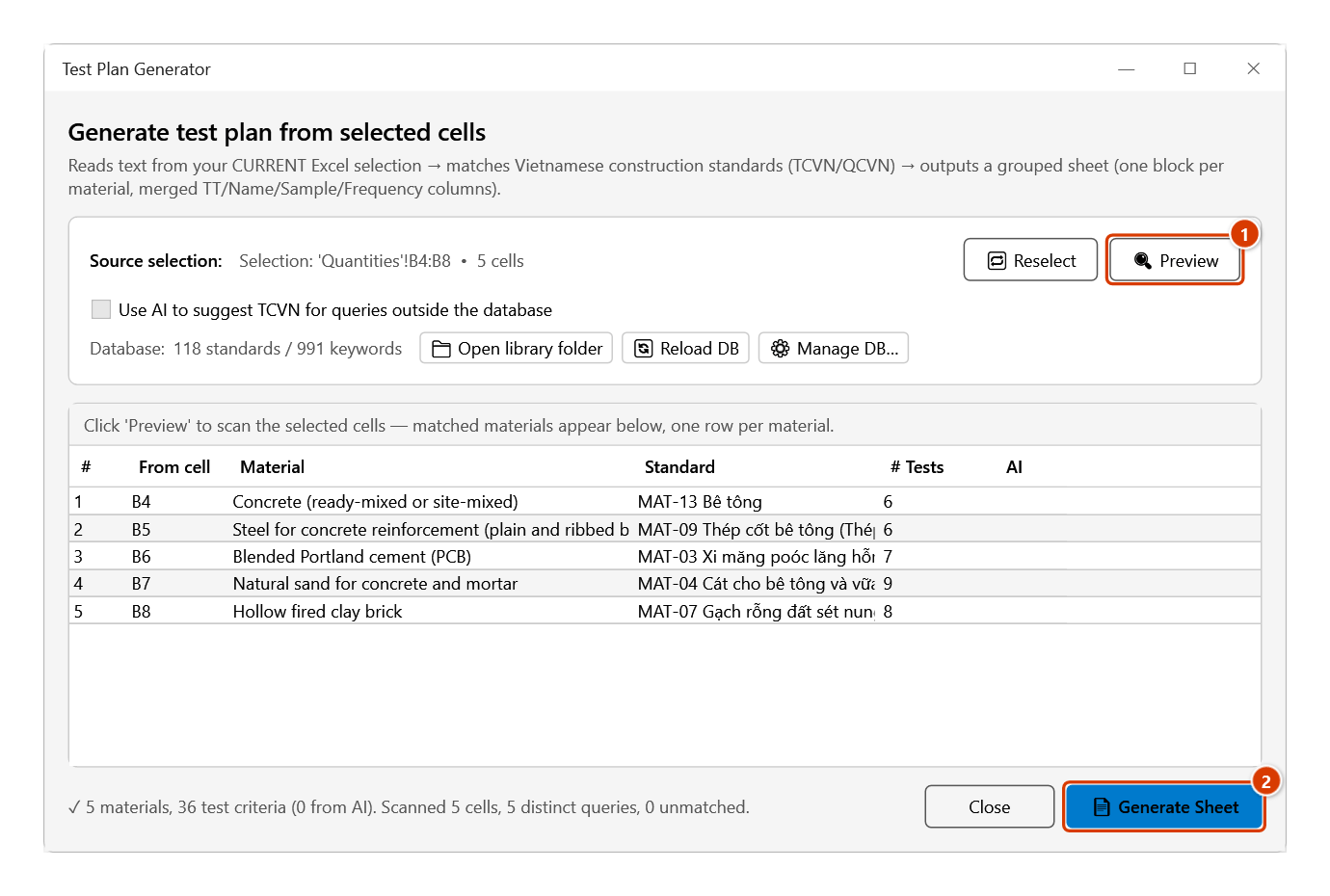
- Click Test Plan. The Test Plan Generator window opens and the Source selection line shows which sheet, range and cell count it captured.
- If you change the selection after opening the window, click 🔁 Reselect to re-capture it.
- Tick Use AI to suggest TCVN for queries outside the database if you want AI to fill gaps for entries the database cannot match. The box is disabled when no API key is configured.
- Click 🔍 Preview to scan. The grid lists each matched material with columns
# | From cell | Material | Standard | # Tests | AI— the Standard column shows the database entry Id (for exampleMAT-13 Bê tông), not a TCVN number — and the status line summarises materials found, test criteria and unmatched queries. - Click 📄 Generate Sheet to produce the output.
- Alternative route: click ⚙ Manage DB…, tick materials directly in the database, then 📄 Generate Sheet — no cell selection needed.
Video tutorial
Narrated in Vietnamese, with Vietnamese subtitles. Kế hoạch thí nghiệm · 5 min 51 s · 14 cases · Download the video · Practice workbook for the video
Chapters (18)
- Giới thiệu
- Mở lệnh
- 1 · Bảng khối lượng mẫu
- 2 · Đọc bảng kết quả
- 3 · Tên viết khác nhau
- 4 · Một ô, nhiều vật liệu
- 5 · Từ khoá dài nhất thắng
- 6 · Tên không khớp
- 7 · Chọn cả bảng, cả cột
- 8 · Bảng đang lọc
- 9 · Sinh lại lần hai
- 10 · Thêm từ khoá vào database
- 11 · Chọn thẳng trong database
- 12 · AI gợi ý tiêu chuẩn
- 13 · Giao diện tiếng Anh
- 14 · Vùng chọn không có chữ
- Mẹo
- Kết thúc
Illustrated walkthrough
Practice
Download this command's sample workbook — the data matches the pictures below (sheet Quantities), so you can follow each step right away.
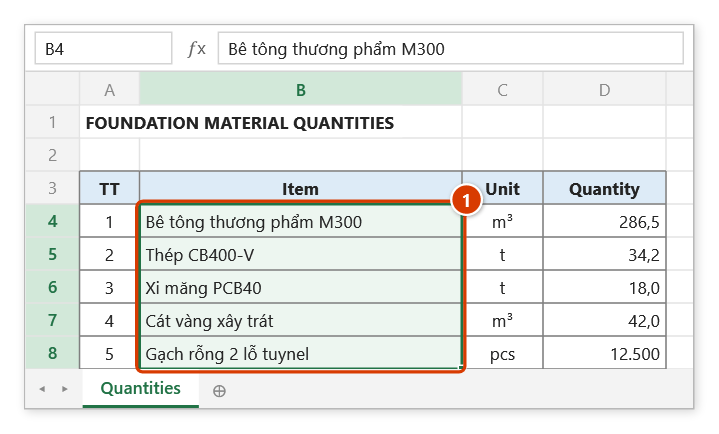
Step 1. Select the cells that hold material names (for example the item column of a bill of quantities) (1).
Step 2. On the ribbon, open the DVD Cons tab → QAQC and Diary group → click Test Plan.
Step 3. The Test Plan Generator window shows the range being read. Click 🔍 Preview (1): the grid lists the materials matched against the TCVN database and how many criteria each has. When it looks right, click 📄 Generate Sheet (2).
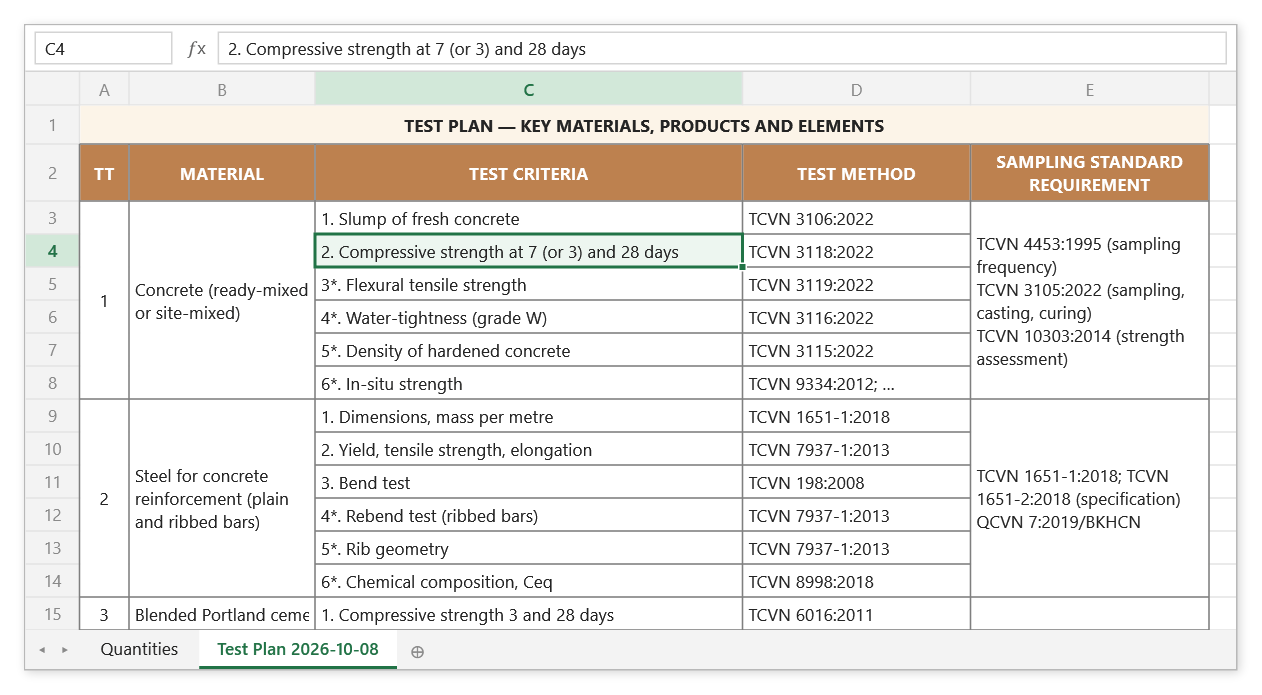
Step 4. The add-in creates a new sheet Test Plan <date>: one block per material, with the No. / Material / Sampling standard / Sample / Frequency columns merged per block; criteria marked * are tested only when the design requires it.
Example
The substructure BoQ has a material column containing "Bê tông thương phẩm M300" (ready-mix concrete), "Thép CB400-V" (rebar), "Cát san lấp" (fill sand) and "Gạch rỗng 2 lỗ tuynel" (hollow clay brick).
Select those four cells → Test Plan → 🔍 Preview → the grid shows four rows with the number of criteria each → 📄 Generate Sheet. The add-in creates a sheet named Test Plan 2026-08-22 (Kế hoạch TN 2026-08-22 with the Vietnamese interface) with seven columns (No., Material, Criterion, Test standard, Sampling standard, Sample spec, Notes/Frequency): concrete expands into compressive strength and slump with the sampling frequency; rebar expands into tensile and bend tests per batch. The No., Material, Sampling standard, Sample spec and Notes/Frequency columns are merged per material block and row heights are auto-fitted, so it prints as is.
Notes
- Make the selection before opening the window, unless you go through ⚙ Manage DB… and tick materials there.
- Clicking 📄 Generate Sheet without a preview first prompts you to scan the selection.
- AI-suggested blocks are flagged in the output sheet (italic) — always verify the standard before it goes into a quality file, as AI can cite the wrong TCVN number.
- The AI fallback uses whichever service you selected in Preferences ▸ AI Assistant (Gemini / OpenAI / Groq / NVIDIA) and needs a valid API key; without one the checkbox is disabled.
- The database is
TCVN-Standards.json(baseline, in theLibraryfolder next to the add-in, e.g.C:\DVDAddin\Library) plusTCVN-Custom.json(your own entries, in%APPDATA%\DVDAddin; on the same Id your entry wins); after editing the JSON click 🔄 Reload DB to pick it up without restarting Excel. Custom entries survive a reinstall. - The baseline is reviewed against QCVN 16:2023/BXD and current TCVN standards: each material lists the sampling standard, the product standard, the QCVN specimen requirements and the frequency; unmarked criteria are mandatory, criteria marked
*(e.g.7*.) are tested only when the design / specification requires them. The material scope shows the HS code and which criteria QCVN makes mandatory. - Each 📄 Generate Sheet adds a new sheet at the end of the workbook, named by date; generating again the same day adds a
(2),(3)… suffix rather than overwriting the earlier sheet — delete surplus drafts yourself. - The database matches only when the cell contains a material's whole keyword phrase: "Gạch rỗng 2 lỗ tuynel" matches (it contains "gạch rỗng"), while "Gạch xây tuynel" matches nothing (the keyword is "gạch tuynel") and is counted as unmatched.
Related
- Material Record Tpl — acceptance record for the materials you just planned tests for.
- Work Record Tpl — work acceptance record in the same quality-file set.
- AI Chat — the AI assistant whose provider setting this feature reuses.
- Preferences — pick the AI provider and enter the API key.