
Download Tool
Location on ribbon: Tab DVD Addin → Group About → Menu Help
Command ID: btnDownloadTool
What it does
Opens your default browser straight onto the latest DVDAddin installer package on the GitHub releases page (the DVDAddin.rar file in the dangdvd/DVDAddin repository). It is the quickest way to get the installer when you are rebuilding a PC, setting up a new colleague, or moving to a newer build after Check Update reported one.
How to use
- Go to tab DVD Addin → group About → Help menu → Download Tool.
- The default Windows browser opens and the
DVDAddin.rardownload begins. - Wait for it to finish, then extract the
.rarwith WinRAR or 7-Zip. - Close every Excel window, then run the installer from the extracted folder.
- Reopen Excel — the DVD Addin tab appears on the new version.
Video tutorial
Narrated in Vietnamese, with Vietnamese subtitles. Cài đặt, cập nhật và gỡ DVD Addin · 4 min 39 s · 12 cases · Download the video
Commands in this video: Check Update · Download Tool
Chapters (15)
- Giới thiệu
- 1 · Máy cần gì
- 2 · Tải và giải nén bộ cài
- 3 · Cảnh báo của Windows
- 4 · Chế độ cài, quyền quản trị
- 5 · Thư mục cài, bấm Install
- 6 · Máy chưa có .NET 8
- 7 · Mở Excel: hai tab mới
- 8 · Sách hướng dẫn cài sẵn
- 9 · Kiểm tra cập nhật
- 10 · Cài bản mới đè bản cũ
- 11 · Gỡ cài đặt
- 12 · Không thấy tab DVD Addin
- Mẹo
- Kết thúc
Illustrated walkthrough
Step 1. On the ribbon, open the DVD Addin tab → About group → open Help → choose Download Tool.
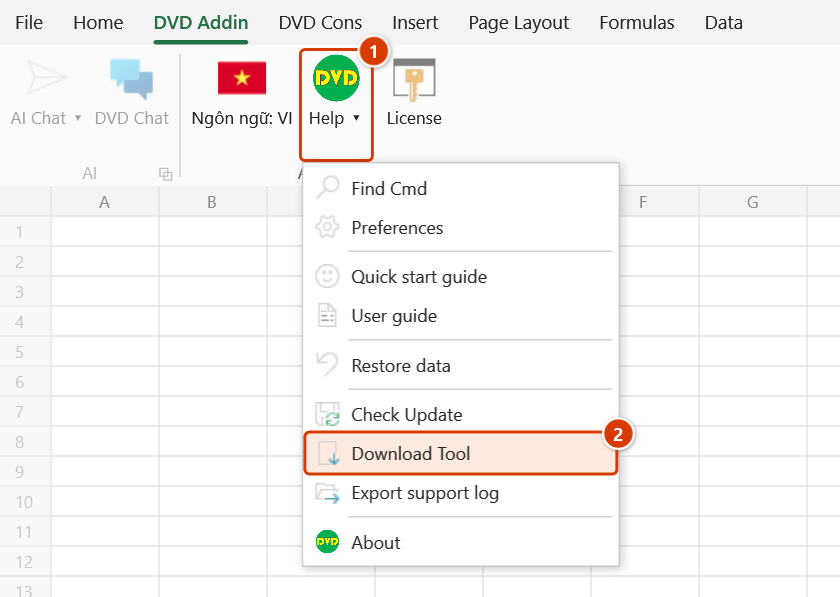
Step 2. No add-in window opens: your default browser opens the download link for the latest DVDAddin.rar package on the GitHub releases page. If Windows cannot open a browser, the add-in reports “Could not open browser:” with the reason.
Step 3. When the download finishes, extract DVDAddin.rar (WinRAR, 7-Zip), close every Excel window, then run the installer from the extracted folder; reopen Excel to use the new version.
Example
The estimating team takes on a new engineer whose PC has no add-in yet. From his own machine the supervisor clicks Download Tool, saves DVDAddin.rar, copies it to a USB stick and installs it on the new PC. After installation the add-in sits in C:\DVDAddin\; the new engineer just signs in with the license and the DVD Addin tab is ready to use.
Notes
- The command only opens the download link; it does not install or update anything for you.
- If Windows cannot launch a browser, the add-in shows a "Could not open browser:" warning with the error text — open the
dangdvd/DVDAddinreleases page manually in that case. - An Internet connection is required; some site networks block GitHub, so use a mobile connection or ask IT to allow it.
- The download is a
.rararchive and needs an extraction tool; your browser or antivirus may ask for confirmation before saving it. - Close all Excel windows before installing, otherwise the loaded XLL is locked and the installer errors out.
Related
- Check Update — confirm whether a new download is actually needed.
- About — compare your installed version with the one you just downloaded.
- License — once installed: check the trial, buy a license and sign in to activate the machine.
- Quick start guide — a fast tour of the feature groups for a fresh install.